Tools
Every built-in tool plus the access-control model (enabled/visible/restricted), locking, and cross-cutting parameters
On this page
Tools are the capabilities available to an agent during its LLM loop. Each tool has access controls: enabled (the tool exists and can be called — by the LLM, lambdas, or other code), visible (the tool is advertised in the LLM’s tool schema; this only controls what the model is shown, not what it may call), and restricted (limits access to authorized code, with HIL for loop calls).
Tool Categories
ADF provides tools organized into these categories:
- Turn Tools — Emitting text and controlling conversation flow
- Filesystem Tools — Reading, writing, and managing files
- Database Tools — Querying and modifying local tables
- Messaging Tools — Sending and receiving inter-agent messages
- WebSocket Tools — Managing persistent WebSocket connections
- Stream Binding Tools — Pumping bytes between endpoints outside the loop
- Execution Tools — Running code and scripts
- Function Call Tool — Calling agent-authored functions
- Package Management Tools — Installing npm packages for the sandbox
- MCP Management Tools — Installing and managing MCP servers
- Timer Tools — Scheduling events
- Loop Management Tools — Managing conversation history
- Inner Loop Tools — Signalling and managing the agent’s inner loops
- Message Deletion Tools — Cleaning up inbox and outbox
- State and Config Tools — Self-management
Turn Tools
These tools emit text and control conversation flow. Plain assistant text is emitted directly by the model; respond is not a tool.
say
Parameters: message
Emit text to the conversation without ending the turn. Use for status updates, intermediate observations, or progress reports.
ask
Parameters: question
Pose a question and block until the human responds. Interactive mode only — disabled in autonomous mode.
The loop pauses, the question appears in chat, and when the human replies the loop resumes with their answer.
Filesystem Tools
Tools for working with the agent’s virtual filesystem.
fs_read
Parameters: path, start_line?, end_line?
Read a file from the VFS. Always returns a JSON object with the full file record: { path, content, mime_type, size, protection, created_at, updated_at }.
- Text files return raw text content. Use
start_line/end_linefor large files. - Binary files return base64 content in code execution. In chat, the executor strips binary content (metadata only) — use code execution to process binary data programmatically.
- Media files — When the corresponding
model.multimodalmodality is enabled, the LLM receives a native content block (image_url,input_audio, orvideo_url) alongside the JSON metadata row, allowing the agent to perceive the media directly. Media blocks are ephemeral (not persisted toadf_loop). When disabled, media returns the JSON row withcontent: null. Media exceeding the size limit (max_image_size_bytes,max_audio_size_bytes,max_video_size_bytes) is skipped. See Multimodal for supported formats and details.
Two output guards are applied by the executor when results go to the LLM context:
- Token limit — Files exceeding
max_file_read_tokens(~30k tokens) are truncated with a footer showing the full size - Large file preview — Files over 300 lines (but within the token limit) show only the first 50 lines with a size summary
These guards do not apply in code execution — adf.fs_read() always returns full content.
fs_write
Parameters: mode (required: "write" | "edit" | "append"), path, content?, old_text?, new_text?, replace_all?, edits?, protection?, encoding?, mime_type?
Unified write/edit tool. mode is required and selects the operation:
write(content): Create or overwrite a file. Content size is limited bylimits.max_file_write_bytes(default: 5 MB) for non-core files. The optionalprotectionparameter sets the file’s protection level (read_only,no_delete, ornone).append(content): Appendcontentto the end of the file (creating it if absent). Subject to the same write-size limit.edit(old_text+new_text): Find and replace text in-place.old_textmust match exactly once unlessreplace_all: trueis set (which replaces every occurrence). More precise than overwriting the entire file.- Batch edits — pass
edits: [{ old_text, new_text, replace_all? }]instead of a singleold_text/new_text. Edits are applied in order and atomically: if any edit fails (text not found, ambiguous match, or a no-op whereold_text === new_text), the whole batch aborts and the file is left unchanged.
- Batch edits — pass
All operations on a given file are serialized per (workspace, path) so concurrent edits/appends cannot clobber each other.
Binary support: In write mode, set encoding: "base64" to write binary files from code. Optionally include mime_type (e.g. "image/png"). Blocked if the file’s protection level is read_only.
Authorized code bypass: When called from authorized code, fs_write bypasses the read_only file protection check and can overwrite any file. Same privilege as the Studio UI.
fs_list
Parameters: prefix?
List files in the virtual filesystem. Optionally filtered by path prefix (e.g., fs_list("lib/") to list only library files). Returns file metadata including protection level.
fs_delete
Parameters: path
Delete a file. Blocked if the file’s protection level is read_only or no_delete. If audit.files is enabled, the file’s content is snapshot to adf_audit before deletion. See Memory Management > Audit.
Authorized code bypass: When called from authorized code, fs_delete bypasses both read_only and no_delete protection and can delete any file. Same privilege as the Studio UI.
Database Tools
Tools for working with custom SQLite tables.
db_query
Parameters: sql, params?
Execute a read-only SELECT statement. Results are capped at 500 rows by default — queries returning more are truncated with a footer showing the total count. Add a LIMIT clause to your query, or use _full: true from code execution to get all rows.
Can query:
local_*tables (agent-created)adf_loop,adf_inbox,adf_outbox(conversation data)adf_timers,adf_files(agent state)adf_audit,adf_logs,adf_tasks(history and diagnostics)
Cannot query adf_meta, adf_config, or adf_identity — use sys_get_config instead.
db_execute
Parameters: sql, params?
Execute INSERT, UPDATE, DELETE, CREATE TABLE, CREATE VIRTUAL TABLE, or DROP TABLE statements on local_* tables only. Cannot modify adf_* system tables. Supports creating vec0 virtual tables for vector search — see Vector Search.
Messaging Tools
Tools for inter-agent communication. See Messaging for the full protocol.
msg_send
Parameters: recipient?, address?, content, content_type?, subject?, thread_id?, parent_id?, attachments?, meta?, message_meta?
Send a message to another agent. Modes:
- Direct send — Provide
recipient(DID) +address(delivery URL) +content - Reply via parent_id — Provide
parent_id+content. The runtime resolves recipient, address, and thread from the referenced inbox message. - Bare handle — Provide a bare
recipienthandle with no address; resolved only against locally-registered agents on this runtime (visibility-enforced). Remote agents always require an explicit address fromagent_discover.
For adapter recipients (e.g., Telegram), use recipient: "telegram:123" without an address.
meta is encrypted alongside content (recipient-only); message_meta is cleartext routing metadata visible to relays. content_type (e.g. application/vnd.adf.form+json, text/html) is validated at send time. There is no intent or trace_id parameter — use thread_id for conversation grouping.
Use agent_discover to discover agents and their DIDs/addresses.
Subject to messaging mode restrictions:
respond_onlyagents must include a validparent_idor be in a message-triggered turnlisten_onlyagents cannot send at all
msg_read
Parameters: status?, limit?, include_original?
Fetch messages from the inbox. Filter by status (unread, read, archived; default unread). Messages returned when reading unread are automatically marked as read. By default the large raw platform payload (original_message) is stripped; set include_original: true to include the full Telegram/Slack/email object.
msg_list
Parameters: (none)
Lightweight inbox check — returns message counts by status (unread/read/archived/total) without fetching content. Useful for “Do I have mail?” checks.
msg_update
Parameters: message_ids, status
Update the status of one or more inbox messages. message_ids is a single ID or an array. status is one of read, archived, or delete — delete only works on messages that are already archived.
agent_discover
Parameters: scope?, visibility?, handle?, description?, include_subdirectories?
Discover agents reachable from this agent. Returns signed agent cards (handle, description, DID, endpoints, public_key, policies, visibility, in_subdirectory, source) — not a flattened name/address list. Visibility enforcement is symmetric with delivery: you only see an agent if you could also message it.
| Parameter | Description |
|---|---|
scope | "local" (default) or "all". "all" merges local-runtime cards with mDNS-discovered LAN peers. See LAN Discovery. |
visibility | Array of tiers ("directory", "localhost", "lan", "off") to include. E.g. ["lan"] to find only LAN-announced agents. |
handle | Case-insensitive substring match on the agent handle. |
description | Case-insensitive substring match on the agent description. |
include_subdirectories | (Backward-compat for "local" scope.) When false, excludes agents in subdirectories. |
[
  {
    "handle": "monitor",
    "did": "did:key:z6Mk...",
    "description": "Monitors system resources",
    "public_key": "z6Mk...",
    "endpoints": {
      "inbox": "http://127.0.0.1:7295/agents/monitor/inbox",
      "card":  "http://127.0.0.1:7295/agents/monitor/card",
      "health":"http://127.0.0.1:7295/agents/monitor/health"
    },
    "policies": [],
    "visibility": "localhost",
    "in_subdirectory": false,
    "source": "local-runtime"
  }
]
See Messaging > Visibility Tiers for how tier filtering interacts with the caller’s own declared tier.
WebSocket Tools
Tools for managing persistent WebSocket connections. All disabled by default. See WebSocket Connections for configuration details.
ws_connect
Parameters: id?, url?, did?, lambda?, persist?, auto_reconnect?, reconnect_delay_ms?, keepalive_interval_ms?
Start a WebSocket connection. Two modes:
- Config-based — Provide
idof a connection defined inws_connectionsconfig - Ad-hoc — Provide
urlfor an on-the-fly connection
When persist is true (default), the connection definition is saved to ws_connections config so it survives agent restarts. Set persist: false for ephemeral connections.
Returns connection_id on success.
ws_disconnect
Parameters: connection_id?, id?
Close an active WebSocket connection by its connection_id or config id.
ws_connections
Parameters: direction?
List active WebSocket connections. Optionally filter by direction (inbound or outbound). Returns connection ID, remote DID, direction, connection time, and last message time.
ws_send
Parameters: connection_id, data, binary?
Send a single frame over an active WebSocket connection. Frames may carry text or raw bytes:
- Text (default) — pass a string. From sandbox code, text frames default to ALF messages.
- Binary — from sandbox code, pass a
Uint8Array. From direct LLM tool calls (noUint8Arrayin JSON), pass base64-encodeddatawithbinary: true.
Sends are backpressure-aware: ws_send awaits a drain when the socket’s bufferedAmount exceeds the connection’s high-water mark, so agents can stream large byte payloads without overrunning the buffer. See WebSocket Connections for details.
Stream Binding Tools
Stream bindings connect two byte endpoints so the runtime pumps data between them outside the LLM loop. Once a binding is established, bytes flow endpoint-to-endpoint at wire speed — the agent is not in the data path and does not see, buffer, or pay context tokens for the traffic. The model’s job is to set up and tear down plumbing, not to shuttle every chunk.
This is what lets an agent act as infrastructure rather than a chat endpoint: it can stand up a relay, tunnel, or tap, then step back while the runtime moves the bytes.
Endpoint kinds:
| Kind | Description |
|---|---|
ws | An active WebSocket connection owned by this agent (by connection_id) |
tcp | A raw TCP socket (host, port) — gated by stream_bind.allow_tcp_bind and the tcp_allowlist |
process | A spawned process whose stdio is the stream. isolation is host, container_shared, or container_isolated (the last requires an image). Each isolation tier has its own enable flag in stream_bind config |
umbilical | The agent’s umbilical event stream as a read-only source. May only appear as endpoint a, never b |
Use cases:
- Relay / bridge — connect a remote peer’s
wsconnection to atcpservice, exposing a local database, API, or device to the mesh without the agent proxying each packet. - Tunnel — pipe a remote
wsstream into a host or containerprocess(run a CLI tool, stream its stdin/stdout) so an agent can drive real software over the wire. - Tap / observe — bind the
umbilicalevent source into aprocessortcpsink for logging, metrics, or archival of the agent’s own activity. - Bulk transfer — move large payloads between two endpoints at full speed, never materializing them in the model’s context.
Security is config-gated by the agent’s stream_bind config — TCP, host processes, and each container tier are off unless explicitly enabled. The runtime additionally locks stream_bind by default for every agent: an agent’s write to these gates is denied but surfaces as a protection request your principal can approve as a one-time override.
| Config key | Gates |
|---|---|
allow_tcp_bind | Whether tcp endpoints are permitted at all |
tcp_allowlist | The host/port rules a tcp endpoint must match (supports port, ports, min_port/max_port) |
host_process_bind | process endpoints with isolation: host |
container_shared_bind | process endpoints in the shared container |
container_isolated_bind | process endpoints in a per-binding isolated container |
ws and umbilical endpoints need no extra config — they’re scoped to connections and events the agent already owns. A binding request to a disabled or non-allowlisted target is rejected with an error.
Bindings can also be declared statically in the agent’s
stream_bindingsconfig (with optionalreconnect), which the runtime materializes on start. The tools below are the imperative equivalent for setting bindings up and tearing them down at runtime.
stream_bind
Parameters: a, b, bidirectional?, options?
Bind two endpoints. a and b are endpoint objects (see kinds above). By default data flows a → b; set bidirectional: true to pump both ways (both endpoints must be readable and writable). Returns a { binding_id } used to manage the binding.
options bound the binding’s lifetime and volume:
| Option | Description |
|---|---|
idle_timeout_ms | Close after this long with no bytes flowing |
max_duration_ms | Hard cap on total binding lifetime |
max_bytes | Close once this many bytes have been pumped |
flow_summary_interval_ms | How often to emit flow/byte-count summary events |
close_a_on_b_close / close_b_on_a_close | Tear down one side when the other closes |
// Bridge a remote WS peer to a local TCP service
{
  "a": { "kind": "ws", "connection_id": "peer-relay" },
  "b": { "kind": "tcp", "host": "127.0.0.1", "port": 5432 },
  "bidirectional": true,
  "options": { "idle_timeout_ms": 60000, "max_bytes": 1073741824 }
}
stream_unbind
Parameters: binding_id
Terminate an active stream binding by ID, closing both endpoints according to the binding’s close policy. Returns { ok: true }.
stream_bindings
Parameters: (none)
List this agent’s active and pending bindings. Each entry includes the binding_id, sanitized a/b endpoint summaries, bidirectional, origin (imperative vs declarative), status, created_at, and live byte counters (bytes_a_to_b, bytes_b_to_a) — useful for monitoring throughput and deciding when to tear a binding down.
Execution Tools
Tools for running code within the agent’s context. All code runs in the sandbox environment with access to the adf proxy object.
sys_code
Parameters: code, language?, timeout?
Execute code in a sandboxed environment. The sandbox has:
- Full compute and data processing
- Standard library packages: xlsx, pdf-lib, mupdf, docx, jszip, sql.js, cheerio, yaml, date-fns, jimp
- Additional packages installable via
npm_install - Read/write access to
adf_filesandlocal_*tables - Read access to
adf_inbox/adf_outbox - Timer globals:
setTimeout,clearTimeout,setInterval,clearInterval - No network access (native
fetchis disabled — useadf.sys_fetch()) - No access to private keys
Useful for math, data transformation, document processing (spreadsheets, PDFs, Word docs), and working with binary files programmatically. Code executed via this tool has access to the adf proxy object for calling other tools and invoking the model.
Function Call Tool
sys_lambda
Parameters: source, args?
Call a function from a script file in the agent’s workspace. The source parameter specifies the file and optionally the function name using colon syntax: "lib/utils.ts:myFunction". If no function name is specified, main() is called.
Functions receive the provided args as a single object parameter and should use destructuring:
// lib/math.js
function add({ a, b }) {
  return a + b;
}
The function runs in the same sandboxed environment as sys_code and has full access to the adf proxy object for calling tools and invoking the model.
Calling syntax examples:
sys_lambda(source: "lib/utils.js")— Callsmain()inlib/utils.jssys_lambda(source: "lib/utils.js:process", args: { data: "hello" })— Callsprocess({ data: "hello" })
Lambdas replace the need for custom tool registrations — agents can call any script they’ve written using sys_lambda.
Authorization: When the LLM calls sys_lambda targeting an authorized file, the runtime triggers a HIL approval prompt before execution. If approved, the lambda runs with authorization and can call restricted tools and methods. Unauthorized targets run normally with no prompt. This ensures the user has visibility whenever authorized code — and its elevated privileges — is invoked from the conversation loop.
Package Management Tools
npm_install
Parameters: name, version?
Install an npm package for use in the code execution sandbox (sys_code / sys_lambda). Pure JavaScript packages only — packages with native addons (e.g., better-sqlite3, sharp) are detected and rejected at install time.
The package becomes importable starting on the next turn (the sandbox module resolver rebuilds at the start of each execution).
// Install a specific version
npm_install({ name: "vega-lite", version: "^5.21.0" })

// Install latest
npm_install({ name: "lodash" })
Returns:
- Success:
{ success: true, name: "vega-lite", version: "5.21.0", size_mb: 5.5 } - Already installed:
{ success: true, name: "vega-lite", version: "5.21.0", already_installed: true } - Native addon blocked:
{ success: false, error: "native_addon", message: "..." } - Size limit exceeded:
{ success: false, error: "size_limit", message: "..." }
Limits: 50 MB per package, 200 MB total, 50 packages max per agent.
Installed packages are persisted to the agent’s code_execution.packages config, so they survive agent restarts. Packages are installed to a shared directory on disk (~/.adf-studio/sandbox-packages/) — multiple agents referencing the same package share one install.
npm_uninstall
Parameters: name
Remove a package from this agent’s available packages. The package becomes unavailable to import starting on the next turn. Does not delete the package from disk (other agents may reference it).
npm_uninstall({ name: "lodash" })Package Tiers
Packages in the sandbox are resolved in three tiers:
| Tier | Source | Scope | Managed by |
|---|---|---|---|
| Standard library | Bundled with Studio | All agents, always | Studio releases |
| Runtime packages | Studio Settings > Packages | All agents on this instance | User via Settings UI |
| Agent packages | code_execution.packages in agent config | Single agent | Agent via npm_install / user via agent config UI |
WASM packages that export initWasm() (e.g., @resvg/resvg-wasm) are auto-initialized during import — no manual initWasm() call needed.
MCP Management Tools
Tools for installing and managing MCP servers on this agent. All disabled by default. Newly discovered MCP tools are enabled and visible but protected by human approval.
mcp_install
Parameters: package?, type? ("npm" | "pypi" | "custom" | "http", default npm), url?, name?, args?, host?, env_keys?, env?, headers?, header_env?, bearer_token_env_var?, auth?, auth_args?, auth_port?, credential_files?
Install an MCP server package, attach a custom server, or connect a Streamable HTTP MCP server. When the requested name or package matches a Settings registration marked Available to agents, the call ATTACHES that registration instead — the user’s configuration, credentials, and run location come along, and no fresh install happens. Provide package (name or command) for npm/pypi/custom, or url for type: "http". custom requires an explicit name. Credential values passed in env are stored in the agent’s identity keystore as mcp:<name>:<key>; secret-bearing HTTP headers must go through header_env or bearer_token_env_var rather than static headers. host: true runs the server on the host (requires compute.host_access). Tools are discovered, enabled, and protected by human approval on connect.
mcp_restart
Parameters: name
Reconnect an MCP server already configured on this agent and refresh its discovered tools. Use after installing a server, changing credentials, or when discovery returned no tools. Existing tool choices are preserved; newly discovered tools require human approval by default.
mcp_uninstall
Parameters: name
Remove an MCP server from this agent — deletes the server configuration and all associated mcp_<name>_* tool declarations.
HTTP Fetch Tool
sys_fetch
Parameters: url, method?, headers?, body?, timeout_ms?
Make an HTTP request. Response bodies are capped at 25 MB. Only http/https URLs are permitted.
Egress (SSRF) guard: loopback (localhost, 127.0.0.0/8, ::1) is reachable by default — except the local ADF daemon control API, which is never fetchable. sys_fetch blocks link-local and private-network destinations — 169.254.0.0/16 (incl. cloud metadata 169.254.169.254), 10/8, 172.16/12, 192.168/16, CGNAT 100.64/10, and the unspecified address (0.0.0.0/::). The check runs on the DNS-resolved address (so a rebinding record pointing at a private IP is rejected) and re-runs on every redirect hop (a public URL that 302s to a private IP is stopped). The opt-in escape hatch for private/LAN destinations is security.allow_local_fetch: true in config. That flag is locked by default in the runtime, for every agent: a write is denied but surfaces as a protection request your principal can approve as a one-time override (see sys_update_config).
Binary response handling: The response body format depends on the response’s Content-Type header:
- Text (
text/*,application/json,application/xml,*+json,*+xml) —bodyis a UTF-8 decoded string - Binary (everything else —
audio/*,image/*,application/octet-stream, etc.) —bodyis aBuffercontaining the raw bytes
When no Content-Type header is present, the response defaults to text.
Writing binary responses to files: Pass the Buffer body directly to fs_write — no encoding parameter needed:
// Fetch binary content (e.g. audio from a TTS API)
const resp = await adf.sys_fetch({
  url: 'https://api.openai.com/v1/audio/speech',
  method: 'POST',
  headers: {
    'Authorization': `Bearer ${await adf.get_identity({ purpose: 'openai' })}`,
    'Content-Type': 'application/json'
  },
  body: JSON.stringify({ model: 'tts-1', input: 'Hello world', voice: 'alloy' })
})

// resp.body is a Buffer — write directly to the virtual filesystem
await adf.fs_write({ mode: 'write', path: 'speech.mp3', content: resp.body })
When the LLM calls sys_fetch directly (not from code), binary bodies appear as base64-encoded strings with a _body_encoding: "base64" field in the JSON result.
Compute Tools
Tools for interacting with authorized compute environments, including managed containers, registered external Docker/Podman containers, and the host when explicitly enabled. See Compute Environments for the full guide.
compute_exec
Parameters: command, target?, timeout_ms?
Execute a shell command in a compute environment. Supports pipes, chaining (&&, ||), redirection, and all standard shell syntax. Returns stdout, stderr, and exit_code.
When more than one environment is authorized, the optional target parameter selects from the per-agent allowlist:
isolated— agent’s dedicated container (requirescompute.enabled)shared— shared MCP container (adf-mcp)- a safe registered alias such as
docker-python-tools— an external container host— host machine directly (requirescompute.host_access)
If omitted, the configured default is used. With one authorized environment, target is omitted from the schema. Unavailable defaults fail closed rather than falling back.
Has restricted: true by default. Use on_task_create trigger lambdas to set up auto-approval policies for specific commands.
fs_transfer
Parameters: from, to, path, save_as?
Transfer files between the VFS (adf_files) and a compute environment.
fromandtoselect different endpoints fromvfs,isolated,shared, andhost- external execution targets are not file-transfer endpoints in this release
For container targets, files are placed at /workspace/{agentId}/{path}. For host, files go to ~/.adf-studio/workspaces/{agentId}/{path}.
The save_as parameter allows a different destination path than the source.
Timer Tools
Tools for scheduling events. See Timers for the full scheduling system.
sys_set_timer
Create a timer. Supports three scheduling modes:
- Once:
at(absolute timestamp) ordelay_ms(relative delay) - Interval:
every_mswith optionalstart_at,end_at,max_runs - Cron:
cronexpression with optionalend_at,max_runs
All timers require a scope array (["system"], ["agent"], or ["system", "agent"]) and an optional payload.
Additional fields for system scope timers:
lambda— Script entry point (e.g.,"lib/poller.ts:check") or a shell script path (e.g.,"jobs/task.sh", run headlessly through the shell runner with event context as env vars). The lambda is executed in a sandboxed environment when the timer fires.warm— Keep the sandbox worker alive between invocations (default:false). Use for frequently-firing timers to avoid startup overhead.
Timers own their execution config — lambda and warm are stored on the timer, not inherited from trigger targets. See Timers for full details.
sys_list_timers
List all active timers with their schedules, next fire times, and run counts.
sys_delete_timer
Parameters: id
Cancel and delete a timer.
Loop Management Tools
Tools for managing the conversation history. See Memory Management for strategy.
loop_compact
Parameters: instructions?
Trigger LLM-powered loop compaction. When called, the runtime:
- Makes a dedicated LLM call to summarize the full conversation transcript
- Deletes old loop entries (archived first if archiving is enabled)
- Inserts the LLM-generated summary as a
[Loop Compacted]message - Token counter is reset
The agent does not need to provide a summary — the compaction LLM generates a structured briefing with specific details (file paths, decisions, pending work) organized by topic. A compaction banner appears in the UI. The archive label only appears when loop archiving is enabled.
Pass the optional instructions string to steer the summarizer — use it to highlight critical context, decisions, or state that must survive compaction (e.g. { "instructions": "Keep the full deployment checklist and any open error messages verbatim." }). When omitted, the summarizer uses its default briefing strategy.
loop_clear
Parameters: start?, end?
Delete loop entries using Python-style slicing. Supports negative indices.
Examples:
loop_clear()— Clear all entriesloop_clear(end: 5)— Clear first 5 entriesloop_clear(end: -5)— Clear all except last 5 entriesloop_clear(start: -10)— Clear last 10 entriesloop_clear(start: 2, end: 8)— Clear entries 2 through 7
If archiving is enabled, entries are compressed and archived before deletion.
To read past loop entries or compute loop statistics (row count, estimated tokens, oldest entry), query the adf_loop table directly with db_query / db_execute.
Inner Loop Tools
Tools for the agent’s inner loops — named loops running inside the same agent, sharing its file, identity, credentials, and memory. See Inner Loops for the model.
All three ship enabled and visible, and the runtime registers each into main whenever its declaration is enabled — like any other capability tool. There is no loop-count gate: an agent with no loops still holds loop_send and loop_list, and they answer sensibly (loop_list returns just main; loop_send errors on any target it names). loop_send and loop_list reach an inner loop only when that loop’s own tool allow-list names them; loop_manage never does.
loop_send
Parameters: to_loop, content, wake?
Send a message, insight, or request from one loop of this agent to another ("main" is the outward-facing loop). The content is appended to the target loop’s stream as a real entry stamped [from loop:<sender>]. Peer-to-peer — any loop may address any other; main is not a bus. Interior signalling only: it never leaves the agent (use msg_send to reach another agent or a person).
content is capped at 48,000 characters, the same bound loop_inject uses.
wake decides when the target reads the message, not whether it arrives — the row is durable either way:
| Target state | wake | Behavior |
|---|---|---|
| Idle | true | Runs a turn immediately; the session rehydrates from the durable row. |
Busy (main or an inner loop) | true | The message is injected and read at the target’s next model boundary — roughly its next tool step, mid-turn. If the turn ends first, the pool runs one extra content-free “kick” turn to drain it. |
| Any | false (default) | The message waits in the stream and is read whenever the target next runs. Never causes an extra turn. |
Delivery is exactly-once: the kick never re-inlines the content, so the model reads the message once and the UI renders one card. A kick is owed per target, not per message — several sends inside one turn are drained by that one turn — and mid-turn compaction preserves anything still undelivered.
Cost note: wake: true into a busy target can cost one extra model turn. Leave wake off for anything that does not have to be acted on promptly.
A message to a disabled loop is delivered (the row lands) but never read, because a disabled loop does not run; the tool says so in its result.
loop_list
Parameters: (none)
Read-only roster of this agent’s loops — each loop’s name, a summary of its goal, whether it is enabled, and whether it is running right now. Marks which loop you are. This is the discovery step for loop_send. main’s entry summarizes its goal rather than reproducing its full instructions.
loop_manage
Parameters: action (create | get | update | delete), name?, config?
Main-only. Create, inspect, update, and tear down this agent’s own inner loops at runtime. Inner loops do not nest, so a loop that calls this is refused; the tool is also subtracted from every derived loop config (LOOP_PROHIBITED_TOOLS).
| Action | Effect |
|---|---|
create | Define a new inner loop and start it. config.autostart defaults to true: main immediately sends it a kickoff message (wake: true), so it runs its first turn on its goal at once, and the pool repeats that every time the agent starts. autostart: false leaves it waiting for a trigger, timer, or loop_send. Omit config.tools and the loop is seeded with loop_send + loop_list; pass [] for a mute loop that only thinks. |
get | One loop’s full definition plus its live status. (Use loop_list to enumerate.) |
update | Patch goal, enabled, autostart, autonomous, model, compact_threshold, or tools; the loop is re-derived and restarted. Loops cannot be renamed. enabled: false stops a running loop immediately (its turn is aborted and flushed). |
delete | Stop the loop (mid-turn included — never refused for being busy), archive its stream to the audit log under loop:<name>, then remove it. A config-edit removal takes the same stop → archive path. |
An agent may declare up to 16 inner loops.
Ungated by default. Unlike sys_update_config and sys_create_adf, loop_manage ships with no restricted flag. A loop is a strict attenuation of authority main already holds — its tool list is intersected with the agent’s own enabled tools, every approval-gated tool is subtracted, and its code profile is clamped — so loop_manage cannot expand the agent’s capability surface, only subdivide it. Creating a loop is therefore not an escalation. Set restricted: true on the tool to re-add human approval.
Locks still bind. create, update, and delete honour locked_fields: with the loops path locked, all three refuse with the same 'loops' is locked. sentence sys_update_config uses. And delete (like removing a loop by config edit) preserves locked timers stamped to that loop — they are kept and logged rather than deleted, matching the human-only semantics of a lock everywhere else.
Message Deletion Tools
msg_delete
Parameters: source, filter
Delete messages from inbox or outbox by filter. Requires at least one supported filter field.
Source: inbox or outbox
Filter fields:
status— Message status (unread/read/archivedfor inbox;pending/sent/delivered/failedfor outbox)from— Sender ID (inbox only)source— Source transport, e.g."mesh","telegram"(inbox only)before— Delete messages with timestamp before this value (epoch ms)thread_id— Filter by thread ID
Supported filters: inbox = status, from, source, before, thread_id; outbox = status, before, thread_id. An empty filter, or one that supplies a field the target table does not support (e.g. from/source on outbox), now errors instead of silently dropping the clause and deleting the whole table.
Deletion is permanent for the store — no audit rows are written at delete time. Messages captured per-message at arrival/send (inbox_message/outbox_message, when audit was enabled then) are the only archive.
State and Config Tools
sys_set_state
Parameters: state
Transition the agent to idle, hibernate, or off. Always ends the LLM loop.
The agent cannot set itself to active (that happens via triggers) or suspended (that’s runtime-only).
In adf_shell the same tool is the state command — state idle, or bare state to read the current one — which lets a yield be chained with the work before it in a single tool call. See Agent States > Setting state from the shell.
sys_get_config
Parameters: section? ("config" | "card" | "provider_status" | "tools" | "limits")
Returns the full agent configuration (excluding secrets) by default. Secret values — MCP server env/headers, provider credentials, and secret-named model/provider params — are replaced with the __redacted__ marker; the keys stay visible so the agent can see which credentials exist without reading the material.
card— the agent’s signed agent card as served on the mesh (introductions, registry posts, inspecting public-facing identity). Only available when the agent is served on the mesh.provider_status— rate limit and usage metadata from the LLM provider. Currently supported for ChatGPT Subscription providers — fields likeprimaryUsedPercent,primaryResetAfterSeconds,planType,creditsBalance. See Settings > Rate Limits. Useful for self-managing agents that throttle or defer work by remaining quota.tools— full tool discovery metadata (name, enabled/visible/restricted/locked state, source, description, and JSON schema) for every tool, including hidden and disabled ones. Equivalent to the shell’sconfig tools. Use this to fetch exact schemas before callingadf.<tool>({...})from code.limits— just thelimitssection (execution timeouts, truncation and size caps).
sys_update_config
Parameters: path, value, action? (“set” | “append” | “remove”), index?
Update agent configuration using a dot-path. Any field not in the deny list (adf_version, id, metadata, locked_fields, providers) can be modified unless locked.
Basic field updates — path + value:
{ "path": "description", "value": "New description" }{ "path": "model.temperature", "value": 0.5 }{ "path": "state", "value": "idle" }{ "path": "triggers.on_chat.enabled", "value": true }{ "path": "logging.default_level", "value": "warn" }{ "path": "model.model_id", "value": "claude-sonnet-4-20250514" }
Array operations — use action and index:
| Operation | Example |
|---|---|
| Append to array | { "path": "triggers.on_inbox.targets", "action": "append", "value": { "scope": "agent" } } |
| Remove by index | { "path": "serving.api", "action": "remove", "index": 1 } |
| Replace entire array | { "path": "tools", "value": [...] } |
Name-based path segments address items in arrays of named objects by their name property — no need to know the index:
{ "path": "tools.fs_read.enabled", "value": true }— enable thefs_readtool{ "path": "tools.sys_code.enabled", "value": false }— disable thesys_codetool
A string segment on an array is resolved by matching the element whose name equals that segment. If no element has that name, the update fails with a clear error. This is the preferred form for tools and other named-object arrays since it’s stable across reordering.
Numeric path segments also index into arrays, and still work for any array (including items without a name):
{ "path": "triggers.on_inbox.targets.2", "value": { "scope": "system", "lambda": "lib/router.ts:handle" } }— replace 3rd target{ "path": "triggers.on_inbox.targets.2.filter.status", "value": "approved" }— update field on 3rd target{ "path": "serving.api.0.warm", "value": true }— update field on 1st route
Locking: A write against fields in locked_fields or items with locked: true (triggers, targets, routes, tools) is denied, but surfaces as a protection request your principal can approve as a one-time override — never blanket-approvable. Approved overrides are audited and the result is marked ⚠.
Restriction protection: Agents cannot modify restricted or restricted_methods fields — these are owner-only security boundaries.
Guard-system config is not agent-writable (hard error). The switches that decide what needs approval in the first place are off-limits to the agent entirely — not HIL-gated, not overridable. Writing any of these hard-errors with no approval path and no one-time override:
security(wholesale replacement of the guard block)security.allow_unsignedsecurity.require_middleware_authorizationsecurity.middleware.*/security.fetch_middleware
Dangerous capability toggles that are not approval-deciding — security.allow_local_fetch (the sys_fetch egress-guard escape hatch) and the stream_bind gates — are instead locked by default: the runtime locks them by default for every agent, so a write is denied but surfaces as a protection request your principal can approve as a one-time override. Ordinary capability toggles (code_execution.*, tools.*.enabled, limits.*) remain HIL-gated as usual — only genuine guard switches are hard-denied. Ask your principal to change those in the app.
Declaration integrity (tools and other named-object arrays). A set/append that writes a declaration cannot: (1) reuse the name/id of an existing element in that array (duplicates always shadow — update the existing entry instead), or (2) carry restricted: false / locked: false when the tool’s effective declaration (current config, else the built-in default) has that flag true. This closes the “fresh duplicate declaration” route to self-de-restricting or self-unlocking a tool. See Duplicate Tool Declarations.
Disallowed (immutable): adf_version, id, metadata, locked_fields, providers
sys_create_adf
Parameters: name, location?, template?, files?, description?, instructions?, icon?, handle?, autonomous?, autostart?, start_in_state?, model?, context?, tools?, triggers?, security?, limits?, messaging?, audit?, code_execution?, logging?, mcp?, adapters?, serving?, providers?, ws_connections?, locked_fields?, card?, metadata?
Create a new .adf file. Requires approval by default. Only name is required — all other parameters override defaults. The parameter schema has full parity with AgentConfig.
The new file is created in the same directory as the calling agent by default, or in the specified location. Config overrides are merged with defaults (tools by name, triggers deep-merged, metadata merged). The tool returns the new agent’s name, ID, file path, and autostart status on success.
Autostart
When autostart: true is set, the child agent is immediately started as a background agent after creation — the child is working before the parent’s turn ends. The tool result includes Autostarted: true to confirm. If the child requires a password (encrypted identity), autostart is skipped and Autostarted: false is returned. Setting autostart also means the agent will auto-start on subsequent runtime boots.
Template-Based Creation
Use template to specify a path to a .adf file stored in the calling agent’s file store. The template’s config and files become the starting point — any explicit parameters override on top. The child agent receives:
- Fresh identity keys — a new DID, public key, and private key are generated automatically
- Preserved credentials — non-signing identity rows (API keys, MCP credentials, adapter credentials) from the template are copied, provided they are stored as plaintext (encrypted rows from password-protected templates are skipped)
- All template files — copied to the child with their original protection levels
Locked field enforcement: The template’s locked_fields and any locked: true flags on tools, triggers, trigger targets, and API routes are enforced during the merge. If an override targets a locked field or item, the tool returns an error without creating anything. Locked fields cannot be stripped by the creating agent — they carry forward to the child.
Config merge order: AGENT_DEFAULTS → template config → explicit tool params.
File Injection
Use files to copy files from the parent agent’s file store into the new agent. Each entry is a { parent_path, child_path } pair. If child_path already exists in the child (from the template or default creation), the file is overwritten unless it has read_only protection — in which case the tool returns an error. Overwrites preserve the existing file’s protection level; new files get none protection.
Parent Lineage
When an agent creates a child via sys_create_adf, the parent’s identity is recorded in the child’s adf_meta table under the adf_parent_did key. If the parent has a cryptographic identity (DID), that is used; otherwise the parent’s nanoid config ID is stored. This lineage is always set regardless of whether a template is used.
sys_get_meta
Parameters: key?
Read metadata values from adf_meta. Pass a key to get just the value, or omit to list all entries as key\tvalue lines. Query adf_meta via db_query if you need protection levels.
sys_set_meta
Parameters: key, value, inc?, protection?
Write a key-value pair to adf_meta. Creates the key if missing, overwrites if present. With inc: true, the (numeric) value is atomically ADDED to the current value instead of overwriting it.
Counters: use inc: true. An atomic add creates the key at value if missing and returns the new total. Doing it yourself — read, add, write — loses updates when two async tasks interleave: both read the same base, the larger write lands first, and the smaller one arrives lower than what is now stored. On an increment key that surfaces as a spurious “must increase” denial and a human approval prompt for what is really a lost update (and approving it would write the lower value, erasing the other task’s contribution). An atomic add cannot race: the read-modify-write happens inside one write-locked transaction, and a positive add on an increment key never trips the protection. In the shell: meta incr llm_tokens_total 1200.
(Legacy: earlier versions took delta: <number> instead of inc; old-style calls are still accepted and mapped to inc: true.)
Every key has a protection level that controls what the agent can do:
| Level | Read | Write | Delete | Description |
|---|---|---|---|---|
none | Yes | Yes | Yes | Fully mutable (default) |
readonly | Yes | No | No | Agent cannot modify or delete |
increment | Yes | Increment only | No | Value can only increase (must be numeric) |
Protection is set at creation time via the optional protection parameter and cannot be changed by the agent afterward. If omitted, defaults to none. The protection parameter is ignored when updating an existing key.
Increment validation: both the stored value and the new value are parsed as numbers. The write is rejected if either is not a valid number or if the new value is not greater than the current value.
Authorized code bypass: When called from authorized code, sys_set_meta bypasses all protection checks — it can overwrite readonly keys, write non-incrementing values to increment keys, and set/change the protection level on existing keys. This gives authorized code the same privileges as the Studio UI.
sys_delete_meta
Parameters: key
Delete a key from adf_meta. Blocked if the key’s protection level is readonly or increment.
Authorized code bypass: When called from authorized code, sys_delete_meta bypasses protection checks and can delete any key.
Shell Tool
shell
Parameters: command
A virtual shell that provides a bash-like interface, consolidating many individual tools into a single command-line experience. When the shell tool is enabled, it absorbs most filesystem, text, database, messaging, timer, code execution, and configuration tools — those tools are removed from the LLM’s tool list and their functionality is accessed through shell commands instead.
Supported syntax: pipes (|), chaining (&&, ||, ;), redirects (>, >>, <), variables ($VAR, ${VAR}), command substitution ($(cmd)), quoting, heredocs. Chaining follows bash precedence: in a && b ; c, c runs even when a fails.
Built-in commands by category:
| Category | Commands |
|---|---|
| Filesystem | cat, ls, rm, cp, mv, touch, find, du, chmod, head, tail |
| Text | grep, sed, sort, uniq, wc, cut, tr, tee, rev, tac, diff, xargs |
| Data | jq, sqlite3 |
| Messaging | msg, who, ping |
| Network | curl (wget) |
| Timers | at, crontab |
| Code | node, ./ |
| Process | ps, kill, wait |
| Identity | whoami, config, status, state, meta, env, export, pwd, date |
| General | help, echo, true, false, sleep |
Use <command> -h for detailed help on any command.
Not supported: background processes (&), subshells, glob expansion in arguments, arithmetic $(()), process substitution <(), if/for/while/case blocks (use &&/|| chaining instead).
The shell parser and most commands run in JavaScript (not real bash). The filesystem is flat (no real directories). When enabled, the system prompt automatically switches from individual tool guidance to a comprehensive shell guide.
Real Tools via WebAssembly
Several commands are the real tools, not reimplementations:
jqis real jq 1.8.2 — a WebAssembly build of actual jq. The full jq language works:defuser functions,foreach,label/break,@base64/@base64d/@uri/@sh, multi-document/NDJSON stdin, andinput/inputs. Supported flags:-r,-s/--slurp,-c,-n,-e,-j,--tab.sort,uniq,wc,cut,trare real GNU coreutils (uutils compiled to wasm32-wasip1) running in an in-memory WASI sandbox — no host filesystem access; file arguments are read through the auditedfs_readpath. Full flag surfaces are available:sort -t/-k/-h/-V/-f,trranges + character classes +-d/-s/-c,cut -c/-b,uniq -f/-s/-d/-i.
grep and sed remain built-in implementations (ERE-only regex) — unchanged.
Shell Scripts
./script.sh parses and runs the whole file (not line-by-line): heredocs, comments, shebang lines, and multi-line chains all work. Semantics are bash-like — a failing command does not stop the script unless it is chained with &&. Known deviation: heredoc bodies have no trailing newline.
Tool Schema Discovery (config tools)
config tools lists every tool — including hidden, absorbed, and disabled ones — with name, state, and a one-line summary. config tools <name|substring> returns the full JSON schemas for matches. config card and config provider print the agent card and provider config.
Use this to fetch exact schemas before writing lambda code that calls adf.<tool>({...}) — never guess input shapes. From sandbox code, the equivalent is await adf.sys_get_config({ section: 'tools' }).
Media Files
cat on an image, audio, or video file emits a short marker in stdout plus a media manifest; when the model has that modality enabled, the file is attached as a multimodal block after the tool result. The same size limits as fs_read apply (max_image_size_bytes, etc.). Base64 never flows through stdout.
Enabling and Disabling Tools
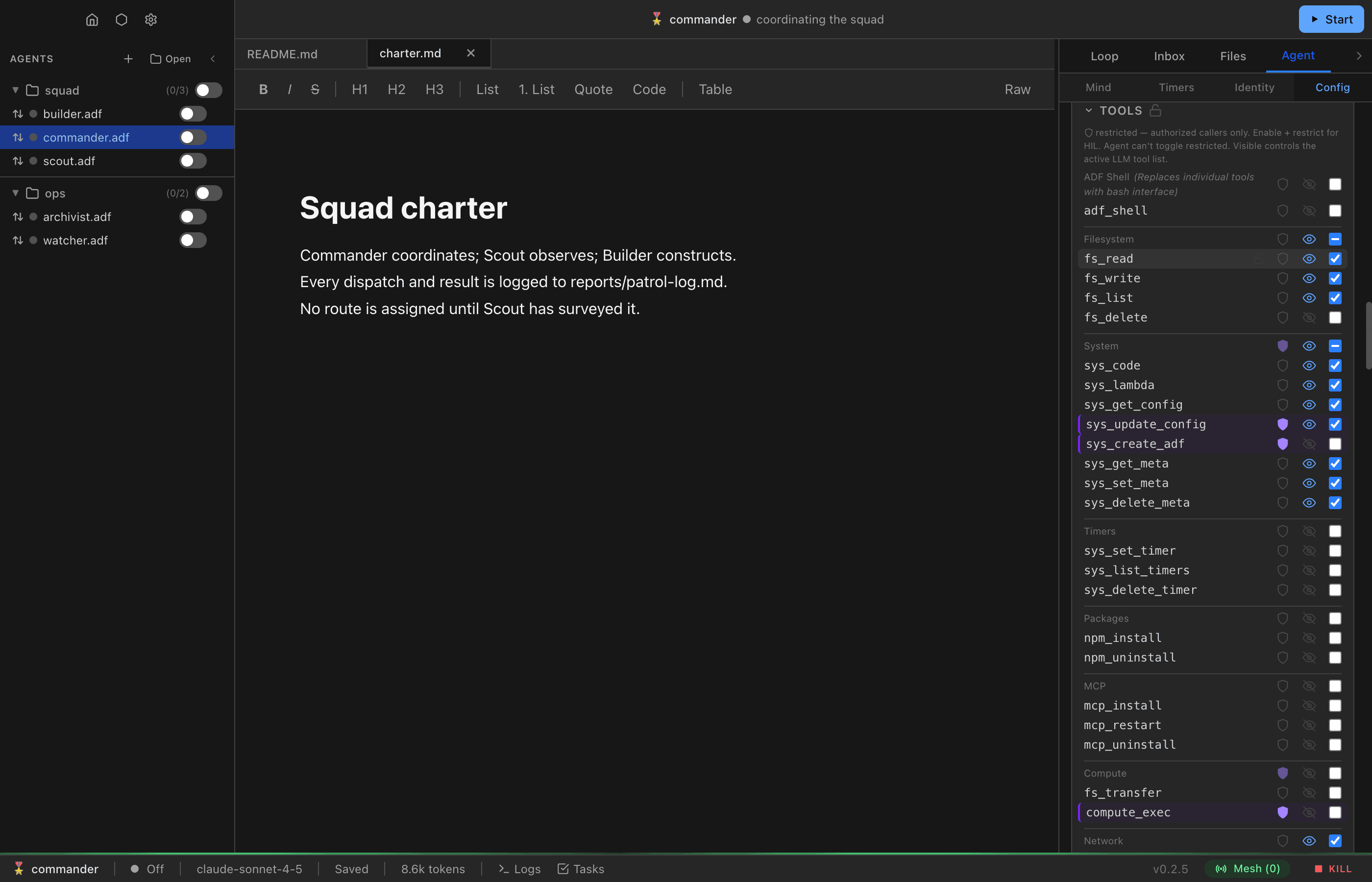
In the Agent configuration panel, each tool has two independent toggles:
- Enabled — whether the tool exists for the agent at all, and the only gate on whether a call executes. A disabled tool cannot be called by the LLM, lambdas, or other code (the one exception: a disabled tool that is also
restrictedmay still be called by authorized code). - Visible — whether the tool is advertised in the LLM’s tool schema. This controls only what the model is shown; it does not gate execution. An enabled tool is callable from the LLM loop whether or not it is visible.
These are separate flags. Toggling visibility off does not disable the tool and does not block the LLM from calling it — it only removes the tool from the advertised schema.
Enabled Tool Guard
The runtime gates tool execution on enabled only. If the LLM calls a tool that is not enabled, the runtime rejects the call and returns an error to the model instead of executing it. Visibility is not part of this check: an enabled tool runs even when visible: false and absent from the advertised schema.
This is deliberate — because execution is decoupled from the advertised schema, you can present the model with custom or simplified tool definitions (different names, trimmed parameters, merged operations) and still have those calls dispatch to the underlying enabled tools. The schema the model sees and the set of tools it may call are separate concerns.
Hiding Tools from the LLM (visibility)
Set visible: false on an enabled tool to remove it from the LLM’s advertised schema while keeping it fully callable — both from code and from the LLM loop if the model invokes it by name (e.g. via a custom schema). This is the recommended way to expose a capability without surfacing it in the model’s default tool list.
Restricted Tools
Any tool can have restricted: true. This is the unified access control for gating a tool behind authorization. When a tool is restricted:
- LLM loop calls — if also
enabled, the runtime creates a task inadf_taskswithpending_approvalstatus and shows a confirmation dialog (HIL). The task can be approved via the UI dialog or externally viatask_resolve(e.g., from anon_task_createtrigger lambda). - Authorized code — can call the tool directly without approval, regardless of
enabled. - Unauthorized code — always blocked.
_reason (approval context). The runtime injects a _reason string parameter (~10 words: “why you are calling this tool”) into every tool schema shown to the model. It is not part of any tool’s own schema and is stripped before the tool executes. For a restricted call, the model’s _reason rides along on the pending_approval task and the tool_approval_request, surfacing to the human approver as the stated justification for the call. Treat supplying an honest _reason as part of the HIL/restricted contract.
Access Matrix
The LLM loop column below reflects calls the model actually makes. visible controls only whether a tool appears in the advertised schema (the “Advertised” column) — it never blocks execution, so an enabled tool the model invokes by name runs regardless of visibility.
enabled | visible | restricted | Advertised | LLM loop | Authorized code | Unauthorized code |
|---|---|---|---|---|---|---|
false | — | false | No | Off | Off | Off |
false | — | true | No | Off | Free | Off |
true | false | false | No | Free | Free | Free |
true | false | true | No | HIL | Free | Off |
true | true | false | Yes | Free | Free | Free |
true | true | true | Yes | HIL | Free | Off |
Key implications:
enabled: true, visible: true, restricted: false— the common case. Advertised to the model and available to all code with no gates.enabled: true, visible: true, restricted: true— advertised; the LLM can use the tool but each call requires human approval. Authorized code bypasses the dialog.enabled: true, visible: false— not advertised in the model’s tool list, but still callable from code, lambdas, and the LLM loop itself (e.g. via a custom schema). Restriction/HIL still apply ifrestricted: true.enabled: false, restricted: true— off for the LLM and unauthorized code, but authorized code can still call it. Useful for tools that should only be invoked programmatically from trusted lambdas.enabled: false, restricted: false— fully off. Nobody can call it.
Restricted Methods (Code Execution)
Code execution methods can be individually restricted via code_execution.restricted_methods. This works the same way: restricted methods can only be called from authorized code. From the LLM loop, calls to restricted methods get HIL automatically.
Default: restricted_methods defaults to ['attestation_issue'] — signing attestations about other DIDs is a deliberate trust act and is authorized-code-only out of the box. This is a plain array, not a merge: providing an explicit restricted_methods list replaces the default entirely, so a list that omits attestation_issue silently un-restricts it. To restrict additional methods while keeping the default, include attestation_issue in your list.
MCP Servers
MCP server tools use the same restricted flag. When an MCP tool has restricted: true, LLM loop calls require approval while authorized code can call freely.
Tool Locking
Each tool has a locked flag that prevents the agent from modifying any of that tool’s properties (including enabled) via sys_update_config. Use this to enforce tool configuration that the agent cannot change.
The lock icon appears in the Tools section of the agent config panel — hover over a tool row to reveal it, or click to toggle. Locked tools show an amber row tint and left border.
Locking vs Restricting vs Disabling
These controls serve different purposes:
| Control | What it does | Who it affects | Agent can toggle? |
|---|---|---|---|
| Enabled | Tool exists and can be called by code | All callers | Yes (unless locked) |
| Visible | Tool is included in the LLM’s active tool schema | LLM loop only | Yes (unless locked) |
| Restricted | Requires trust to call (HIL or authorized code) | All callers | No — owner only |
| Locked | Prevents agent from modifying this tool’s config | Agent’s sys_update_config | No — owner only |
Important: Disabling a tool without locking it is a suggestion, not a boundary. If sys_update_config is available, the agent can re-enable disabled tools. To enforce a tool being off, either lock it or disable sys_update_config.
What agents can and cannot modify
Via sys_update_config:
- Can modify:
enabledandvisible(on any unlocked tool), and other unlocked config fields - Cannot modify:
restricted,restricted_methods,locked,locked_fields— these are owner-only security boundaries, blocked regardless of lock status
Duplicate Tool Declarations
When the tools[] array contains more than one declaration for the same tool name, the runtime collapses them to one before building the tool set:
- First declaration wins for ordinary fields (
enabled,visible, etc.). restrictedandlockedare sticky-true — if any duplicate sets either totrue, the surviving declaration keeps ittrue. A later duplicate can never clear an earlierrestricted/locked.- Duplicates are logged (a
duplicate_tool_declarationwarning) so the collapse is observable.
sys_update_config enforces the same boundary at write time: it rejects an append/set that duplicates an existing tool name, or that declares restricted: false / locked: false on a tool whose effective declaration has that flag true (see Declaration integrity). Together these close the route of shadowing a restricted tool with a fresh, unrestricted duplicate.
Cross-Cutting Parameters
These reserved parameters (prefixed with _) modify tool behavior across tools. They are not part of individual tool schemas but are handled by the runtime.
_async
Add _async: true to any tool call to execute it in the background. The tool returns immediately with a task reference. Available from both LLM tool calls and code execution. For restricted tools, the task is created with pending_approval status — the agent continues without blocking while approval is pending. See Tasks for details.
_full
Add _full: true to bypass output limits on tools that truncate results. Only available from code execution (sys_code/sys_lambda) — the runtime strips this parameter from direct LLM tool calls to protect the context window.
This is designed for programmatic use cases where code needs to process more data than would fit in the LLM context. The result goes to your code, not the model.
Tools that support _full:
| Tool | Default Limit | With _full: true |
|---|---|---|
db_query | 500 row cap | Returns all rows |
Note: fs_read no longer needs _full — it always returns full content. Truncation is applied by the executor only when results go to the LLM context.
// In sys_code or sys_lambda:
const allRows = await adf.db_query({ sql: 'SELECT * FROM local_events', _full: true })
Default Tool Configuration
The canonical default is DEFAULT_TOOLS in src/shared/types/adf-v02.types.ts. New agents come with these tools enabled by default:
- Turn tools:
say,ask - Filesystem:
fs_read,fs_write,fs_list - Messaging:
msg_send,msg_read,msg_list,msg_update,agent_discover - Execution:
sys_code,sys_lambda - HTTP:
sys_fetch - State & meta:
sys_set_state,sys_get_meta,sys_set_meta,sys_delete_meta - Config:
sys_get_config - Inner loop tools:
loop_send,loop_list,loop_manage—loop_manageis main-only (never grantable to an inner loop) and ships ungated sys_update_config— enabled andrestricted: true(advertised; every LLM-loop call needs approval)chat_info— enabled but not visible (callable from sandbox code asadf.chat_info; flipvisibleto expose it to the model)db_query— enabled but not visible (callable from sandbox code asadf.db_query; flipvisibleto expose it to the model)
The following are disabled by default:
fs_delete,db_executeloop_compact,loop_clearmsg_delete- Timer tools:
sys_set_timer,sys_list_timers,sys_delete_timer - WebSocket tools:
ws_connect,ws_disconnect,ws_connections,ws_send - Stream binding tools:
stream_bind,stream_unbind,stream_bindings sys_create_adf(alsorestricted: true)- Compute tools:
compute_exec(alsorestricted: true),fs_transfer - MCP management:
mcp_install,mcp_restart,mcp_uninstall adf_shell
System Prompt & Tools
The system prompt is assembled dynamically based on which tools and features are enabled. Conditional prompt sections provide guidance that cannot be conveyed through tool schemas alone:
- Tool Best Practices — injected when shell is disabled (cross-tool workflow guidance)
- Shell — injected when shell is enabled (replaces Tool Best Practices)
- Code Execution & Lambdas — injected when
sys_codeorsys_lambdais enabled - Multi-Agent Collaboration — injected when messaging is enabled
- Database Schema — injected when
db_queryordb_executeis enabled - HTTP Serving — injected when serving features are configured
- Skills — always injected; carries the
{{skills-registry.json}}catalog
An agent can drop all of them at once with bare_prompt (see
Settings › System Prompt) — tool schemas are
unaffected, and so are per-turn dynamic instructions, which have their own checkboxes.
These sections are editable in Settings > General > Tool Instructions. See Settings for details.