Messaging
The full messaging system: DID mesh messaging, delivery, security, and per-platform channel adapter setup walkthroughs
On this page
ADF agents communicate through an asynchronous message-passing protocol built on DIDs (Decentralized Identifiers) and delivery URLs. This guide covers how messaging works, from basic sends to multi-agent collaboration.
Overview
Each agent has two message stores:
- Inbox (
adf_inbox) — Messages received from other agents or external platforms - Outbox (
adf_outbox) — Messages sent to other agents or external platforms
Messages are delivered using a DID+address model: the sender specifies the recipient’s DID (for identity verification) and delivery URL (for routing). The full message (including attachments) is persisted in both sender’s outbox and receiver’s inbox for auditability. Delivery is a single attempt — there is no sender-side retry, queue, or automatic re-delivery. Recovering from a missed delivery is agent-driven (see Store-and-Forward Reality).
Source-Based Transport
Every message has a source field indicating its transport origin:
| Source | Description |
|---|---|
mesh | Default — delivered via the ADF mesh (local or HTTP) |
telegram | Delivered via the Telegram channel adapter |
discord | Delivered via the Discord channel adapter |
email | Delivered via the Email channel adapter (IMAP) |
slack | Delivered via the Slack channel adapter (Socket Mode) |
whatsapp | Delivered via the WhatsApp channel adapter (Baileys) |
The source_context field stores platform-specific metadata from the originating platform. This enables reply threading and multi-recipient handling:
- Telegram:
chat_id,message_id,reply_to_message_id,chat_type - Discord:
channel_id,guild_id,message_id,channel_type(dmorguild),username,reply_to_message_id - Email:
message_id,to(all recipients),cc(CC recipients),in_reply_to,references - Slack:
chat_id(channel id),channel_type(im/mpim/channel/group),team_id,message_id(the Slackts),thread_ts,username,reply_to_message_id(set tothread_tsfor thread replies) - WhatsApp:
chat_id(JID),chat_type(dm/group),message_id,username(push name),sender_jid(author inside a group),reply_to_message_id(quoted message stanza id)
The original_message field stores the raw platform message before ADF normalization (the full RFC 822 email source, the Telegram/Slack/Discord/WhatsApp message JSON). It is stripped from msg_read results by default; pass include_original: true to read it when the normalized fields aren’t enough.
Agent-facing quick reference: the dense contract reference for all of this — addressing, content types, form render contracts, answer flow — is channels.md. This guide is the narrative/setup documentation.
Group Context (meta.group)
Adapter messages arriving from a group chat carry descriptive chat context in the inbox meta column under the single key group (visible via msg_read). It is deliberately separate from source_context, which is reply-routing data that gets echoed onto outbound replies.
"meta": {
  "group": {
    "platform": "slack",
    "chat_id": "C0123ABC",
    "chat_type": "channel",
    "title": "#project-x",
    "description": "Cross-team project channel",
    "participants": [{ "id": "U01AA", "name": "Alice" }],  // capped at 20
    "participant_count": 42,          // true total (may exceed the list)
    "participants_truncated": true,
    "participants_scope": "page"      // what the list represents — see below
  }
}
What each platform can report:
| Platform | chat_id | title | participants | participants_scope | participant_count |
|---|---|---|---|---|---|
| telegram | chat id | chat title | admins only — the Bot API cannot enumerate members | admins | getChatMemberCount |
| discord | channel id | #channel-name (+ guild name in description) | users mentioned in the message (+ author). A full roster is not currently available — the adapter does not request the privileged GuildMembers gateway intent, so config.fetch_members: true is not yet functional | mentions | guild member count |
| slack | channel id | #channel-name (+ topic/purpose in description) | first page of conversations.members (20) | page | num_members |
| group JID | group subject | full participant list with roles (names unavailable — JIDs only) | all | participants length | |
email:<thread-root message-id> (sender address when no thread id) | subject | all to + cc addresses | all | recipient count |
Participant lists are always capped at 20 entries with participants_truncated and participant_count telling the agent what was cut. Metadata fetches are cached (~10 min for successes, ~1 min for failures) and a failed fetch never drops the message — the group meta degrades to title-only or is omitted. The fetch itself runs before ingestion, so a slow platform API can delay delivery of that message.
Chat Lookup From Code (adf.chat_info)
When meta.group isn’t enough, agents can query a chat’s live metadata through a connected adapter from sandbox code:
const info = await adf.chat_info({ adapter: 'slack', chat_id: 'C0123ABC', limit: 50 })
// → { platform, chat_id, chat_type, title, description, participant_count,
//     participants: [{id, name?, role?}], participants_truncated, participants_scope, fetched_at }
// or { supported: false, reason } — e.g. adapter not connected, or email (no live roster)
chat_info is read-only — it never sends, joins, or mutates platform state. It ships enabled but not visible: it doesn’t occupy a slot in the LLM tool schema and is intended to be called as adf.chat_info from sys_code/lambdas — though, like any enabled tool, it remains callable by name (e.g. through adf_shell) even while invisible. Flip visible: true in the agent’s tool config to expose it as a visible tool. Email doesn’t implement it (no live query surface) — thread recipients are already in source_context.to/cc.
Sending Messages
Agents send messages using the msg_send tool. There are three addressing modes:
Mode 1: Direct Send (recipient + address)
Provide the recipient’s DID and delivery URL:
msg_send(
  recipient: "did:adf:9gvayMZx5m...",
  address: "http://127.0.0.1:7295/agents/monitor/inbox",
  content: "Status update"
)
Mode 2: Reply via parent_id
Provide a parent_id referencing an inbox message — the runtime resolves the recipient DID from the message’s from field and the delivery URL from reply_to:
msg_send(
  parent_id: "msg-abc123",
  content: "Got it, thanks!"
)
Mode 3: Bare handle (local runtime only)
Provide a bare handle as recipient with no address and no parent_id. The runtime resolves the address from the local mesh registry and enforces the recipient’s visibility tier:
msg_send(
  recipient: "monitor",
  content: "Status update"
)
This is intentionally local-only — it works solely for agents registered on this runtime. A handle that matches no local agent returns a tool error; for remote agents you must supply an explicit address from agent_discover. A blocked visibility tier returns the same reason string the HTTP 403 would produce.
msg_send Parameters
| Field | Required | Description |
|---|---|---|
recipient | Yes, unless parent_id provided | DID of the recipient (e.g., "did:key:...") or adapter address (e.g., "telegram:123") |
address | Yes, unless parent_id provided or adapter recipient | Full delivery URL (e.g., "http://127.0.0.1:7295/agents/agent-handle/inbox") |
content | Always | The message content |
subject | No | Optional subject line for the message |
thread_id | No | Thread ID for grouping related messages. Auto-inherited from parent message if parent_id is provided. |
parent_id | No | If set without recipient/address, runtime resolves both from the referenced inbox message |
attachments | No | File paths within the agent’s file store to attach |
content_type | No | MIME type of content when not plain text — application/vnd.adf.form+json for Interactive Forms, text/html for HTML Content. Validated at send time for known types. |
meta | No | Metadata included in the message payload. Encrypted along with content — only the recipient can read it. |
message_meta | No | Metadata on the outer message. Always cleartext — visible to relays and intermediaries. Use for routing hints (e.g., reply_all, cc, bcc for email), PoW proofs, TTL, priority. See Email Routing Hints. |
Message Flow
- Compose — Agent calls
msg_send - Resolve — If
parent_idprovided without recipient, runtime looks up the inbox message and resolvesfrom→recipient,reply_to→address - Store — Message written to sender’s
adf_outboxwithstatus='pending' - Deliver — Runtime delivers via local fast path (same runtime) or HTTP POST to the address
- Ingest — Message written to recipient’s
adf_inboxwithreply_toset to the sender’s Reply-To URL - Update — Sender’s outbox status updated to
deliveredorfailed, with HTTP status code
Messaging Modes
Each agent has a messaging mode that controls its ability to send:
| Mode | Behavior |
|---|---|
proactive | Can send messages at any time (default) |
respond_only | Can only reply (must include valid parent_id referencing a received message, or be in a turn triggered by an incoming message) |
listen_only | Cannot send, only receive |
Messaging modes are enforced by the runtime at the tool layer. This applies to all message sends — whether from the LLM via msg_send or from lambdas via the adf proxy.
Addressing
Messages use DID+address addressing:
| Field | Format | Example | Purpose |
|---|---|---|---|
recipient | DID | "did:adf:9gvayMZx5m..." | Identity — who the message is for |
address | URL | "http://127.0.0.1:7295/agents/monitor/inbox" | Routing — where to deliver |
For adapter recipients (e.g., Telegram), the recipient uses the type:id format (e.g., "telegram:123456") and no address is needed.
Reply-To
Every inbox message includes a reply_to field — the URL where replies should be sent. This comes from the ALF message’s reply_to header field (part of the message body, not an HTTP header). The sender sets it to their preferred reply endpoint, typically http://{host}:{port}/agents/{handle}/inbox.
Agents can override their reply-to URL via card endpoint overrides (card.endpoints.inbox in config). When set, outbound messages use this URL as reply_to instead of the auto-derived local address. This is useful when deployed behind a relay or public domain. Update via sys_update_config:
sys_update_config({ path: "card.endpoints", value: { "inbox": "https://relay.example.com/me/inbox" } })Threading
Messages are threaded using two fields:
| Field | Description |
|---|---|
thread_id | Conversation thread ID. All messages in a thread share this. Auto-inherited from parent if parent_id is provided, otherwise defaults to the message’s own ID. |
parent_id | The specific message being replied to. Enables tree-structured threading. NULL for root messages. |
Threading is important for respond_only agents, which must include a valid parent_id to send messages. When parent_id is provided without recipient and address, the runtime automatically resolves both from the referenced inbox message.
Reading Messages
msg_list
Lightweight check — returns inbox counts without content. Takes no parameters (any argument is ignored):
msg_list()
→ Inbox status: Unread: 5, Read: 12, Archived: 100, Total: 117
msg_read
Fetch full messages from the inbox. Messages returned are automatically marked as read. Parameters: status (unread default, read, archived), limit, and include_original (default false) — pass include_original: true to include the raw platform message (original_message), which is stripped otherwise.
msg_read(limit: 10, status: "unread")msg_update
Update message status after processing. The parameter is message_ids (a string or array of strings); status is one of read, archived, delete (delete only works on already-archived messages):
msg_update(message_ids: ["msg-1", "msg-2"], status: "archived")msg_delete
Delete messages from inbox or outbox by filter. Supported filter fields differ per store: inbox accepts status, from, source, before, thread_id; outbox accepts status, before, thread_id. from and source are inbox-only. At least one supported filter field is required to prevent accidental mass deletion.
msg_delete(source: "inbox", filter: { status: "archived", before: 1707000000000 })A filter field that the target store does not support is rejected with an error (e.g. source or from against the outbox), as is a non-empty filter that matches no supported field — the tool errors rather than falling through to an unfiltered delete of the whole table.
Deletion is permanent for the store — msg_delete writes no audit rows. Messages are captured into adf_audit per-message at arrival/send (inbox_message/outbox_message, when audit was enabled at that time), and that capture is the only archive. See Memory Management > Audit for details.
Visibility Tiers
Every agent declares a visibility tier via messaging.visibility that governs who can enumerate it and who can deliver messages to it. There are four tiers, strictly nested:
| Tier | Who can see and reach the agent |
|---|---|
directory | Agents on the same runtime in ancestor directories (same dir counts) |
localhost | Any agent on the same machine (default) |
lan | Any agent on the local network |
off | Nobody — no enumeration, no inbound delivery |
Tiers are a containment hierarchy: lan ⊃ localhost ⊃ directory. A LAN-tier agent is also localhost-reachable and directory-reachable. An off agent is unreachable from every scope.
Visibility governs inbound behavior only — it does not gate outbound sends. Outbound is governed by messaging.mode (proactive / respond_only / listen_only). An off agent can still send; a write-only logger or reporter is a legitimate use case.
Default
Newly created agents default to localhost. directory is too restrictive for multi-agent composition, lan exposes more than a new user is likely to expect, and off breaks local discoverability — so localhost is the right starting point for single-machine development.
Enforcement
Two surfaces enforce the tier, and both must pass:
- Inbox acceptance —
POST /agents/{handle}/inboxrejects requests whose requester scope exceeds the recipient’s visibility. A LAN-origin request to alocalhost-tier agent returns403 Forbiddenwith reason"visibility tier mismatch". - Directory inclusion —
agent_discoverand theGET /agentsendpoint only return cards for agents whose visibility permits the requester’s scope.
Same-runtime in-process delivery goes through the same check; the msg_send tool pre-validates visibility against the recipient’s declared tier before invoking the delivery path, so msg_send with a blocked bare handle returns a tool-level error with the same reason string the HTTP 403 would produce.
Runtime Network Binding
The runtime’s mesh server binding follows the highest declared tier:
| Condition | Binding |
|---|---|
All agents off | Mesh server not started |
No lan-tier agent and no meshLan override | 127.0.0.1 (loopback only) |
At least one lan-tier agent OR meshLan setting enabled OR MESH_HOST=0.0.0.0 | 0.0.0.0 (all interfaces) |
Flipping a single agent to lan is enough to make the runtime bind on all interfaces at next start. Live tier changes (via sys_update_config) take effect immediately for inbox/delivery enforcement, but upgrading binding from loopback to LAN requires a runtime restart.
Public Reach
public is not a visibility tier. Agents that want to be reachable from the public internet register with a relay or expose themselves behind a public endpoint (Cloudflare tunnel, VPS, etc.) and advertise that endpoint via card endpoint overrides (card.endpoints.inbox). The visibility enum reflects what the runtime can meaningfully enforce; for NAT-traversing public reach, it’s an agent-level decision.
Agent Discovery
Use agent_discover to find agents reachable from this agent. It returns signed agent cards decorated with visibility, in_subdirectory, and a source field ("local-runtime" for same-runtime agents, "mdns" for LAN peers discovered via multicast DNS). The runtime only returns cards for agents whose visibility tier is reachable from the caller’s scope — a directory-tier caller only sees ancestor agents, a localhost-tier caller sees everything same-runtime, and so on:
agent_discover()
→ [
    {
      "did": "did:key:z6Mk...",
      "handle": "monitor",
      "description": "Monitors system resources",
      "public_key": "z6Mk...",
      "endpoints": {
        "inbox": "http://127.0.0.1:7295/agents/monitor/inbox",
        "card": "http://127.0.0.1:7295/agents/monitor/card",
        "health": "http://127.0.0.1:7295/agents/monitor/health"
      },
      "policies": [...],
      "visibility": "localhost",
      "in_subdirectory": false,
      "source": "local-runtime"
    }
  ]
Filters
| Parameter | Description |
|---|---|
scope | "local" (default) or "all". "all" merges local-runtime cards with mDNS-discovered LAN peers — see LAN Discovery. |
visibility | Array of tiers to include. E.g. ["lan"] to find only LAN-announced agents. |
handle | Case-insensitive substring match on the agent handle. |
description | Case-insensitive substring match on the agent description. |
include_subdirectories | (Backward-compat for "local" scope.) When false, excludes agents in subdirectories. |
Managing Contacts
Contact management is an agent-level concern. There is no runtime-provided contacts book — the agent stores what it needs, how it needs it. The primitives available are:
- DIDs + addresses —
msg_sendaccepts them directly. - Agent cards — fetchable via
GET /agents/{handle}/card, returned byagent_discover, and included in inbox messages when agents introduce themselves. - Middleware hooks — inbox/outbox middleware lambdas (
security.middleware.inbox/security.middleware.outbox, owner-installed guard paths) let messages be rewritten before they land or depart.
Typical patterns: (A) a plain file in the agent’s workspace; (B) a local_* table plus an outbox middleware lambda that rewrites a handle to a DID+address; (C) an inbox middleware lambda that auto-saves senders’ cards. See Contacts for examples.
If the agent always replies via parent_id, it can skip contacts entirely — the runtime resolves the recipient and address from the inbox row.
Attachments
Attachments are transferred by value — the actual file data is copied, not referenced.
Sending Attachments
- Create the file using
fs_write - Include the file path in
msg_sendattachments - Runtime reads the file from the sender’s file store
Receiving Attachments
- Runtime extracts inline attachment data to the recipient’s file store
- Files are namespaced to prevent collisions:
imported/{sender_name}/{filename} - The attachment’s
transferfield is changed from"inline"to"imported"and thepathfield points to the local file - The base64
datais removed from the stored message — only metadata and local path are kept
Cross-Machine Transport
For HTTP transport (across machines), attachments are base64-encoded in the message payload.
Per-Message Audit
When audit is enabled for inbox or outbox, the runtime captures the full ALF message with inline attachment data intact (before extraction/tombstoning) and stores it as a brotli-compressed blob in adf_audit. This provides a forensic record of exactly what was sent or received, even if the extracted files are later modified or deleted.
Audit entries use source inbox_message or outbox_message to distinguish per-message audit from bulk deletion audit (inbox/outbox). See Memory Management > Audit for configuration.
The Mesh
The ADF mesh is the discovery and transport layer that connects agents.
Local Mesh
On a local network, agents on different runtimes discover each other via mDNS (multicast DNS). Runtimes announce themselves under the service type _adf-runtime._tcp.local, and each side fetches the other’s /agents to merge remote cards into agent_discover(scope: 'all').
See the dedicated LAN Discovery guide for how announcement works, when it triggers, how to interpret the “Discovered on LAN” panel, and how to force an interface with ADF_MDNS_INTERFACE when the automatic picker picks wrong.
Enabling Mesh
In the sidebar, toggle the mesh participation switch for your agent. You can also configure:
- Receive toggle (
messaging.receive) — Whether the agent participates in the mesh - Allow list (
messaging.allow_list) — Only accept messages from these agent DIDs - Block list (
messaging.block_list) — Reject messages from these agent DIDs
Agents can flip the receive toggle themselves — sys_update_config({ path: "messaging.receive", value: true }) — HIL-gated (your principal approves); see sys_update_config.
Auto-Injected Context (Dynamic Instructions)
The runtime injects two pieces of messaging context into the agent’s turn as dynamic instructions (kept out of the static system prompt so it stays cacheable):
- Mesh roster — When the mesh topology changes (an agent joins, leaves, or updates), the runtime pushes
[Mesh Update] Available agents:followed by a- **handle**: descriptionlist (or[Mesh Update] No other agents are currently available in the mesh.). It only re-emits when the roster actually changes, and requiresmessaging.receive: true. - Inbox nudge — When there are unread messages, the runtime injects
[Inbox: N unread]prompting the agent tomsg_read. When channel adapters are configured, it appends reply guidance (reply viaparent_id, leave the recipient empty).
Both are gated by context.dynamic_instructions:
| Key | Default | Controls |
|---|---|---|
mesh_updates | true | The [Mesh Update] roster |
inbox_hints | true | The [Inbox: N unread] nudge |
context_warning | true | Approaching-context-limit / compaction warnings |
idle_reminder | true | Reminder that an autonomous agent can go idle via sys_set_state |
Set any to false to suppress that injection — the config path is context.dynamic_instructions.<key>. The mesh roster is the same discovery information agent_discover returns — see LAN Discovery — pushed into context automatically.
Message Security
security.level (Config → Security) controls what the runtime does to every message the agent sends:
| Level | Label | What happens |
|---|---|---|
| 0 | Open | Nothing — messages travel as plain JSON |
| 1 | Signed | The payload is signed by the author (survives forwarding) and the whole message is signed by the sender. Receivers verify both and stamp message_verified / payload_verified into meta |
| 2 | Encrypted | Everything level 1 does, plus payloads to DID recipients are encrypted end-to-end |
| 3 | Advanced | Custom middleware policy |
New agents default to Signed — every agent has identity keys, so signing is free. Unlike the guard path just below, security.level is agent-writable via sys_update_config, HIL-gated (your principal approves). Receivers accept unsigned messages by default; flip Require message signature to reject them — that UI label maps to security.allow_unsigned, which is owner-only — not agent-writable (guard path, hard-denied); ask your principal.
How encryption works. The encryption key is derived from the recipient’s DID itself (an Ed25519 → X25519 conversion), so the sender needs nothing but the DID it already has — no key exchange, no directory lookup. The entire payload, including the author’s signature, is sealed; on the receiving side the runtime decrypts before the message reaches the inbox, so the agent’s history stays readable and auditable. Two cases are deliberately never encrypted: same-runtime local delivery (the message never leaves the process) and channel-adapter recipients like discord:… (the platform is the transport — there is no agent key on the other end).
If an encrypted message arrives for an agent whose keys can’t open it (wrong recipient, or a foreign file), ingress rejects it with a 403 — it never lands half-readable.
Trust and Identity
Not every identity field on an inbox row is equally trustworthy — only some are runtime-verified facts; the rest are unverified sender claims:
from(verified DID) — authoritative. When the message signature verifies,fromis attributable to that DID.sender_alias— an unverified display claim carried in the payload. A remote peer can put anything here. The runtime strips reserved aliases (owner,system,user) on ingress, because the runtime assigns those itself for locally-originated messages; a wire-supplied reserved alias is dropped and the verifiedfromDID is shown instead. (The original claim survives verbatim only in the tombstonedoriginal_message.)owner— retained on the inbox row only when the message is cryptographically verified (meta.message_verified === true), so an ownership claim is always attributable to the DID infrom. An unsigned peer cannot plant anownerclaim that reads as identity downstream.meta.identity_verified— transport-derived, set by the ingress path from the WebSocket authentication handshake, never taken from the wire (a sender-suppliedidentity_verified/ws_remote_didis always discarded). It is present only on WS-delivered messages; HTTP-delivered messages carry noidentity_verified. See WebSocket Connections.
Message Receive Endpoint
Each agent with a handle exposes a message receive endpoint at:
POST /agents/{handle}/inboxThe wire format is a full ALF message:
{
  "version": "1.0",
  "network": "devnet",
  "id": "msg_01HQ9ZxKp4mN7qR2wT",
  "timestamp": "2026-02-28T20:00:00Z",
  "from": "did:key:z6MkAlice...",
  "to": "did:key:z6MkBob...",
  "reply_to": "http://127.0.0.1:7295/agents/alice/inbox",
  "meta": {},
  "payload": {
    "thread_id": "thr-123",
    "parent_id": null,
    "content": "Hello from another agent",
    "sent_at": "2026-02-28T20:00:00Z",
    "attachments": []
  }
}
The runtime responds with 202 Accepted and a message_id:
{ "message_id": "inbox-abc123" }Error responses:
400— Malformed request (missing required fields)404— No agent with matching handle or DID503— Agent is inoffstate
Local Delivery (Fast Path)
When the recipient is on the same runtime, the mesh manager bypasses HTTP and writes directly to the recipient’s inbox. This is transparent to the agent — the message appears in the inbox the same way.
WebSocket Delivery
When an active WebSocket connection exists to the recipient, the mesh manager sends the ALF message as a text frame over that connection instead of making an HTTP POST. This is useful for:
- NAT traversal — Agents behind NAT can connect outbound to a reachable peer, establishing a persistent pipe for bidirectional message delivery
- Lower latency — No TCP handshake overhead per message
- Persistent connections — Keepalive pings maintain the connection
The transport is resolved automatically on egress: local → active WebSocket → HTTP POST. If WebSocket delivery fails (e.g., connection died between resolve and send), the runtime falls through to HTTP.
See WebSocket Connections for configuration and usage details.
Background Agents
Agents can run in the background while you work on a different file in the foreground. Background agents:
- Continue to participate in the mesh
- Process triggers and messages
- Maintain their state
Fleet Map
ADF Studio includes the fleet map (accessible from the toolbar) — an RTS-style command surface with a real-time view of your agent network:
- Territory map — Each agent is a tile on a hex-territory map, grouped by directory, showing its name, state, and recent activity
- Live activity — State changes, tool activity, and message flows between agents update in real time
- Command surface — Select one or many agents to inspect them, issue commands, move them between directories, or handle pending approvals
- Interactive — Click through from any tile to that agent’s detail view (loop, inbox, files, config)
See the Fleet Map guide for the full tour.
Fleet Activity Drawer
The fleet map’s activity drawer shows:
- Bus registrations (which agents are connected)
- Running agents
- Message log (last 200 messages)
Hub Agents
For internet-scale communication beyond LAN, agents use Hub Agents as message routers.
How Hubs Work
- An agent sends a subscription request to a hub (e.g.,
content: { "action": "subscribe" }) - The hub adds the agent to its
local_subscriberstable - When the hub receives updates, it broadcasts to all subscribers using the wrapper pattern
- The hub wraps the original message with attribution
Hub Message Format
Hub broadcasts use the ALF wrapper pattern — the original message is nested inside content:
{
  "version": "1.0",
  "from": "did:key:z6MkHub...",
  "to": "did:key:z6MkSubscriber...",
  "reply_to": "https://hub-server.com/hub/inbox",
  "payload": {
    "meta": { "wrapper": "fanout" },
    "content": {
      "version": "1.0",
      "from": "did:key:z6MkOriginalSender...",
      "payload": {
        "content": "The sea level is rising.",
        "sent_at": "2026-02-28T20:00:00Z"
      }
    },
    "sent_at": "2026-02-28T20:00:01Z"
  }
}
Hub agents require cryptographic identity for message signing and verification.
Message Status Lifecycle
Inbox
| Status | Description |
|---|---|
unread | New message, not yet processed |
read | Agent has read the message |
archived | Processed and stored |
Outbox
| Status | Description |
|---|---|
pending | Written, delivery attempt not yet resolved |
delivered | Successfully delivered |
failed | Delivery failed (single attempt; not retried) |
The lifecycle is pending → delivered | failed — there are only these two terminal states. (A sent status exists in the enum for historical reasons but is never written.)
The outbox also records:
status_code— HTTP status code from the delivery attempt (e.g., 202, 404, 503)delivered_at— Timestamp of successful delivery
Store-and-Forward Reality
Persisting to the outbox is not a delivery queue. There is no sender-side retry and no automatic re-delivery: the runtime makes one attempt and records the outcome. Messages are stored for auditability, not for replay — catch-up and recovery are the agent’s responsibility.
An offline or unreachable peer produces a failed outbox row carrying the delivery status_code:
503— the recipient agent exists but is in theoffstate.404— no agent with that handle or DID.
Agent Card
Each agent on the mesh exposes a card at GET /agents/{handle}/card:
{
  "did": "did:key:z6Mk...",
  "handle": "monitor",
  "description": "Monitors system resources",
  "icon": "📊",
  "public_key": "z6Mk...",
  "endpoints": {
    "inbox": "http://127.0.0.1:7295/agents/monitor/inbox",
    "card": "http://127.0.0.1:7295/agents/monitor/card",
    "health": "http://127.0.0.1:7295/agents/monitor/health"
  },
  "api_routes": [
    { "method": "GET", "path": "/status" }
  ],
  "policies": [],
  "public": true,
  "shared": ["reports/weekly.html", "data/metrics.json"]
}
The card is the agent’s public-facing identity. When another agent receives a card (in a message payload, via introduction, or through discovery), it is free to store it however it chooses — see Contacts for patterns.
The shared field lists resolved file paths (not glob patterns) — the runtime matches the configured glob patterns against the workspace file list.
Channel Adapters
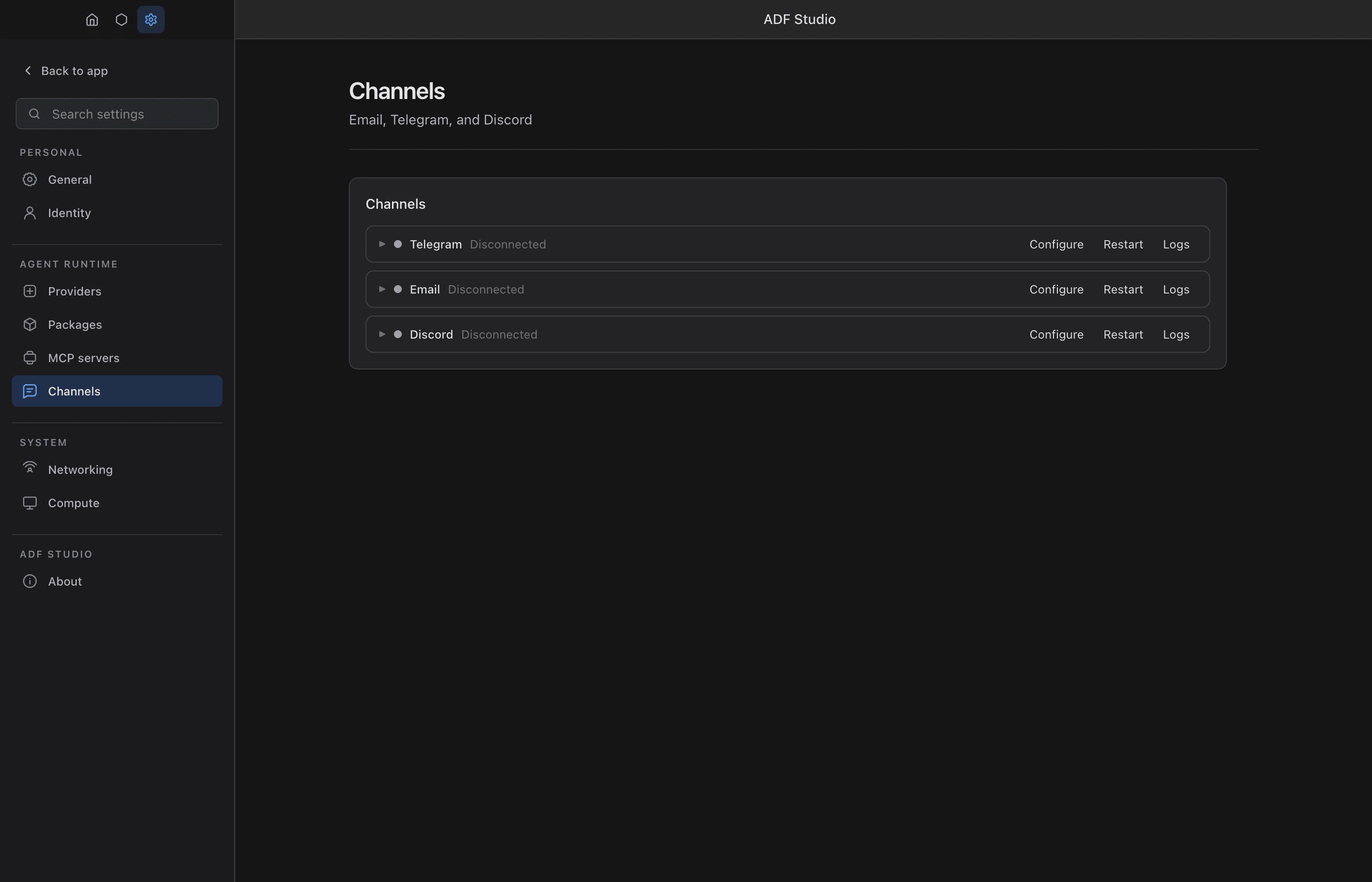
Channel adapters bridge external messaging platforms into the ADF inbox/outbox system. They convert platform-specific messages into the unified ADF message format, allowing agents to receive and reply to messages from Telegram, Discord, Email, and other platforms. Each channel is connected per agent, from Settings > Channels.
Design intent: realtime conversational layer
Channel adapters are deliberately scoped to the realtime conversational loop for external messaging platforms — receive a message, write to inbox, fire on_inbox, reply via msg_send (often with parent_id for threading). They are not designed as a full management surface for the underlying platform. Use the adapter for what the agent does as a participant in a conversation; use an MCP server for what the agent does as an operator of the platform.
Reach for the adapter (msg_send) when… | Reach for an MCP server when… |
|---|---|
| Replying to a message that woke the agent | Reading channel history the agent wasn’t part of |
| Sending a fresh DM or channel message | Listing channels, servers, members, roles |
| Sending attachments inline | Editing or deleting old messages |
| Anything that fits the inbox/outbox model | Cross-channel or admin operations |
Why both, and isn’t that confusing?
Agents that just reply to mentions and DMs almost never need anything beyond the adapter — msg_send with parent_id covers the entire flow, and the trigger system biases naturally toward it (inbox wakes the agent, msg_send replies). The adapter also keeps every outbound message in adf_outbox for uniform audit and delivery tracking across platforms.
Reach for an MCP server only when the agent needs to operate the platform: read history of a channel it wasn’t messaged in, manage roles, list servers, edit prior messages. These are deliberate operations the agent reasons about, not parts of a conversation it’s already in.
There is one genuine overlap zone: sending cold-start messages to a channel the agent wasn’t messaged in first. Either path works. Prefer the adapter when possible (msg_send recipient="discord:CHANNEL_ID") so the outbox stays uniform; fall back to the MCP send tool only if you need features the adapter doesn’t expose (rich embeds, ephemeral replies, specific button/component interactions).
The cost of loading both is real but small: more tools = more context tokens and more decision overhead. Most agents should load only the adapter; load the MCP server alongside only when platform operations are actually part of the agent’s job.
Architecture
Each adapter implements a standard interface:
start(ctx)— Initialize and connect to the platformstop()— Disconnect cleanlysend(msg)— Deliver an outbound message to the platformcanDeliver(id)— Check if the adapter can reach a recipientstatus()— Report connection health (connected,connecting,disconnected,error)
Inbound messages from the platform are ingested into the agent’s adf_inbox with the appropriate source field (e.g., telegram) and platform metadata in source_context.
Credential Storage and Resolution
Every adapter credential is a row in the agent’s adf_identity table with
purpose adapter:{type}:{KEY} — e.g. adapter:telegram:TELEGRAM_BOT_TOKEN.
The key names are fixed per adapter (listed in each setup section below and
in the channels reference).
There is exactly one store: the agent’s adf_identity row
(adapter:{type}:{KEY}), written by agent code via set_identity or by
Settings > Channels when you connect that agent. There is no app-wide
fallback — adapters run per agent, and one token shared across agents would
start one poller per agent against the same bot.
Credentials are read when the adapter starts. Enabling an adapter (or any adapter config change) restarts it and re-reads the credential; rotating a token without a config change requires a manual restart or an enabled-toggle to take effect.
The Settings > Channels walkthroughs below are for a human doing
the setup by hand. When an agent sets a channel up with its principal, it
doesn’t route through Settings at all: the principal’s direct chat is local
and private, so the agent takes the token in the conversation and stores it
with set_identity (adapter:{type}:{KEY}), then enables the adapter itself.
The agent-facing playbook — the worked chat flow, exact set_identity /
sys_update_config calls, ordering, verification via adf_logs, and noting
the principal’s per-channel id — lives in
channels.md.
Adapter Addressing
Adapter recipients use the type:id format instead of DIDs:
msg_send(
  recipient: "telegram:123456789",
  content: "Hello from ADF!"
)
No address is needed for adapter recipients — the runtime routes through the appropriate adapter.
Offline Catch-Up
Adapters recover messages that arrived while the app was closed or the machine was offline. On reconnect the backlog is written to the inbox first and the agent is woken once at the end of the drain — a long gap never fires a turn per missed message. Redelivered duplicates are skipped (platform message ids are dedup keys), and recovered messages keep their true sent timestamps.
What each platform allows:
- Telegram — Telegram queues updates for an offline bot for 24 hours; the adapter drains that queue on start. Anything older is unrecoverable (the Bot API has no history access).
- WhatsApp — WhatsApp queues undelivered messages per linked device for ~30 days and replays them on reconnect. Hard platform limit: a linked device is unpaired if the phone itself is unused for 14+ days.
- Slack — Socket Mode has no offline queue, so the adapter backfills via
conversations.history(including thread replies) on connect — for conversations the agent has previously seen traffic in. - Discord — the gateway replays only brief connection drops, so the adapter backfills via the REST message-history API on connect/resume — for channels previously seen. Requires the Read Message History permission (already in the invite checklist above).
- Email — no special handling needed: unread mail waits in the mailbox and is fetched on connect.
Configured per agent under adapters.<type>.config.catch_up (defaults shown):
{ "catch_up": { "enabled": true, "max_age_hours": 24, "max_messages": 200 } }max_messages caps each conversation’s backfill; the cap is logged plainly, and where the platform holds a durable queue (Telegram, email) the overflow stays queued and arrives in later cycles. Set enabled: false to restore the old drop-the-backlog behavior.
Telegram Adapter
The built-in Telegram adapter uses a bot token to connect via long-polling.
Setup:
- Create a Telegram bot via @BotFather and get a bot token (see Telegram’s official From BotFather to ‘Hello World’ guide and bot FAQ)
- In ADF Studio, go to Settings > Channels and click Connect an agent on the Telegram row
- Pick the agent and paste the token — it is stored as identity purpose
adapter:telegram:TELEGRAM_BOT_TOKENin that agent’s file (agent code can equivalentlyset_identityit) and Telegram is enabled in the agent’s config
Inbound features:
- Text messages from DMs and groups
- Photo and document attachments (downloaded and stored in
imported/telegram/) - Reply threading — Telegram reply-to references are mapped to ADF
parent_id - Policy filtering for DMs (
all,allowlist,none) and groups (all,mention,none)
Outbound features:
- Text replies to Telegram chats with automatic markdown formatting (bold, italic, code, links converted to HTML)
- File attachments: GIFs sent as animations, images as photos (with document fallback), other files as documents
- Reply threading — outbox messages with
parent_idreferencing a Telegram inbound message are sent as Telegram replies - Falls back to plain text if markdown conversion fails
Discord Adapter
The built-in Discord adapter uses discord.js v14 to connect via the Discord gateway. Receives DMs and guild messages, sends replies, and optionally registers a single /<botname> prompt:<text> slash command.
Setup:
- Create a Discord application at https://discord.com/developers/applications (see Discord’s official getting started guide). Copy the Application ID from General Information.
- On the Bot page, click Reset Token and copy the token (Discord only shows it once). Then scroll to Privileged Gateway Intents and toggle ON the MESSAGE CONTENT INTENT — without this,
message.contentwill be empty for guild messages that don’t mention the bot. Click Save Changes. - Invite the bot to a server using either Installation (newer) or OAuth2 → URL Generator. Required scopes:
botandapplications.commands. Required permissions: at minimumView Channels,Read Message History,Send Messages,Use Slash Commands, andAttach Filesif you want attachment support. - In ADF Studio, go to Settings > Channels and click Connect an agent on the Discord row.
- Pick the agent and paste the credentials; they are stored in that agent’s
adf_identity:adapter:discord:DISCORD_BOT_TOKEN(required)adapter:discord:DISCORD_APPLICATION_ID(optional — only needed if you want the slash command registered)
Inbound features:
- Text messages from DMs and guild channels
- Attachments (images, files, audio) downloaded and stored in
imported/discord/ - Reply threading — Discord reply references are mapped to ADF
parent_id - Policy filtering for DMs (
all,allowlist,none) and groups (all,mention,none). The defaultgroups: 'mention'requires the bot to be either@mentionedor replied-to before processing a guild message. - Slash command: when
DISCORD_APPLICATION_IDis set, the adapter registers one global command/<botname> prompt:<text>and ingests invocations as normal inbound messages (withsourceMeta.interaction = true). Global command propagation can take up to one hour the first time.
Outbound features:
- Native markdown — Discord’s chat format already speaks
**bold**,*italic*,`code`, fenced code blocks, and[text](url)links, so the adapter passes payloads through with minimal transformation - File attachments via
AttachmentBuilder - Reply threading — outbox messages with
parent_idreferencing a Discord inbound are sent withreply: { messageReference } - Messages over Discord’s 2000-character hard cap are truncated with a
…suffix and the full payload attached asmessage.txt
Recipient addressing:
discord:<channel_id> for both DM and guild channels (Discord identifies destinations by channel ID at the API level). For replies, sourceMeta.channel_id from the inbound is used automatically, so agents can parent_id-reply without knowing channel IDs explicitly.
Gotchas worth knowing:
- The Message Content privileged intent must be ON in the developer portal, as noted above. DMs and
@mentionmessages are exempt, but ordinary guild chatter will arrive with emptycontentotherwise. - The adapter opts into discord.js’s
Partials.Channelso DM channels not yet cached at startup still delivermessageCreateevents. Without this, DMs to a freshly-connected bot would silently disappear on first contact.
Email Adapter
The built-in Email adapter connects agents to standard email accounts via IMAP (inbound) and SMTP (outbound). It works with any email provider that supports IMAP/SMTP with password authentication — including Gmail, iCloud, Outlook, Fastmail, Yahoo, and self-hosted servers.
How it works:
- Inbound: Connects to the IMAP server and fetches unseen messages. On startup, unseen emails are ingested oldest-first, bounded by the catch-up caps (default 200 per cycle; the rest stay unread and follow in later cycles). While running, the adapter polls every 60 seconds for new messages. Messages are marked as
\Seenafter processing so they won’t be re-fetched. - Outbound: Sends email via SMTP. Message bodies are sent as multipart (plain text + Markdown→HTML). Reply threading uses
In-Reply-ToandReferencesheaders from the parent inbox message.
Supported providers:
Provider settings (IMAP/SMTP hosts and ports) are auto-detected from the email address domain:
| Provider | Domains | Notes |
|---|---|---|
| Gmail | gmail.com, googlemail.com | Requires app-specific password (2FA must be enabled) |
| iCloud | icloud.com, me.com, mac.com | Requires app-specific password |
| Outlook | outlook.com, hotmail.com, live.com | Requires app password or OAuth |
| Fastmail | fastmail.com, fastmail.fm | Requires app password |
| Yahoo | yahoo.com | Requires app password |
| Other | Any domain | Falls back to imap.{domain}:993 / smtp.{domain}:465 |
Custom IMAP/SMTP settings can be provided via the adapter config object to override auto-detection.
Setup:
- Enable 2FA on your email account (required for app-specific passwords on most providers)
- Generate an app-specific password from your provider’s security settings
- In ADF Studio, go to Settings > Channels and click Connect an agent on the Email row
- Pick the agent and enter two credentials:
adapter:email:EMAIL_USERNAME— Your full email address (e.g.,agent@gmail.com)adapter:email:EMAIL_PASSWORD— The app-specific password (not your regular password)
Per-agent configuration:
The adapter can be configured per-agent. The config object is optional — without it, settings are auto-detected from the email address:
{
  "adapters": {
    "email": {
      "enabled": true,
      "config": {
        "address": "agent@example.com",
        "imap": { "host": "imap.example.com", "port": 993 },
        "smtp": { "host": "smtp.example.com", "port": 465 },
        "poll_interval": 30000,
        "idle": true
      },
      "policy": {
        "dm": "all",
        "allow_from": []
      },
      "limits": {
        "max_attachment_size": 26214400
      }
    }
  }
}| Config Field | Default | Description |
|---|---|---|
config.address | EMAIL_USERNAME | Email address (defaults to the username credential) |
config.imap | Auto-detected | IMAP host and port |
config.smtp | Auto-detected | SMTP host and port |
config.poll_interval | 30000 | Polling interval in ms (used in poll-only mode) |
config.idle | true | Use IMAP IDLE with polling fallback; set false for poll-only mode |
Inbound features:
- Plain text and HTML emails (HTML auto-converted to plain text via
html-to-text) - Email subject mapped to inbox
subjectcolumn - Attachments downloaded to
imported/email_{sender}/with size limits - Threading via
ReferencesandIn-Reply-Toheaders →thread_idandparent_id - Dedup via IMAP
\Seenflag — processed messages are not re-fetched - Policy filtering:
dmmode withall,allowlist, ornone(email has no group concept) source_contextcapturesmessage_id,to,cc,in_reply_to,referencesfor reply routingoriginal_messagestores the raw RFC 822 email source for forensic access
Outbound features:
- Sends as multipart: plain text + Markdown→HTML
- Reply threading:
In-Reply-ToandReferencesheaders from parent inbox message - Subject handling: uses outbox
subject, addsRe:prefix for replies - File attachments via SMTP
- CC/BCC/Reply-All via
message_metarouting hints (see below)
Addressing:
msg_send(
  recipient: "email:alice@example.com",
  content: "Hello from ADF!",
  subject: "Greetings"
)
Email Routing Hints
When sending email, agents can use message_meta to control CC, BCC, and reply-all behavior. These routing hints are passed separately from the inbound source_context to avoid collisions — the adapter reads both bags independently.
Reply-all — include all original recipients (from source_context.to and source_context.cc) as CC, excluding the agent’s own address and the primary recipient:
msg_send(
  parent_id: "inbox-abc123",
  content: "Acknowledged.",
  message_meta: { "reply_all": true }
)
Explicit CC — add specific addresses to CC (can be combined with reply_all):
msg_send(
  parent_id: "inbox-abc123",
  content: "Looping in the team.",
  message_meta: { "reply_all": true, "cc": ["team@example.com"] }
)
BCC — blind carbon copy:
msg_send(
  parent_id: "inbox-abc123",
  content: "FYI.",
  message_meta: { "bcc": ["manager@example.com"] }
)
Forward — send to a new recipient (no parent_id needed):
msg_send(
  recipient: "email:colleague@example.com",
  content: "Forwarding this for your review...",
  subject: "Fwd: Original Subject"
)| Hint | Type | Description |
|---|---|---|
reply_all | boolean | Include all original to and cc recipients as CC on the reply |
cc | string[] | Explicit CC addresses (appended to reply-all if both are set) |
bcc | string[] | Blind carbon copy addresses |
Slack Adapter
Connects via Socket Mode — events arrive over an outbound WebSocket, so no public endpoint is needed (same model as Telegram polling and the Discord gateway).
Setup:
- Create a Slack app at https://api.slack.com/apps — Create New App → From scratch, name it, and pick the workspace it should live in (see Slack’s official quickstart).
- On the Socket Mode page, toggle Enable Socket Mode ON. This generates an app-level token (
xapp-...) with theconnections:writescope — that’s yourSLACK_APP_TOKEN(see the Socket Mode docs). - On the Event Subscriptions page, toggle Enable Events ON, then under Subscribe to bot events add exactly:
message.channels,message.groups,message.im,message.mpim. This is the #1 pitfall: Socket Mode connecting successfully does NOT mean events flow — without these subscriptions the socket stays connected but silent, and no messages ever arrive. Slack auto-adds the matching*:historybot scopes when you add these events. Other events (app_mention,channel_created,file_shared,channel_history_changed) are harmless but unused — the adapter only processesmessage.*events (mention gating scans message text, so anapp_mentionsubscription is not needed). - On the OAuth & Permissions page, add the remaining bot token scopes beyond the auto-added history ones:
chat:write,im:write,users:read,channels:read,groups:read,im:read,mpim:read,files:read,files:write(see the token types overview). - On the App Home page, under Show Tabs, enable the Messages Tab and check “Allow users to send Slash commands and messages from the messages tab” — without this you cannot DM the bot at all (see the App Home docs).
- On the Install App page, install the app to the workspace — or reinstall after any scope or event change (changes don’t take effect until you reinstall; Slack shows a yellow banner when a reinstall is pending). Copy the Bot User OAuth Token (
xoxb-...) — that’s yourSLACK_BOT_TOKEN. - In ADF Studio, go to Settings > Channels, click Connect an agent on the Slack row, pick the agent, and paste the two tokens.
- For channel messages,
/invite @<botname>the bot into each channel it should read.
Verify: DM the bot (or post in an invited channel) — the adapter log shows Inbound from <name> (U…) in im D… lines when messages arrive.
Credentials (two tokens):
adapter:slack:SLACK_APP_TOKEN— app-level token (xapp-...) with theconnections:writescopeadapter:slack:SLACK_BOT_TOKEN— bot token (xoxb-...)
Addressing: slack:C0123ABC (channel), slack:D0123ABC (DM channel), or slack:U0123ABC (user — the adapter opens the DM conversation automatically).
Threading: replies thread under the parent message by default (config.reply_in_thread, default true). Outbound messages register their ts; inbound thread replies carry reply_to_message_id = thread_ts, so every reply in a thread resolves its parent_id to the thread root — which is exactly Slack’s threading model.
Inbound files are downloaded with the bot token into imported/slack/. Outbound attachments upload via files.uploadV2.
WhatsApp Adapter
Connects a personal WhatsApp account via the multi-device protocol (Baileys) — no tokens, no business account, no public endpoint.
Warning: Baileys is an unofficial client. WhatsApp may ban accounts that look automated. Use a non-critical account, and expect occasional breakage when WhatsApp changes its protocol.
Pairing: no credentials to configure. On first start the adapter writes a pairing QR code to the agent’s file store at imported/whatsapp/pairing-qr.png (also announced in the adapter log). Open WhatsApp → Linked Devices → scan (see WhatsApp’s official linked devices help). The QR expires every ~60 seconds and regenerates automatically; after the manager’s retry cap, restart the adapter for a fresh one.
Session state lives on disk next to the agent’s .adf file (<agent>.adf.adapters/whatsapp/). To unpair, delete that directory and restart the adapter. Treat the directory like the workspace DB — it contains the account’s signal keys.
Addressing: whatsapp:15551234567 (bare number), whatsapp:15551234567@s.whatsapp.net, or whatsapp:<groupid>@g.us.
Replies quote the original message (WhatsApp-native threading) when sent with parent_id — quoting works for messages received since the adapter last started (most recent 500, held in memory); replying to an older parent silently sends a normal, unquoted message. Voice attachments (WAV) are converted to OGG/Opus voice notes via ffmpeg when available.
Interactive Forms (content_type: application/vnd.adf.form+json)
A form is content of a specific type: the message content is the form JSON and content_type marks what it is. The form travels in the payload — signed, encrypted over mesh, and stored as the real record in outbox/inbox history. msg_send validates the form at send time, so an invalid form is an immediate tool error, never a silent degradation.
msg_send(
  parent_id: "inbox-abc123",
  content_type: "application/vnd.adf.form+json",
  content: "{
    \"id\": \"checkin1\",
    \"title\": \"Sprint check-in\",
    \"render\": \"per_question\",
    \"questions\": [
      { \"id\": \"q1\", \"text\": \"How is the sprint going?\", \"type\": \"choice\",
        \"options\": [ { \"id\": \"good\", \"label\": \"On track\" }, { \"id\": \"risk\", \"label\": \"At risk\" } ] },
      { \"id\": \"q2\", \"text\": \"Which areas need help?\", \"type\": \"multi\",
        \"options\": [ { \"id\": \"fe\", \"label\": \"Frontend\" }, { \"id\": \"be\", \"label\": \"Backend\" } ] },
      { \"id\": \"q3\", \"text\": \"Anything else?\", \"type\": \"text\" }
    ]
  }"
)
Schema rules: ids are lowercase [a-z0-9_-] (form id ≤ 16 chars, question/option ids ≤ 8 — these limits keep Telegram’s 64-byte callback_data within budget); up to 10 questions, 12 options each; choice/multi require options; optional fallback_text overrides the auto-generated plain-text rendering.
One canonical format, adapters translate — the same contract as markdown text (agents write it once; each adapter converts to its platform dialect). The sender never authors platform-specific form structures:
| Transport | Rendering |
|---|---|
| telegram | Rich (native) — the adapter picks the best Telegram surface for the form’s shape (see below). |
| slack / whatsapp / discord / email | Plain-text questionnaire (numbered questions, lettered options). Native Block Kit / Discord component rendering is a follow-up. Guidance for agents: on these channels a normal message is usually the better way to ask questions — reserve the form type for transports that render it richly. |
| mesh (agent recipient) | Delivered as-is: the receiving agent sees content_type on the inbox row and parses content directly. Encrypted end-to-end like any payload. |
Telegram rendering strategies
The form’s required render field chooses the Telegram surface — the agent owns the decision; the adapter only validates the form’s shape against the chosen surface’s contract and dispatches. There is no automatic selection: a shape that doesn’t satisfy the chosen surface fails the send with the precise reason (e.g. render 'poll' rejected: has 3 questions (polls hold exactly one)), and a form without render fails schema validation in msg_send.
render | Contract (form shape must satisfy) | Rendering |
|---|---|---|
poll | Exactly one choice/multi question, 2–10 options, title+question ≤300 chars, option labels ≤100 | A native non-anonymous Telegram poll — single block, platform-rendered, multi allows multiple answers. Vote changes re-ingest (latest answer wins); retractions are ignored. |
compact | Every question is choice/multi | One message: questions in the text, one combined keyboard underneath with each question’s options sharing rows horizontally (max 4 buttons per row). Question numbers appear only on multi-question forms. Answered questions collapse to a ✓ row; the message finalizes with a summary once all questions are answered. |
per_question | Any shape | One message per question — keyboards for choice/multi, reply prompts for text. |
Malformed form content (invalid JSON or schema) likewise fails the delivery with a clear error on every adapter — nothing is silently degraded to raw text. msg_send validates the same contract at send time, so agents normally hit the error before anything is sent.
For a true single-block form with text inputs and a submit button, see the Telegram Mini App design in docs/design/telegram-webapp-forms.md (render: 'webapp', planned) — it requires the agent to have a public HTTPS URL.
Answers arrive as ordinary inbox messages threaded to the form (parent_id resolves via the registered per-question message ids), with the structured result in source_context: form_id, question_id, answer_id, answer_value. Free-text answers ride the normal reply path. Aggregation is the agent’s job — collect answers until every question_id you sent has one.
Extending beyond forms: new rich capabilities follow the same pattern — define a new content_type, implement per-adapter rendering where platforms support it, fall back to text elsewhere. message_meta stays reserved for true delivery hints (reply_all, cc, bcc), not content.
HTML Content (content_type: text/html)
Send an HTML body with content_type: "text/html":
| Transport | Rendering |
|---|---|
| Full HTML — the payload becomes the HTML body verbatim, with the plain-text part auto-derived for multipart delivery. | |
| telegram | Sanitized subset — structural elements become newlines/bullets/bold headings; Telegram’s allowed inline tags (b, i, u, s, code, pre, blockquote, a href) are kept, everything else is stripped. Falls back to plain text if Telegram rejects the result. |
| slack / whatsapp / discord | Converted to readable plain text (these platforms speak their own markup, not HTML) — prefer markdown content there. |
| mesh (agent recipient) | Delivered as-is with the content_type on the inbox row. |
Default (no content_type) remains markdown, which every adapter converts to its native dialect — the right choice for ordinary messages on every channel.
Per-Agent Adapter Configuration
Adapters are configured per-agent in the adapters section of the agent config:
{
  "adapters": {
    "telegram": {
      "enabled": true,
      "policy": {
        "dm": "all",
        "groups": "mention",
        "allow_from": []
      },
      "limits": {
        "max_attachment_size": 10485760
      }
    }
  }
}| Field | Description |
|---|---|
enabled | Whether the adapter is active for this agent |
config | Adapter-specific options (e.g. Slack reply_in_thread: false, email imap/smtp overrides) |
config.catch_up | Offline catch-up bounds: {enabled, max_age_hours, max_messages}, defaults true/24/200 — see Offline Catch-Up |
policy.dm | DM handling: all, allowlist, or none |
policy.groups | Group handling: all, mention (only when @mentioned or replied to), or none |
policy.allow_from | Sender IDs to allow when using allowlist mode |
limits.max_attachment_size | Max attachment size in bytes (default: 10 MB) |
Adapter Health and Monitoring
The adapter manager performs health checks every 30 seconds. If an adapter disconnects, it auto-restarts with exponential backoff (2s → 4s → 8s → … → 60s max, up to 5 retries).
The Adapter Status Dashboard (in Settings) shows:
- Connection status per adapter
- Log viewer with up to 500 entries per adapter
- Start/stop/restart controls