LAN Discovery
Finding agents across machines via mDNS: announcements, discovery merging, and LAN troubleshooting
On this page
Agents on different machines find each other over a local network via mDNS (multicast DNS). Each ADF runtime announces itself under the service type _adf-runtime._tcp.local; peers browsing for that type see the announcement, fetch /agents from the announced host, and merge the returned cards into agent_discover(scope: 'all') results.
mDNS is a LAN-only convenience layer for reachability. It is not a trust boundary — per-card signatures and visibility tiers carry authorization. A runtime that reaches you via mDNS still has to clear the same visibility enforcement as a loopback caller.
When mDNS kicks in
The runtime evaluates three gates at mesh startup and whenever a LAN-tier agent registers:
- Mesh server is bound to
0.0.0.0. Driven bymeshLan=truein settings or the presence of any agent withmessaging.visibility = "lan". A loopback-bound server never announces. - At least one registered agent has
visibility: "lan". Browsing is always-on once the server is LAN-bound, but announcement is gated on having something to announce. - mDNS library initialized successfully. Another process holding UDP 5353 exclusively, a kernel firewall, or a missing interface will surface as
[mdns] unavailable: <reason>in the logs. The runtime continues — direct-addressmsg_sendstill works.
The announcement is not re-emitted on tier changes at runtime (per spec). Setting the tier is the one step an agent can do itself — sys_update_config({ path: "messaging.visibility", value: "lan" }), HIL-gated (your principal approves) — but the app must be restarted before the announcement starts going out.
What gets announced
A single SRV/TXT record per runtime, not per agent:
Service type: _adf-runtime._tcp.local
Service name: adf-<runtime_id>
Host:         <machine-hostname>.local
Port:         <mesh-server-port>   # default 7295
TXT:
  runtime_id = <stable 21-char nanoid>
  runtime_did = did:key:z... (optional, omitted if not set)
  proto      = alf/0.2
  directory  = /agents
runtime_id is generated once on first launch and persisted in settings; it’s used for self-skip so your browser ignores your own announcement.
Once a peer is seen, its /agents directory is fetched over plain HTTP with a 2-second timeout. The response is a list of signed AlfAgentCard objects for the peer’s agents whose visibility tier permits a LAN observer. Cards are cached per-peer for 30 seconds; in-flight fetches dedupe across concurrent callers.
Observing it in the UI
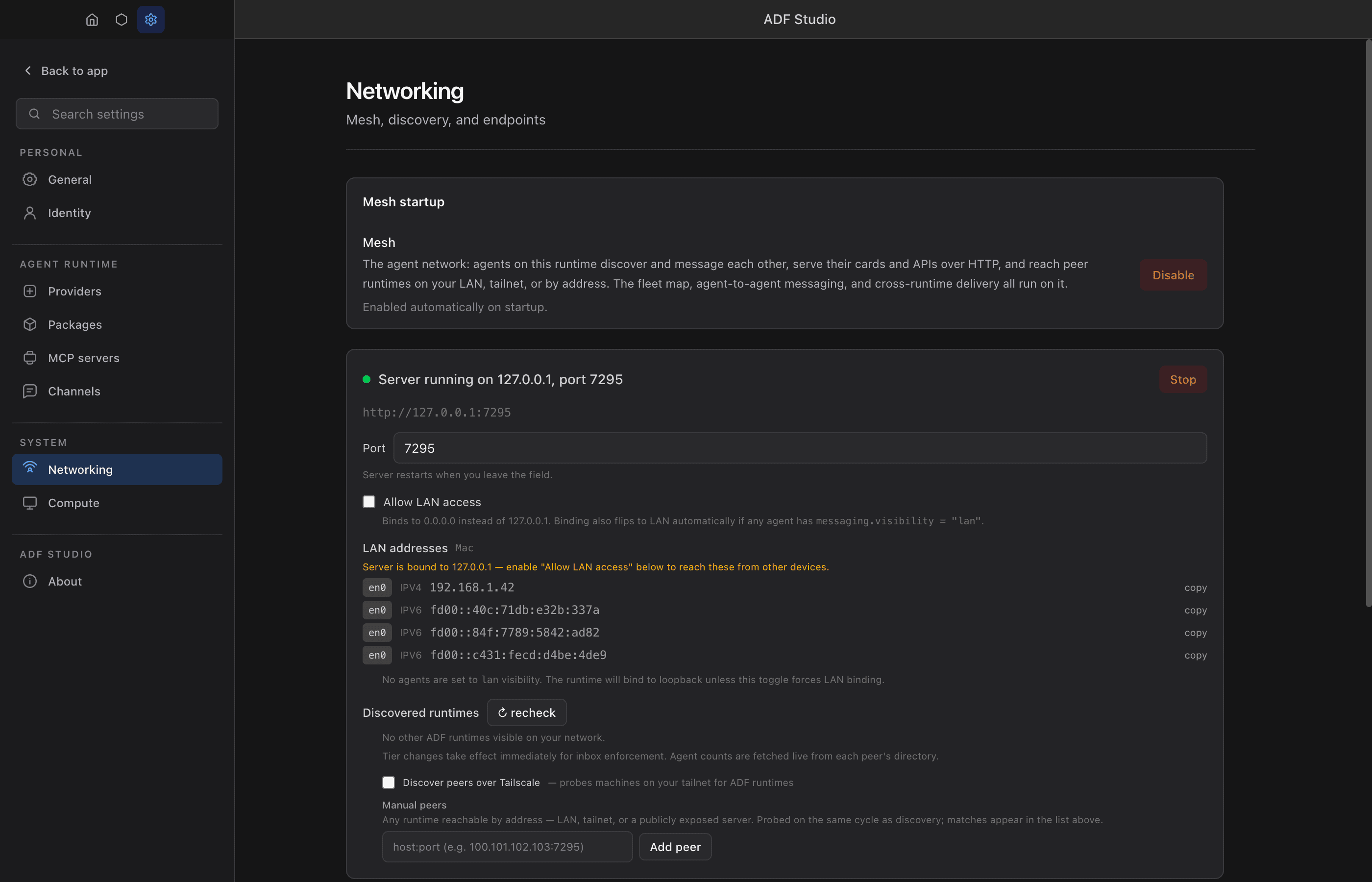
Settings → Networking → Discovered on LAN:
- Empty state: “No other ADF runtimes visible on your network.”
- Each discovered runtime shows as
<hostname>.local — <N> agents, where the agent count comes from the cached directory fetch. The count is eagerly prefetched on first sight, so it’s populated by the time the row renders. - Rows disappear a few seconds after a peer sends its mDNS goodbye on shutdown (TTL=0), or after ~120s if the peer crashes without cleaning up.
The list is driven by the adf:mesh:discovered-runtimes IPC channel and updated live by MeshEvent broadcasts (lan_peer_discovered / lan_peer_expired).
How agent_discover(scope: 'all') merges
agent_discover({ scope: 'all' })
  → local-runtime cards (source: 'local-runtime')
  + remote cards from every discovered peer (source: 'mdns' | 'tailnet' | 'manual', runtime_did: <peer did>)
Each remote card’s source reflects how its runtime was found: mdns for same-broadcast-domain peers, tailnet for peers reached via the Tailscale sweep, manual for Settings-listed host:port entries.
Filters (visibility, handle, description) apply to the merged set. A remote card keeps the peer’s signed endpoints; signature verification succeeds end-to-end because canonicalizeCardForSignature strips URL fields before hashing, so observer-specific URL rewriting doesn’t break the signature.
Remote entries are additionally decorated with trust flags at merge time:
card_verified— the card’s Ed25519 signature checks out against its owndidowner_attested— the card carries arole: 'owner'attestation whose signature verifies against its issuer and whose subject matches the card’s DID (only meaningful whencard_verifiedis true)attested_owner_did— the owner DID that issued the verified attestation
Peers only publish attestations for agents that opted in (card.publish_attestations) — absence of owner_attested means “unknown owner”, not “untrusted”. Local-runtime entries skip decoration (same-process trust).
Pushed into agent context
Discovery isn’t only pull-based. When an agent has messaging.receive: true, the runtime pushes the current mesh roster into the agent’s turn as a [Mesh Update] Available agents: dynamic instruction whenever the topology changes (an agent joins, leaves, or updates) — so an agent learns about newly-discovered peers without having to call agent_discover. This injection is gated by context.dynamic_instructions.mesh_updates (default true); set it to false to suppress it. See Messaging → Auto-Injected Context.
Reply-path correctness
When a remote agent sends you a message, its reply_to was built before the packet left the sender’s host — so it commonly arrives carrying http://127.0.0.1:<port>/.... Replying to that literally would loop back on your host.
The mesh inbox handler rewrites loopback hosts in incoming reply_to URLs with the transport-observed peer address (request.socket.remoteAddress). Senders who explicitly set a public endpoint (Cloudflare tunnel, VPS) keep it — only loopback triggers the rewrite. Same trust model as observer-aware /agents directory URLs: the transport layer is the ground truth.
Troubleshooting
Most remediations below (Settings > Networking toggles, firewall rules, environment variables, app restarts) are owner/OS-level — not agent-executable; agents should diagnose and then ask their principal.
Nothing appears under “Discovered on LAN”
The scripts/mdns-probe.mjs utility lists every _adf-runtime._tcp.local service it can see from the command line. Run it on each machine:
node scripts/mdns-probe.mjs- Your own runtime doesn’t appear in your own probe → the three gates above aren’t all satisfied. Check main-process logs for
[mdns] announcing ...(publish success) and[mdns] using interface=... (bind=...)(interface pick). If only[mdns] browsing ...appears but noannouncing, gate 2 failed — add or restart an agent withvisibility: "lan". - Your own runtime appears but peers don’t → the peer’s multicast isn’t reaching your subnet. See Forcing the mDNS interface below and the LAN isolation section.
- Neither side appears → the library failed to bind. Look for
[mdns] unavailable: ....
For deeper inspection, scripts/mdns-probe-raw.mjs sends active PTR queries via multicast-dns directly (below bonjour-service) and prints every _adf-runtime._tcp.local record received.
Forcing the mDNS interface
The runtime picks a LAN interface for mDNS automatically, skipping virtual adapters by name:
- Windows:
vEthernet,VMware,VirtualBox,Hyper-V,WSL,Bluetooth,Loopback,Npcap,Pseudo-*,Wintun,TAP-Windows,OpenVPN,Tailscale. - macOS/Linux:
lo*,gif*,stf*,awdl*,llw*,anpi*,ap\d+,bridge*,utun*,ipsec*,ppp*,tun*,tap*,veth*,vmnet*,vboxnet*,docker*,br-*,wg*,tailscale*,zt*.
It also rejects CGNAT (100.64.0.0/10, Tailscale) and non-RFC1918 addresses. When multiple candidates remain, NICs named like a physical adapter (en0, eth0, Wi-Fi, Ethernet) win.
Symptom: your peer shows up on other machines but you can’t see anyone. Multicast often behaves asymmetrically — a virtual adapter on one host silently absorbs outbound multicast while inbound still arrives on the physical NIC.
Fix: set the ADF_MDNS_INTERFACE environment variable to the IPv4 address of the adapter that routes to your LAN, and restart:
# macOS / Linux
ADF_MDNS_INTERFACE=192.168.1.50 open -a "ADF Studio"

# Windows (PowerShell)
$env:ADF_MDNS_INTERFACE = "192.168.1.50"; & "ADF Studio.exe"
Find your LAN IP with ipconfig (Windows), ifconfig / ipconfig getifaddr en0 (macOS), or ip addr (Linux). mDNS binds once at startup — the override only takes effect on a fresh launch.
LAN isolation and IGMP snooping
If neither machine appears on the other even when both correctly announce themselves, the network itself is blocking multicast. Common causes:
- Guest / “IoT” Wi-Fi SSIDs often enable AP client isolation, which blocks all client-to-client traffic including multicast.
- Aggressive IGMP snooping on consumer Wi-Fi routers can prune
224.0.0.251when no active querier is present. - Corporate VLANs frequently isolate wireless clients from each other.
Sanity-check by running ping <other-machine>.local in both directions before launching ADF. If that ping fails, mDNS is broken at the OS layer and no ADF-side change will help — switch to a non-guest SSID, disable AP isolation, or move both machines to the same Ethernet segment.
Firewalls
LAN discovery uses two network paths, and each needs its own firewall allowance:
- UDP 5353 — mDNS multicast. Opening only this makes your runtime discoverable.
- TCP
<mesh port>(default 7295) — the plain-HTTP/agentsfetch that returns the agent list. If only 5353 is open, peers see your runtime row but 0 agents (“directory unreachable”). This is the most common misconfiguration and is asymmetric: the side whose firewall blocks the fetch is the side that hides its agents.
Automatic (recommended). The Windows installer adds both inbound rules (program-scoped, Private+Domain profiles) at install time — no runtime prompt. If you moved the mesh port, declined at install, or run a dev build, Settings → Networking → Allow LAN access runs a live reachability check and offers an Enable in firewall button that creates/repairs the rules behind a single UAC prompt. The Visible on LAN indicator only turns green once the server is 0.0.0.0-bound and the inbound rule is present.
Manual:
- macOS: System Settings → Network → Firewall. If the firewall is on, allow incoming connections for the ADF Studio binary (Electron during
npm run dev). The in-app “Enable in firewall” button does this viasocketfilterfwbehind an admin prompt. - Windows: an inbound UDP 5353 rule and an inbound TCP
<mesh port>rule for the ADF binary on the Private profile:
Confirm the active network is Private, not Public — a Private-scoped rule doesn’t apply on a Public network.New-NetFirewallRule -DisplayName "ADF Mesh (LAN)" -Direction Inbound -Protocol TCP -LocalPort 7295 -Program "<path\to\ADF Studio.exe>" -Profile Private,Domain -Action Allow New-NetFirewallRule -DisplayName "ADF mDNS (LAN)" -Direction Inbound -Protocol UDP -LocalPort 5353 -Program "<path\to\ADF Studio.exe>" -Profile Private,Domain -Action Allow - Linux: the in-app “Enable in firewall” button detects an active firewalld or ufw and applies the rules via
pkexec(desktop password prompt). Manual equivalents:firewall-cmd --add-port=5353/udp --add-port=7295/tcp --permanent && firewall-cmd --reload, orufw allow 7295/tcp && ufw allow 5353/udp. If no firewall is active (common on Ubuntu, whereufwships inactive), inbound is already open and nothing is needed. Rawnftables/iptablessetups are reported as unmanaged — add the rules by hand.
Hostname collisions
If two machines on the LAN share a hostname, macOS will bump the later one (MacBook-Pro.local → MacBook-Pro-2.local) and surface a system dialog. The announcement uses the current OS hostname at startup, so a fresh launch picks up the bumped name. In-flight announcements continue with the old name until restart — harmless, but a source of visual confusion if you see MacBook-Pro-3.local appear after several relaunches.
Goodbyes and TTL
On clean shutdown the runtime emits bonjour.unpublishAll() goodbyes (TTL=0) before destroying the socket. There’s a 100ms flush delay between unpublish and destroy because UDP writes are fire-and-forget — without it, aggressive app.quit() drops the goodbyes and peers keep the ghost entry until the standard 120-second mDNS TTL expires. You’ll rarely hit this, but it explains the occasional “peer still shows for a minute after I closed the app.”
Explicitly out of scope
- Live re-announcement on tier change (restart required).
- Signed directory responses (per-card signatures only; a directory-level envelope is a future spec).
- Wide-area mDNS gateways, DHT discovery — mDNS is LAN-only by design.
- Automatic tier escalation on discovery (tiers stay operator-declared).