Memory Management
Managing the loop (conversation history) and mind (working memory): compaction, audit, context blocks, long-running strategies
On this page
ADF agents have two forms of memory: the loop (conversation history) and the mind (persistent working memory). Managing these effectively is key to long-running agents.
The Loop (adf_loop)
The loop is the agent’s conversation history — every message, tool call, and response is stored as a row in the adf_loop table. This is what gets sent to the LLM as context.
Loop Structure
Each entry has:
- seq — Auto-incrementing sequence number
- role —
userorassistant - content_json — JSON array of content blocks (text, tool use, tool results)
Viewing the Loop
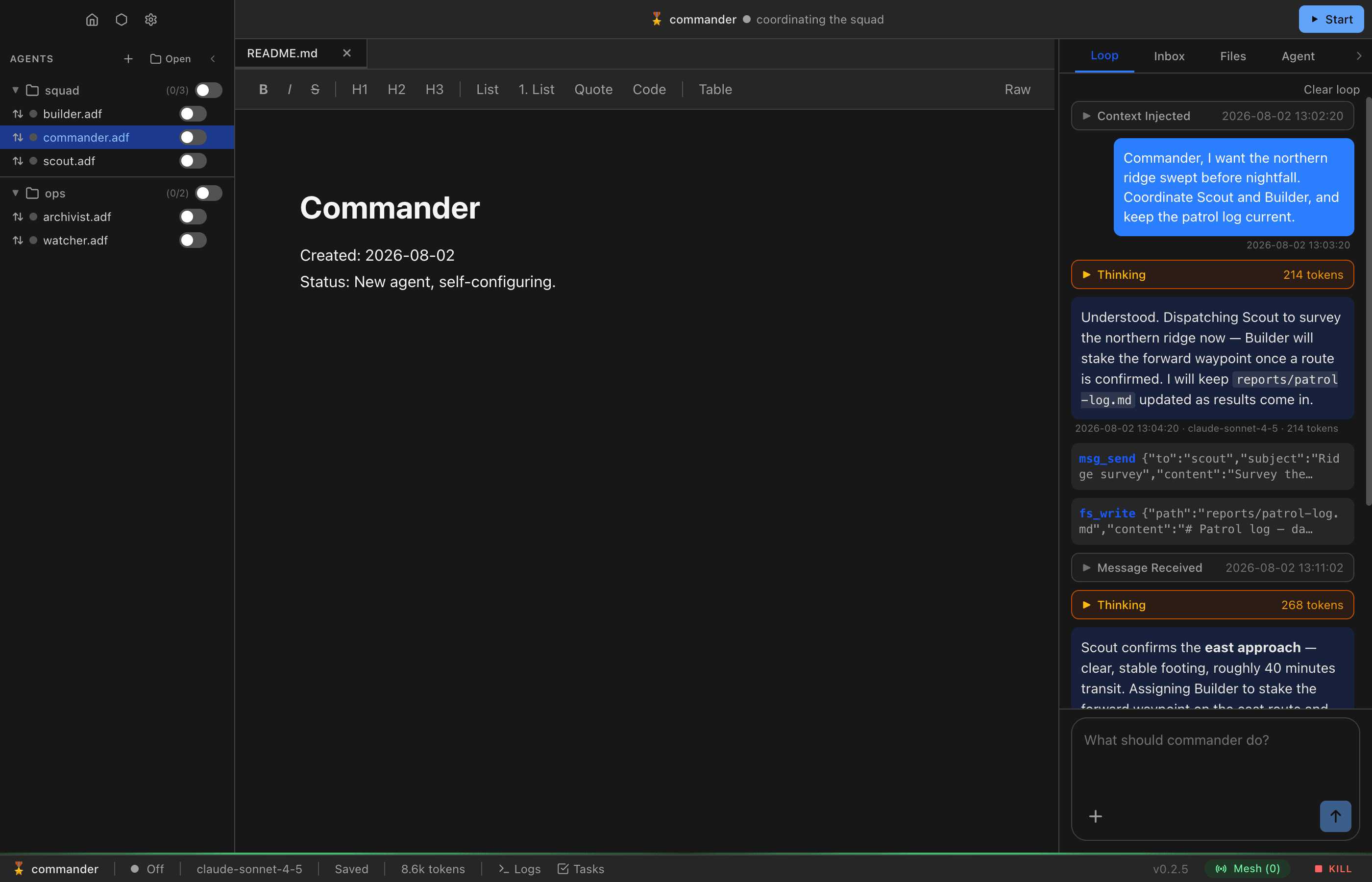
The Loop tab in the UI shows the full conversation history, including:
- User messages (your chat input)
- Assistant responses
- Tool calls (with expandable input/output)
- Tool errors
- Inter-agent messages
- State transitions
- Plan/reasoning steps
- Approval requests
- Context blocks (injected system prompt and dynamic instructions)
Loop Growth
Every interaction adds to the loop. Over time, this grows and eventually hits limits:
- More tokens sent per turn = higher cost
- Eventually exceeds the model’s context window
- Older context becomes less relevant
This is where compaction comes in.
Context Blocks (No Secrets)
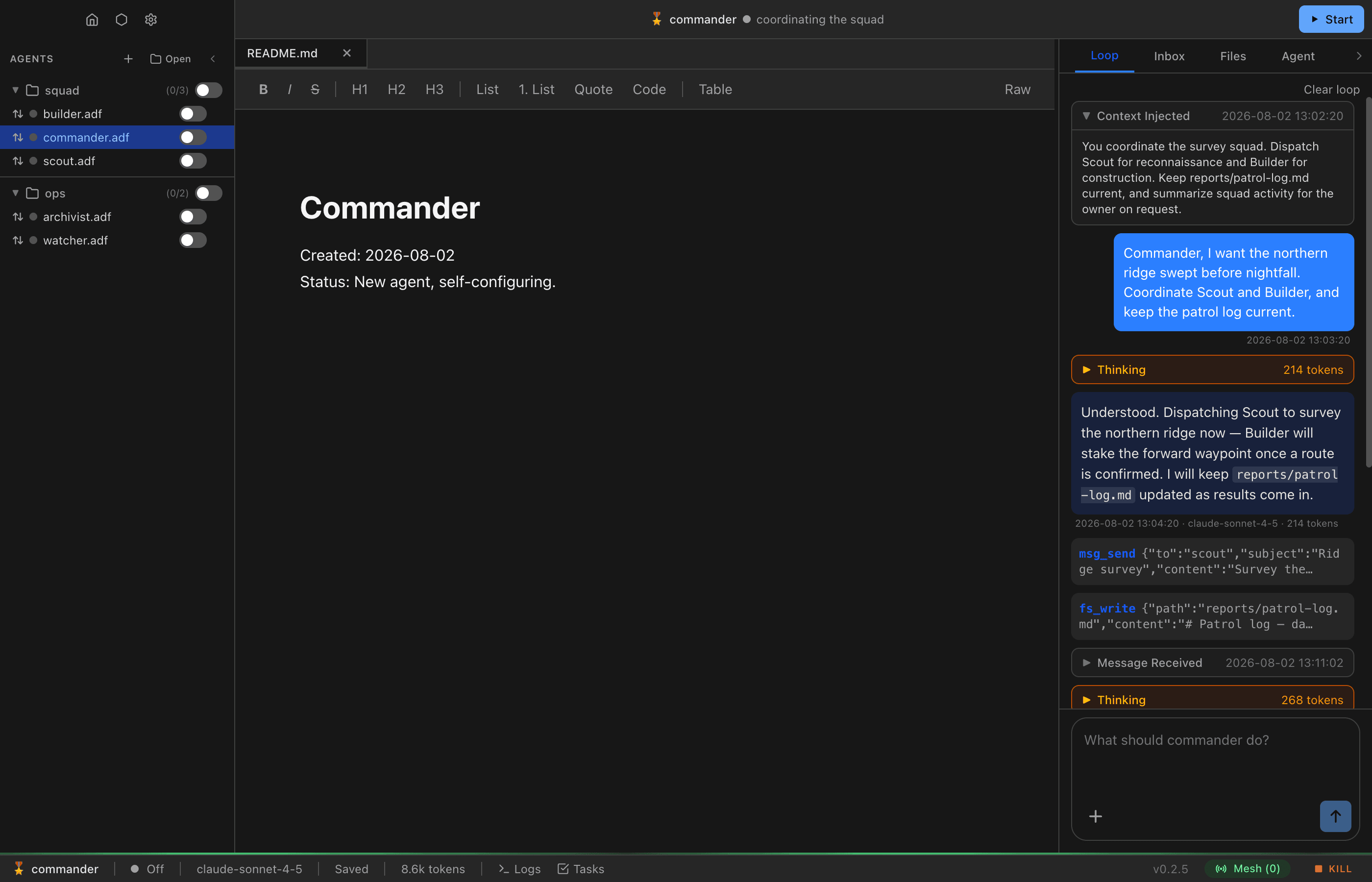
Every LLM API call includes content that the user doesn’t directly author — the system prompt and per-turn dynamic instructions. ADF follows a “No Secrets” principle: any content injected into the agent’s context must be viewable and auditable.
Context blocks are stored as regular entries in adf_loop and appear in the Loop tab as collapsible teal blocks. They persist across sessions, survive restarts, and are swept by compaction like any other loop entry.
What Gets Recorded
| Category | When Written | Contents |
|---|---|---|
| System Prompt | First turn, and whenever the prompt changes (instructions edited, document/mind content changed in included mode, mesh status changed) | The full system prompt sent to the LLM — base prompt, tool guidance, agent instructions, document/mind content (when included), identity, mesh status, messaging guidance |
| Dynamic Instructions | Each turn where non-null and changed from previous | Per-turn context injected as a trailing user message — inbox status notifications, context limit warnings |
Deduplication
Context blocks are only written when their content changes:
- System prompt uses the existing hash cache (doc + mind + mesh + config hashes). A new entry is written only when the composite hash differs from the previous turn.
- Dynamic instructions are compared as strings. A new entry is written only when the content differs from the previous turn.
This avoids spamming the loop in multi-tool-call turns where both functions are called repeatedly.
Querying Context Blocks
Context entries are regular adf_loop rows with a [Context: <category>] prefix:
-- All context entries
SELECT * FROM adf_loop WHERE content_json LIKE '%[Context:%' ORDER BY seq DESC

-- System prompt history
SELECT * FROM adf_loop WHERE content_json LIKE '%[Context: system_prompt]%' ORDER BY seq DESC
Compaction
Compaction is the process of summarizing old conversation history and preserving the important parts so the agent can continue working with full context.
LLM-Powered Compaction
Compaction uses a dedicated LLM call to generate a high-quality summary. The loop_compact tool is signal-only — the agent calls it (optionally with an instructions string to steer the summary) and the runtime handles the rest:
- Agent calls
loop_compact()(no summary parameter needed; an optionalinstructionsstring can guide the summarizer) - Runtime reads the full conversation transcript
- A dedicated LLM call generates a structured briefing covering: current task state, key decisions, files/agents/resources involved, pending work, and constraints
- Old loop entries are deleted (audited if audit is enabled)
- The LLM-generated summary is inserted as a
[Loop Compacted]user message - A compaction banner appears in the UI
- Token counter resets
The compaction LLM is prompted to produce a concise briefing (under 1500 words) with specific details — file paths, function names, error messages — organized by topic in bullet points.
Automatic Compaction
When the loop reaches context.compact_threshold (default: 100,000), the runtime injects a system message instructing the agent to call loop_compact. The agent triggers compaction, and the LLM-powered summarization handles the rest.
Manual Compaction
Agents can proactively call loop_compact() at any time to manage their own memory. This is useful for:
- Preserving important learnings before they scroll out of context
- Keeping the loop focused on the current task
- Reducing token costs
The loop_compact Tool
loop_compact()This is a signal-only tool — it takes only an optional instructions string (guidance for the summarizer), never the summary itself. When called:
- The runtime makes a dedicated LLM call to summarize the conversation
- Old loop entries are deleted (audited if enabled)
- The summary is inserted as the new conversation starting point
Compact Threshold
The context.compact_threshold setting (default: 100,000) defines the token count that triggers automatic compaction.
Audit
When you clear loop entries, delete messages, delete files, or compact the loop, the data doesn’t have to be lost forever. ADF supports an audit system that compresses and stores snapshots of cleared data before deletion.
The audit table is written for the operator: the agent manages its own context (compact, clear, delete) without that bookkeeping depending on whether history is being retained. It is not hidden from the agent, though — adf_audit is a readable table for db_query (SELECT only; it is append-only, so writes are rejected), and an agent reflecting on its own past is expected to read it. See the self-observation skill for how to decompress rows.
How Audit Works
Loop audit (on clear/compaction):
- Before deletion, the cleared loop entries are serialized to JSON
- The JSON is compressed using brotli compression for efficient storage
- The compressed snapshot is stored in the
adf_audittable with metadata:source, the seq range of the archived entries (start_seq/end_seq),entry_count,size_bytes,created_at - The original rows are then deleted — their seqs stay addressable via the blob’s seq range
Per-message audit (on ingestion/send):
When audit is enabled for inbox or outbox, the runtime also captures individual messages at ingestion/send time:
- The full ALF message — including inline base64 attachment data — is captured before the data is stripped and files are extracted to the filesystem
- The JSON is brotli-compressed and stored in
adf_auditwith sourceinbox_messageoroutbox_messageandrefset to the message id - This provides a forensic record of exactly what was sent/received, even if extracted attachment files are later modified or deleted by the agent
Per-message capture is the message archive: deleting inbox/outbox messages later does not write additional audit rows (batch inbox/outbox audit rows exist only in files created by older versions).
File audit (on deletion):
When file audit is enabled, fs_delete snapshots the file’s content (as base64), path (also stored in the row’s ref column), mime type, and size before the hard delete. This is especially important for binary/multimodal content (images, audio, etc.) that only exists in adf_files — the loop only records the tool call metadata, not the actual bytes.
Configuring Audit
Audit is configured per data source in the agent config:
{
  "audit": {
    "loop": true,
    "inbox": true,
    "outbox": true,
    "files": true
  }
}
Each source (loop, inbox, outbox, files) can be independently toggled. loop defaults to true; inbox, outbox, and files default to false. Loop audit is on by default because compaction is the one routine operation that discards history irreversibly, and the compressed snapshots are cheap next to losing the transcript. When inbox or outbox is enabled, each message is captured at ingestion/send time. When files is enabled, file content is snapshot before deletion via fs_delete. You can also configure audit from the Agent configuration panel in the UI, and an agent can toggle these paths itself — e.g. sys_update_config({ "path": "audit.inbox", "value": true }) (see sys_update_config). These writes are HIL-gated (your principal approves) — and disabling audit.loop in particular is exactly the kind of self-interested change an owner will scrutinize.
Audit Sources
| Source | Trigger | Key Columns | What’s Stored |
|---|---|---|---|
loop | Loop clear / compact | start_seq, end_seq (seq range) | Serialized loop entries |
inbox_message | Message received | ref = message id | Full ALF message with inline attachment data |
outbox_message | Message sent | ref = message id | Full ALF message with inline attachment data |
file | File deleted via fs_delete | ref = path | File path, content (base64), mime type, size |
inbox / outbox | (legacy only — no longer written) | — | Batch of deleted messages |
Rows written by older versions may have NULL start_seq/end_seq/ref.
Which Operations Trigger Audit
loop_compact— Audits old loop entries before removing themloop_clear— Audits entries before deletionfs_delete— Audits file content before deletion (if files audit enabled)- Message receive — Audits the full inbound ALF message (per-message, if inbox audit enabled)
- Message send — Audits the full outbound ALF message (per-message, if outbox audit enabled)
Message deletion (msg_delete) writes no audit rows — the per-message capture at arrival/send is the archive. If audit is disabled for a source, data is permanently deleted on clear/compact/delete, and no per-message or per-file audit entries are created. Messages that arrived while audit was disabled (or before per-message capture existed) have no audit row — enabling audit later does not retroactively archive them.
The Mind File (mind.md)
mind.md is the agent’s persistent working memory. Unlike the loop (which gets compacted), the mind file persists indefinitely.
What Goes in Mind
mind.md is not a flat notes file — it is the always-loaded index over a wiki of memory pages:
## Always— a few lines that must load every turn (principal, standing constraints, current focus)## Pages— a catalog of one-line links to pages inmind/<slug>.md## Rules— the maintenance rules the agent follows
Durable knowledge lives in the pages (mind/<slug>.md, with typed YAML frontmatter, loaded on demand); mind/log.md is the append-only history of mind changes. See Agent Memory for the full pattern — page contract, citations, and the retrieval recipe.
Mind vs. Instructions
| Aspect | Instructions | Mind |
|---|---|---|
| Purpose | Identity and rules | Knowledge and memory |
| Mutability | Immutable (by agent) | Freely writable |
| Content | Who the agent is | What the agent knows |
| Growth | Static | Grows over time |
Injection Behavior
mind.md is injected into the system prompt as a session-start snapshot, conditional on include_base_prompt being enabled (or a {{mind.md}} placeholder appearing in the agent’s instructions). Mid-session writes update the file on disk but do not refresh the injected version. After compaction or loop clear, the runtime re-reads the latest mind.md and injects the fresh content. The agent must call fs_read("mind.md") to see its own mid-session writes.
Loop Management Tools
loop_compact
loop_compact()
loop_compact(instructions: "Preserve the deploy checklist verbatim.")
Trigger LLM-powered compaction. The runtime generates a summary, clears old entries, and inserts the summary. Accepts an optional instructions string to steer what the summary preserves. See Compaction above.
loop_clear
loop_clear()                    # Clear all entries
loop_clear(end: 5)              # Clear first 5 entries
loop_clear(end: -5)             # Clear all except last 5
loop_clear(start: -10)          # Clear last 10 entries
loop_clear(start: 2, end: 8)   # Clear entries 2 through 7
Delete loop entries using Python-style slicing. If audit is enabled, entries are compressed and stored in adf_audit before deletion. See Tools > loop_clear for full details.
loop_inject (code execution only)
await adf.loop_inject({
  content: 'inbox_summary: 3 unread messages from monitor',
  category: 'inbox_summary',
  key: 'inbox_summary'
})
Inject user context into the active loop from code execution (sys_code/sys_lambda). Not a regular tool — controlled via the Code Execution config section (code_execution.loop_inject). ADF writes an auditable versioned [Context: …] loop entry immediately, then queues it for the next model boundary. This preserves valid tool-call ordering: context is never inserted between an assistant tool_use and its user tool_result.
Use category to make provenance legible; ADF records the runtime-derived origin so code cannot forge it. Use a stable key for mutable state such as a skills registry; if several keyed updates arrive before the next model call, only the latest is sent, while every version stays in adf_loop for audit. A key does not remove a value that has already been delivered in provider history. On restart, only the latest keyed entry is re-queued; unkeyed one-shot notices are not replayed. Only text with the user role is accepted—system, assistant, tool-call, and tool-result injection are intentionally unavailable.
Strategies for Long-Running Agents
Regular Compaction
For agents that run frequently, set a reasonable context.compact_threshold and let automatic compaction handle it. The runtime summarizes, clears the old context, and inserts the summary back into the loop (it is not written to mind).
Structured Mind
The default mind is already structured: mind.md is a small index (## Always facts, a ## Pages catalog, ## Rules), pages live in mind/<slug>.md with typed frontmatter, and mind/log.md records changes:
# Mind

## Always
- Principal: christian; current focus: Q1 report

## Pages
- [Monitor agent](adf-file://mind/monitor-agent.md) — slow on weekends, prefers batch queries

## Rules
1. Keep this index small — details go in pages.
...
See Agent Memory for the full pattern.
Database for Structured Data
For data that’s better stored in tables than in markdown, use db_execute to create local tables:
CREATE TABLE local_observations (
    timestamp INTEGER,
    category TEXT,
    observation TEXT
);
This keeps the mind file for narrative memory and uses tables for structured data.
Clearing Agent State
In the UI, you can clear agent state from the Agent configuration panel:
- Clear loop — Delete all conversation history
- Clear mind — Reset mind.md to empty
- Clear inbox — Delete all received messages
- Clear all — Reset everything except config and files
This is useful for resetting an agent without recreating the file.