Security and Identity
The identity and secret-protection stack: owner/runtime/agent DIDs, envelope encryption, sharing, claiming, and attestations
On this page
ADF’s security model gives every agent a cryptographic identity from birth, seals its secrets so .adf files can move between machines without leaking keys, and lets agents build verifiable trust relationships with each other. This guide covers the whole stack: who the identities are, where everything is stored, how secrets are protected, and how sharing and trust work.
The Three Identities
| Identity | Scope | Key | Where |
|---|---|---|---|
| Owner | You, across all machines | Ed25519 derived from your seed phrase | Settings → Identity |
| Runtime | This Studio install | Fresh Ed25519 per install | Settings → Identity |
| Agent | One .adf file | Ed25519 per agent | Agent → Identity |
Owner DID — who you are
Your user identity, derived from a 12-word BIP-39 seed phrase generated on first launch (SLIP-0010 hardened Ed25519 at m/44'/0'/0', DID format did:key:z...). The same phrase always derives the same owner DID, on any machine:
- Backup: Settings → Identity → Back up seed phrase. Until confirmed, the tab shows a “Seed not backed up” badge. Anyone with the phrase can act as you; without it, a lost machine means a lost identity and the loss of the owner-side recovery path for envelope-sealed secrets (below).
- Multi-machine: Import identity on a second Studio with the same phrase — its owner DID converges to yours, local files stamped with its old owner DID are restamped, and envelope-sealed agents unlock via the owner recovery slot on first open.
- Storage: the phrase is encrypted at rest via the OS keychain (Electron safeStorage). If keychain encryption is unavailable, the tab shows a warning and the phrase is stored in plain app settings.
The owner identity also derives a separate X25519 encryption key (at the sibling path m/44'/0'/1') used for envelope keyslots — signing and encryption keys are deliberately distinct. Only the public half is kept in settings; wrapping secrets to the owner never touches the seed.
Runtime DID — this install
Each Studio generates its own Ed25519 runtime keypair — deliberately not derived from the seed, so the seed stays cold after setup. Two machines never share a runtime DID, even with the same owner. The owner key signs a runtime delegation certificate proving the runtime acts on the owner’s behalf; its validity is shown in Settings → Identity. The runtime also holds its own X25519 encryption key for day-to-day envelope unlocking.
Nothing should ever anchor trust or allow-lists on a runtime DID — it is operational metadata (“which install is operating this file”). The owner attestation is the trust root. Reinstalls mint a new runtime DID; recovery goes through the seed phrase, after which files re-wrap and restamp automatically.
Agent DID — one per file
Every agent gets an Ed25519 keypair and a did:key DID at creation — identity is no longer opt-in. The DID is the agent’s identity for lineage, addressing, attestations, and the mesh. Files created by older versions are provisioned automatically on upgrade (existing DIDs are kept; only the at-rest protection changes).
The agent’s config.id (a 12-character nanoid) still exists but is a local runtime handle, not an identity: it stays stable across re-keying and is used for audit labels and log continuity. Everything identity-shaped speaks DID.
Rotation and history. Claiming or re-keying an agent mints a new DID. The old one is never lost: it is appended to adf_did_history, so anything that referenced the agent by its old DID — most importantly child agents’ parent references — still resolves. Lineage resolution is read-time (current DID → DID history → legacy config.id); child files are never rewritten when a parent rotates.
Where Identity Data Lives — Three Layers
Identity-adjacent data lands in one of three stores by rule:
| Layer | Store | Semantics |
|---|---|---|
| Key material | adf_identity | Secrets. Envelope-sealed at rest; unreadable when locked or foreign. |
| Runtime-asserted facts | adf_meta | Public, unsigned, single-valued claims by the runtime: adf_did, adf_owner_did, adf_runtime_did, adf_parent_did, adf_did_history. Readable without unlocking anything, protected readonly against agent tampering. Trustworthy locally (your runtime watched them happen), but not proof to a remote peer. |
| Signed proofs | adf_attestations | Statements one identity signs about another, verifiable by anyone against the issuer’s DID. |
The recurring pattern is a fact + proof pair: adf_owner_did in meta is the fast fact; the owner attestation is the verifiable proof of the same statement. When you wonder “where does X belong,” pick the layer whose semantics match — single-valued hot-path facts go in meta, evidence goes in attestations, secrets go in the keystore.
Envelope Protection
Agent secrets are sealed with dual-envelope keyslot encryption. A random data-encryption key (DEK) encrypts each envelope’s rows; the DEK is wrapped once per keyslot, and any slot opens the envelope — the same pattern as LUKS disk encryption or age multi-recipient files.
| Envelope | Protects | Slots |
|---|---|---|
| Identity | The agent’s signing private key | Owner + runtime. Never a password slot — identity is not transferable by file copy. |
| Credentials | Everything else: set_identity values, MCP credentials, provider API keys | Owner + runtime + an optional share password slot. |
What this buys you:
- A leaked or copied
.adfcannot impersonate the agent or expose its API keys. The file’s readable parts (config, README, loop history) remain readable — envelopes are key-leak damage control, not whole-file privacy. - Day-to-day operation never touches your seed. The runtime slot unlocks everything silently when an agent opens or starts. You will never see a password prompt for envelope-sealed files.
- Same-owner machines just work. On a machine where you’ve imported your seed, the owner slot unlocks the file once, and a runtime slot for that install is added automatically (“re-wrap”) — the seed is needed at most once per file per machine.
- Foreign files stay sealed. On someone else’s machine, neither slot opens. Their Studio offers the claim flow instead (below).
Migration is automatic: a boot sweep provisions envelopes for existing files (with a lazy fallback on open), keeping DIDs intact and sealing previously-plain secrets in place. Password-protected files are left untouched until unlocked.
Envelope states
| State | Meaning |
|---|---|
| Protected (unlocked) | Normal operation — secrets open transparently. |
| Password locked | A share password slot exists; enter the password to unlock. |
| Foreign | Sealed to another owner — claim the agent, or unlock credentials with a share password if one was set. |
| Not protected | Pre-envelope file, not yet migrated. |
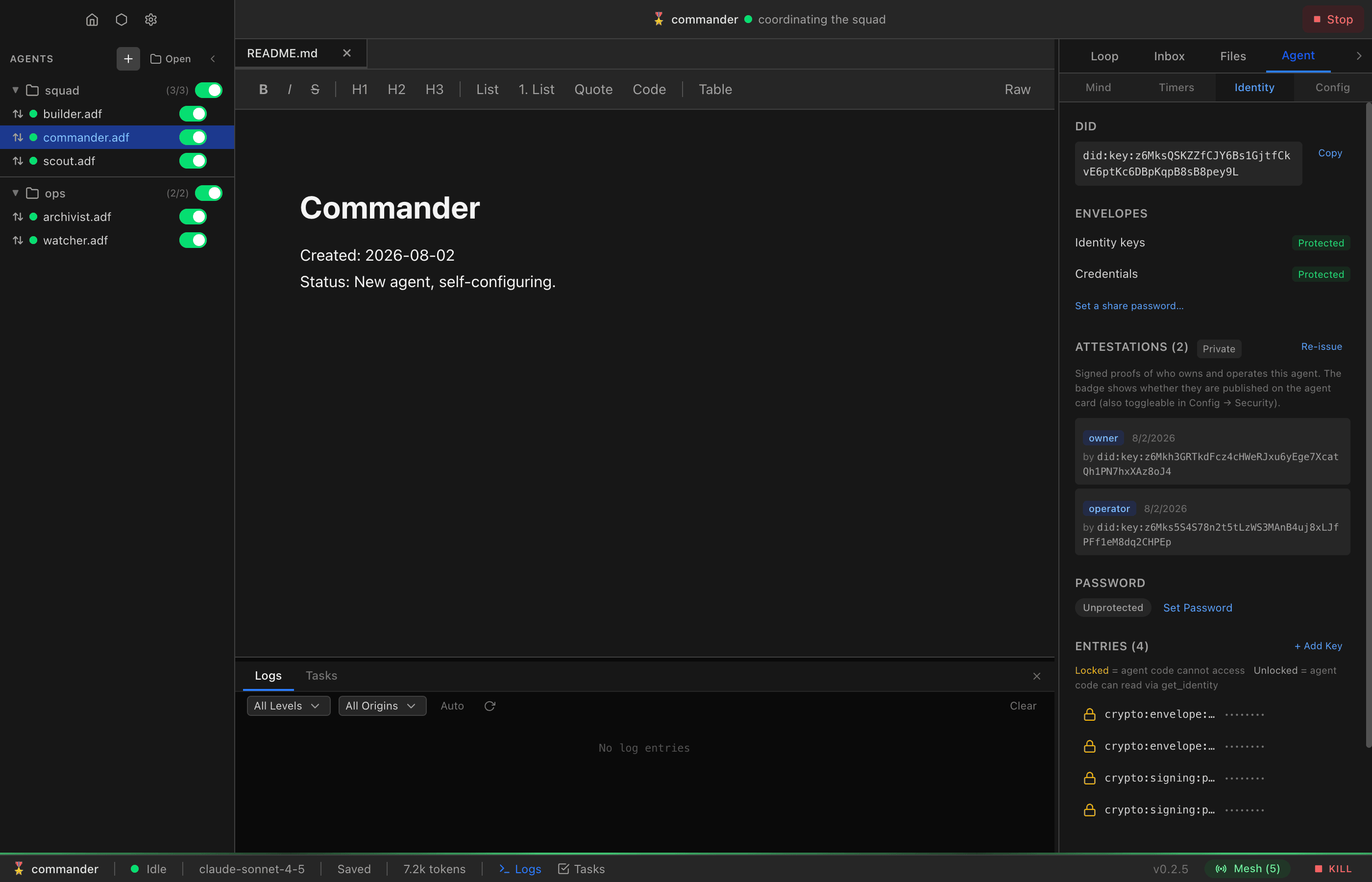
The Agent → Identity panel shows both envelopes’ states.
Headless daemons and the credentials envelope
The ADF daemon has no OS keychain, so its envelope key is a file: on first boot it writes an X25519 keypair to runtime-enc-key (0600) next to its settings file, prints the public half (also saved as runtime-enc-key.pub), and never replaces it — a corrupt key file is an error to fix, not a reason to mint a new key that would orphan existing slots.
To let a daemon unlock agents’ credentials:
- Copy the daemon’s public key from its boot log or
runtime-enc-key.pub. - Add it to the
trustedDaemonEncKeysarray in Studio’s settings file (adf-settings.json) — there is no Settings UI for this yet; editing the file (or using the settings API) is the current route. A dedicated, confirmation-gated UI is planned. - Open (or start) each agent in Studio once — Studio adds a credentials-envelope keyslot wrapped to the daemon key. From then on the daemon decrypts that agent’s credentials (env vars and credential files) on its own.
Only the credentials envelope ever gets daemon slots — identity keys stay bound to your owner/runtime pair, and a daemon can never grant itself access: trust is a Studio-side, user-made decision, applied per agent file. An agent the daemon loads before this provisioning fails plainly, naming the key file and this exact procedure.
Revoking a daemon: remove its key from trustedDaemonEncKeys. On the next unlock of each agent file, Studio reconciles the slots — the daemon’s daemon:<fingerprint> slot is stripped (owner, runtime, and password slots are never touched), and every add or removal is logged to the agent’s log as daemon_slot. Until an agent file has been re-opened in Studio, its existing slot remains readable to a daemon that still holds the key — for immediate revocation of a compromised daemon key, also rotate the upstream credentials the envelope guards.
Sharing an Agent
The intended flow for handing a configured agent — including its API keys — to another person:
- Sender: Agent → Identity → Set a share password… This adds a password slot to the credentials envelope only. Use a strong passphrase; it is the only thing protecting the keys while the file is in transit.
- Send the
.adffile however you like, and tell them the password out of band. - Recipient: opening the file shows the arrival dialog — a capability review (tools, triggers, network, compute) followed by a claim step. They enter the password there → the credentials unlock, are re-wrapped to their own owner/runtime keys, and the password slot is removed (it’s a transit artifact, not a standing secret). The password can also be skipped and entered later in the Identity panel.
- Claim & Open completes the handover: the agent gets a fresh DID under their ownership, with a
cloneattestation recording where it came from. Your identity never transfers — the agent runs for them, with your API keys, as their agent.
Be clear about what sharing means: once unlocked, the recipient has the credentials. Revoking access later means rotating those keys upstream. And the file’s non-secret contents (configuration, conversation history, memory) are readable regardless of any password — don’t share files whose history is sensitive.
Claiming a Foreign Agent
Opening an unreviewed file classifies its identity into one of four scenarios, which drive the arrival dialog:
| Scenario | Meaning | Flow |
|---|---|---|
| Yours | Owned by you, provisioned on this install | Review → Accept & Open |
| Yours · another install | Owned by you, arrived from another machine — envelopes unlock automatically via the owner-slot cascade (seed phrase needed at most once per file per machine) | Review → Accept & Open |
| From another owner | Verified owner attestation (or owner meta) names someone else | Review → Claim & Open |
| No identity | No signing keys at all | Review → Claim & Open |
An identity-less file is not treated as trustworthy: anyone can strip a file’s identity before sharing it, and adf_owner_did meta alone is forgeable (the attestation that would prove ownership can’t exist without an agent DID as its subject). It gets the same review-and-claim treatment as a foreign file. Until a file is reviewed and accepted, the runtime never mutates it — no ownership stamp, no envelope provisioning — so rejecting a suspicious file leaves it exactly as it arrived.
Claiming (whether from the arrival dialog or Config → Security):
- deletes the old signing keys and the previous owner’s identity envelope,
- mints fresh keys sealed under your envelopes, with a new DID,
- records the old DID in
adf_did_history(lineage stays resolvable), - stamps your owner/runtime DIDs and issues fresh owner/operator attestations,
- appends an owner-signed
cloneattestation (scope= the prior DID) as permanent provenance, - keeps the credentials envelope only while it is recoverable — a share password slot exists and it guards at least one stored secret. A foreign credentials envelope with no password slot (or nothing in it) is cryptographically dead: nothing can ever derive its key, and leaving its descriptor in place would silently prevent every credential stored after the claim from being sealed. Claiming drops dead envelopes (and their unreadable rows) and provisions a fresh one under your keys.
Claiming is always explicit and user-confirmed. An agent arriving on the wrong machine should never silently become someone else’s.
Attestations
An attestation is a signed certificate: an issuer identity signs a statement about a subject DID. They live in the adf_attestations table — public by design, stored plain (readable even under password lock), and covered by the card signature when published.
Runtime-issued (reserved) roles
| Role | Issuer | Meaning | Lifecycle |
|---|---|---|---|
owner | Owner DID | “This agent is mine” | Replaced on re-key |
operator | Runtime DID | “This runtime operates this agent” | Replaced on re-key |
clone | Owner DID | “This identity was claimed over a prior one” (scope = old DID) | Append-only, permanent |
Reserved roles (owner, operator, runtime, clone, rotation) can only be written by the runtime — agents can never forge ownership certs. The signature covers every field including the subject, so a certificate cannot be replayed onto a different agent.
Publishing is opt-in per agent. By default attestations stay private — the agent card omits them, so peers cannot link an agent to you by card inspection. Enable Publish owner attestation in Config → Security (or the On card / Private badge in the Identity panel). The config path is card.publish_attestations — agent-writable via sys_update_config, HIL-gated (your principal approves). Peers discovering a publishing agent see card_verified / owner_attested flags after verifying the chain.
Peer attestations — agent-negotiated trust
Agents can negotiate their own certificates: group membership, roles, capabilities. Three code-execution methods (documented in the adf object guide):
attestation_list— read your own certs.attestation_add— store a cert someone issued about you. Validated at the boundary: verifying signature, subject must be your own DID, reserved roles rejected, duplicates idempotent.attestation_issue— sign a cert about another DID with your agent key. Returned, not stored — attestations live with their subject. In the defaultrestricted_methodslist, so it requires authorized code: signing certificates is a deliberate trust act.
Negotiation is plain messaging — request, issue, send back, add. There is deliberately no verification policy built in yet: whether a member cert from some DID means anything is the verifying agent’s decision (e.g. an inbox middleware lambda checking certs before accepting group messages).
The Identity Store (adf_identity)
A general-purpose secret store, sealed by the envelopes above.
| Purpose | Envelope | Description |
|---|---|---|
crypto:signing:private_key | identity | The agent’s Ed25519 signing key |
crypto:signing:public_key | — (plain) | Public key; not a secret |
crypto:envelope:* | — (plain) | Envelope descriptors (wrapped keyslots; public by design) |
mcp:<server>:<key> | credentials | MCP server credentials |
openai_key, custom keys | credentials | Provider or application secrets |
code_access controls whether agent code can read a row via get_identity. Independent of that flag, key material (crypto:signing:*, crypto:envelope:*, crypto:kdf:*) is never readable from agent code — flipping code_access on those rows has no effect. Keys created by set_identity get code_access enabled; a user’s revoke survives code overwrites.
The Agent → Identity panel shows envelope states, all entries, attestations, and the share-password controls; you can reveal values, delete entries, wipe all identity data, or claim ownership there.
Manual Password Protection (Legacy / Local Lock)
Separate from share passwords, a whole-file password can still be set in the Identity panel. Its threat model is someone at your machine: with a manual password, secrets do not unlock automatically — the password is required on every open, even for you. Forgetting it means the keys are unrecoverable.
This is the only situation where Studio prompts for a password on open. Envelope-sealed files never prompt; they unlock silently via your runtime/owner keys.
| State | Capabilities |
|---|---|
| Locked | Receive messages, read public files, serve public content. No signing, no secret access. |
| Unlocked | Everything. The derived key is held in memory only. |
Message Security
-
security.level— new agents default to 1 (Signed): outbound messages carry an author payload signature and a sender message signature, verified on receipt. Level 2 (Encrypted) additionally encrypts payloads to DID recipients end-to-end, deriving the encryption key from the recipient’s DID itself — no key exchange needed. See Messaging → Message Security. -
security.allow_unsigned: true(default) accepts unsigned inbound messages — fine for local development and LAN. Internet-facing agents should setallow_unsigned: false; with mandatory identity, every agent can sign. This is a guard-system setting — not agent-writable; the owner changes it in the app UI, never the agent viasys_update_config. -
security.middleware.*andsecurity.fetch_middlewareconfigure the middleware lambda chains for inbox/outbox/fetch pipelines. Likeallow_unsigned, these are owner-only guard settings the agent cannot change throughsys_update_config. -
By contrast,
security.level,security.require_signature, andsecurity.require_payload_signatureare agent-writable viasys_update_config— HIL-gated (your principal approves); only the guard switches above are hard-denied (see Tool Access Control). -
The inbox
ownerfield andsender_aliasare unverified claims carried in message meta — a sender sets them freely. Trust them only when the message ismessage_verified; otherwise the verifiedfromDID is the sole authoritative identity. (Reserved aliasesowner/system/userare stripped on ingress, but any other display name passes through unverified.)
Effective Runtime Config
What an agent runs with is its adf_config plus app-level settings inherited from whichever runtime loaded it. The runtime writes a snapshot of those inherited values to adf_meta under adf_effective_runtime (readonly JSON) at start, and rewrites it whenever the main loop’s provider or the agent config changes. Read it with any SQLite tool:
SELECT value FROM adf_meta WHERE key = 'adf_effective_runtime';| Field | What it tells you |
|---|---|
host | Which runtime started the agent: studioForeground, studioBackground, or daemon |
provider | Provider id, type, name, base URL (omitted for Anthropic, OpenAI and subscription types, whose endpoint is fixed) and model actually used. source = agent (the file’s own provider copy), app (the runtime’s Settings → Providers row), or unknown (a provider the runtime did not build itself, e.g. one supplied by an embedding host). api_key_source = agent / app / subscription (app-level OAuth session) / env (SDK environment-variable fallback) / none |
prompts | Base and compaction prompt: applied / shipped-default flags and a SHA-256 each. Tool and dynamic prompts: the overridden keys and one combined SHA-256. The system prompt text is written to the loop when a turn runs |
compute | App-level host access switch, host-approved MCP servers, registered execution targets (this runtime’s whole inventory, not only this agent’s), container image and packages |
mcp_servers | Per server that starts: whether its command/URL/package is pinned to the app registration (the file’s copy is then not what runs), transport, the command, URL and package values in effect, run location, env var names |
adapters | Adapter types that start: enabled in the file and registered on this runtime |
sandbox_packages | Package modules visible to code execution (a process-wide sandbox setting) |
mesh | Mesh on / LAN / port; forces_messaging_receive is true when the agent receives mesh messages although its file says messaging.receive: false |
Key and env values are never recorded — keys appear only as their source, env vars only by name. URLs are recorded with any userinfo, query string and fragment removed; commands and package names are recorded as configured, so don’t embed credentials in them.
Limits: the snapshot describes the main loop’s provider — side loops and model_invoke with their own model overrides are not listed. App settings changed while an agent runs (MCP registrations, compute policy) appear at the next rewrite. readonly stops ordinary tool writes but not authorized code or an owner-approved override, so the snapshot is not tamper-evident on its own.
Runtime defaults that only fill gaps are written to the file rather than applied in memory: joining the mesh persists a missing messaging section or mode and missing communication tool declarations, and every start persists missing core inbox/stream tool declarations. An open Studio editor is refreshed after such a write. The mesh never writes over the owner’s messaging.receive choice; receiving on the mesh is a runtime policy, recorded as mesh.forces_messaging_receive.
Provider resolution is the same in Studio and the headless daemon. The agent’s own providers[] entry (base URL, params, per-agent key) wins; if the file has no entry for the selected provider id, the runtime’s provider is used as-is. A key-less entry borrows the runtime’s key for the same id only when it targets the same endpoint — same type and, for types that honor a base URL, the same base URL — so a file cannot direct your key to a server of its choosing. An agent key that is stored but locked (password or sealed envelope not open) is never replaced by the runtime’s key; the provider is rebuilt once the key is unlocked.
Note:
security.allow_protected_writesis dead — it is stripped from stored config on migration and no longer exists.no_deletefiles are always writable by the agent (the protection blocks deletion, not overwrite); there is no config flag gating that. Any older claim that it gates overwritingno_deleteis incorrect.
Best Practices
- Back up your seed phrase immediately. It is now the recovery root for both your identity and every envelope-sealed secret in your fleet.
- Local development: defaults are fine. Envelopes work silently; you should never see a password prompt.
- Sharing an agent: use the share-password flow — never strip protection to “make it easy.” Remember the recipient keeps the credentials; revoke by rotating upstream keys.
- Internet-facing agents: set
allow_unsigned: false(owner-only — not agent-writable; ask your principal) and publish attestations (card.publish_attestations— the agent can request this itself, HIL-gated) so peers can verify ownership. - API key management: store keys via
set_identity/ the Identity panel, not in plain config — they’re envelope-sealed automatically. - Agent spawning: inject only the API keys the child needs (least privilege). The child gets its own identity and envelopes automatically, plus
adf_parent_didlineage. - Trust between agents: prefer peer attestations over shared secrets — certificates are verifiable, scoped, expirable, and revocable by expiry.