Creating and Configuring Agents
Walkthrough of creating an agent and every per-agent setting: identity, model, context, tools, messaging, limits, serving
On this page
This guide covers everything you need to know about creating a new agent and configuring its settings.
Creating a New Agent
To create a new .adf file:
- Click New .adf in the sidebar
- Choose a filename — this becomes the agent’s default name
- The file is created from an agent template and placed in your tracked directory
A new agent gets everything in its template except the template’s identity and history: config (including its start state), files and tools. It gets a new 12-character config id and its own signing keys. Fields the template does not set take the new-file defaults.
Identity Settings
Name
The agent’s human-friendly name. Used in the UI, tool calls, and when other agents discover it. The runtime resolves names to IDs for message routing.
Description
A short description of what this agent does. Shown in agent_discover output and helps both humans and other agents understand the agent’s purpose.
Icon
A single emoji used for visual identification in the sidebar and other UI elements.
Agent ID
A machine-unique identifier. By default, a 12-character nanoid generated at creation. When cryptographic identity is provisioned (for mesh networking), this upgrades to DID format (e.g., did:adf:9gvayMZx5m...). The ID is immutable once set and is used for message addressing.
Model Configuration
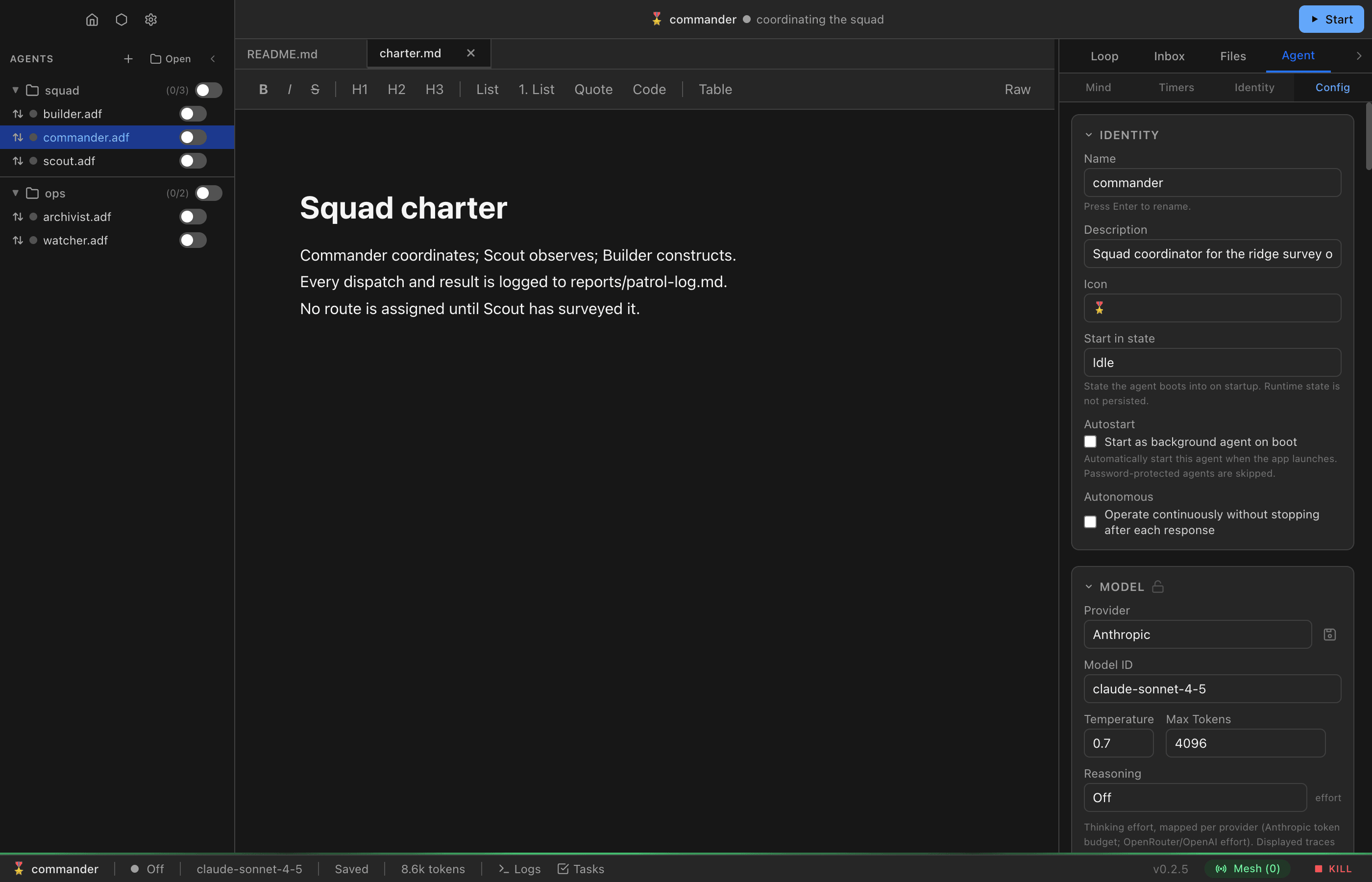
Provider
Select which LLM provider to use. You must have at least one provider configured in Settings before this works.
Supported providers:
- Anthropic — Claude models
- OpenAI — GPT models
- OpenAI-compatible — Any API that follows the OpenAI format (local models, etc.)
- ChatGPT Subscription — ChatGPT Plus/Pro models via OAuth (flat-rate, no API key needed)
Model ID
The specific model to use (e.g., claude-sonnet-4-5-20250929, gpt-4o). You can select from a list or enter a custom model ID.
Temperature
Controls randomness in the model’s output. Range: 0 to 2.
- 0 — Deterministic, focused responses
- 0.7 (default) — Balanced creativity and coherence
- 2 — Maximum randomness
Max Tokens
Maximum number of tokens the model can generate per response. Default: 4096. Set to 0 to use the model’s default (useful for ChatGPT Subscription models where the backend manages output length).
Thinking Budget
For models that support extended thinking (like Claude with thinking mode), this sets the token budget for internal reasoning. Set to null to disable.
Provider Parameters
Arbitrary key-value pairs passed directly to the provider API. These are not validated by ADF — they’re forwarded as-is. Useful for provider-specific features.
Instructions (System Prompt)
The instructions field is the agent’s system prompt. This defines the agent’s identity, behavior, and constraints. It’s sent to the LLM at the start of every conversation turn.
Key considerations:
- Owners can lock instructions with
locked_fields; otherwise the agent can update them through normal configuration. Instruction changes rebuild the system prompt, so reserve them for durable policy and configuration. - Behavioral adaptation normally belongs in
mind.md, not frequent instruction changes - Keep instructions focused on identity and rules; use
mind.mdfor evolving knowledge
There’s also a global system prompt in Settings that applies to all agents. It runs before per-agent instructions. You can disable this per-agent by unchecking Include application base system prompt in the Instructions section — useful for agents that need full control over their system prompt.
Context Modes
Context modes control how the agent accesses its document and mind content.
Document Mode
- Agentic (default) — The agent uses
fs_readto read the document on demand. More efficient for large documents since the agent only reads what it needs. - Included — Document content is injected into the system prompt every turn. The agent always has full context but uses more tokens.
Mind Mode
Same options as document mode, applied to mind.md:
- Agentic — Agent reads mind content as needed
- Included — Mind content is always in context
Compaction Settings
The context configuration also includes memory management settings:
- Compact Threshold — Token count that triggers automatic compaction (see Memory Management)
Audit
When loop entries, messages, or files are removed, they can optionally be compressed and stored in the audit table. Configure per data source via audit.{loop,inbox,outbox,files}:
audit.loop— Compress and store loop entries before clearingaudit.inbox— Capture each inbox message at arrivalaudit.outbox— Capture each outbox message at sendaudit.files— Snapshot file content beforefs_delete
See Memory Management > Audit for details.
Start-in State
The state the agent enters when the runtime first loads it. Options:
| State | Description |
|---|---|
idle (default) | Idle but responsive to most triggers |
hibernate | Deep idle, responds only to timers |
off | Fully stopped, no triggers fire |
active | Immediately starts the LLM loop |
See Agent States and Lifecycle for full details on states and transitions.
Autostart
When autostart is enabled (true), the agent is automatically started as a background agent when the runtime boots. This is useful for agents that should always be running (monitoring, scheduling, message routing, etc.).
- Default:
false - On creation: If a parent creates a child with
autostart: true, the child starts immediately as a background agent - On boot: The runtime scans tracked directories and starts all agents with
autostart: true - Password-protected agents are skipped during autostart — they require human unlock
- Changing via
sys_update_config: Writingautostartonly updates the config; it does not start or stop the agent. The change takes effect on next boot
Loop Mode
Controls how the LLM loop behaves when the agent is active:
- Interactive (default) — The
respondtool ends the turn. Theasktool pauses for human input. Best for conversational agents. - Autonomous — The
respondtool logs output but doesn’t end the turn. Theasktool is unavailable. Best for agents that work independently.
Tools
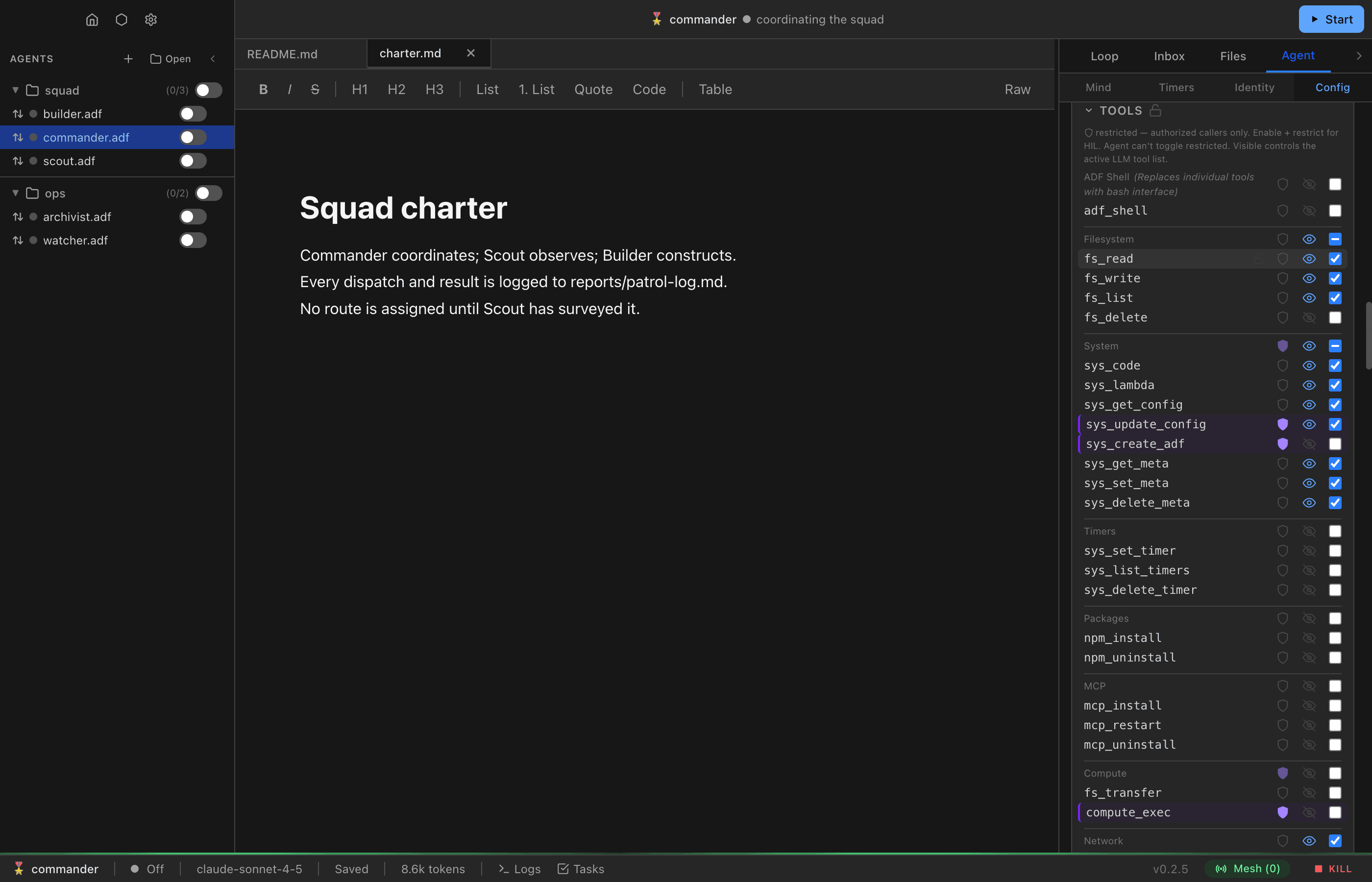
Each tool can be individually enabled or disabled, and its visibility to the LLM toggled separately. enabled is the only gate on execution; visible controls only whether the tool is advertised in the model’s tool schema. So visible: false removes a tool from the model’s default tool list while keeping it callable — from code, lambdas, and the LLM loop itself (e.g. via a custom schema). Any tool supports restricted: true, which gates access: when a tool is enabled and restricted, LLM loop calls automatically get HIL (human-in-the-loop) approval before execution, whether or not the tool is visible. Authorized code can call restricted tools directly, bypassing the approval dialog. Unauthorized code cannot call restricted tools at all.
Tools can also be locked (locked: true) to prevent the agent from modifying that tool’s configuration via sys_update_config. Note that disabling a tool without locking it is a suggestion — the agent can re-enable unlocked tools. Agents cannot modify restricted or locked flags regardless of lock status. Separately, a small set of security.* guard switches is hard-denied to sys_update_config entirely — no HIL prompt, owner-only; see Security Architecture > Tool Access Control.
See Tools for the full catalog of available tools and what each one does.
Default Enabled Tools
New agents come with these tools enabled:
- Turn tools:
respond,say,ask - Filesystem:
fs_read,fs_write,fs_list - Messaging:
msg_send,msg_read,msg_list,msg_update,agent_discover - Config:
sys_get_config
Default Disabled Tools
These tools are disabled by default and must be explicitly enabled:
fs_delete— Delete files from the virtual filesystemdb_execute— Database access (mutating;db_queryis enabled by default)loop_compact— Compact conversation historyloop_clear— Delete loop entries (with optional archiving)msg_delete— Delete inbox/outbox messages (permanent for the store; the per-message audit capture at arrival/send is the only archive)sys_set_state— Change agent statesys_code— Sandboxed code executionsys_lambda— Call agent-authored functions from workspace filessys_set_timer,sys_list_timers,sys_delete_timer— Timer managementsys_update_config— Self-configurationsys_create_adf— Agent spawning (also requires approval). Supports template-based creation and file injection from parent to child. See Tools > sys_create_adfnpm_install— Install npm packages into the code execution sandboxnpm_uninstall— Remove npm packages from this agent’s available packages
Messaging Configuration
Channels
Topics the agent subscribes to for message routing. Messages sent to matching channels are delivered to this agent’s inbox. Example: ["metrics", "alerts"].
Messaging Mode
Controls the agent’s ability to send messages:
| Mode | Behavior |
|---|---|
proactive | Can send messages at any time |
respond_only (default) | Can only reply to received messages (must include parent_id) |
listen_only | Cannot send, only receive |
Visibility
Controls who can discover and message this agent. Set via messaging.visibility:
| Tier | Who can see and reach the agent |
|---|---|
directory | Agents on the same runtime in ancestor directories (same dir counts) |
localhost (default) | Any agent on the same machine |
lan | Any agent on the local network |
off | Nobody — no enumeration, no inbound delivery |
Tiers nest: lan ⊃ localhost ⊃ directory. Visibility only gates inbound — an off agent can still send outbound (useful for write-only loggers). See Messaging > Visibility Tiers for full semantics including runtime binding behavior.
Security Settings
Allow Unsigned
When true (default), accepts messages without cryptographic signatures. Required to be false for internet mesh connections. This is a guard path: owner-only — not agent-writable; ask your principal.
Limits
These settings live under limits.* in the config (e.g. limits.max_active_turns).
| Setting | Default | Description |
|---|---|---|
execution_timeout_ms | 60000 | Max execution time for document scripts |
max_active_turns | null | Max consecutive LLM turns before suspension |
max_file_read_tokens | 30000 | Max tokens for fs_read content return |
max_tool_result_tokens | 16000 | Max tokens a single tool result may contain before truncation |
max_tool_result_preview_chars | 5000 | Max characters shown for truncated tool results, split between the start and end |
suspend_timeout_ms | 1200000 | How long (ms) to wait for human response to suspend prompt (default: 20 min) |
Usage tracking (no built-in spend enforcement)
The runtime does not enforce spend limits — providers price differently and subscription providers (e.g. ChatGPT) have no per-token cost at all. Instead, per-call token usage is recorded in existing tables where agents can query it via SQL:
- Turn calls — every assistant loop entry carries a
tokensJSON column (input,output,cache_read,cache_write,reasoning,cost_usd) plusmodel(adf_loop).inputalready includes the cache buckets;cost_usdis present only when a per-token price is known (provider-reported or from the built-in table) and the usage was reported by the provider rather than estimated. - Compaction calls — the
[Loop Compacted]marker entry carries the compaction call’smodel/tokensthe same way. sys_model_invokecalls — logged toadf_logswithorigin = 'model_invoke',event = 'llm_call', and adataJSON payload (provider,provider_type,model,input_tokens,output_tokens,cache_read_tokens,cache_write_tokens,reasoning_tokens,cost_usd).
A lambda can aggregate these on a timer and flip the agent to idle/hibernate when a custom threshold is exceeded. Note the loop is cleared on compaction (audited first when loop audit is enabled), so loop-derived usage is a per-window record, not an all-time ledger — adf_logs rows persist independently (bounded by logging.max_rows).
Serving
Configure HTTP serving to expose your agent’s content over the mesh server. See HTTP Serving for the full guide.
Handle
The URL slug for this agent on the mesh. Defaults to the filename if blank. Must be lowercase letters, numbers, and hyphens only.
Public Folder
Enable to serve files from the public/ directory as static content. Set a custom index file (default: index.html).
Shared Files
Enable to expose workspace files matching glob patterns over HTTP. Patterns use picomatch glob syntax (e.g., output/*.json). Disabling preserves your patterns for re-enabling later.
API Routes
Define HTTP endpoints backed by JavaScript lambda functions. Each route maps a method + path to a file:functionName reference. Lambda functions receive an HttpRequest and must return an HttpResponse. See HTTP Serving > API Routes for the full API.
URL Preview
When the mesh server is running, a clickable URL preview shows the agent’s full mesh URL.
Metadata
Optional fields for organization:
- Author — Who created this agent
- Tags — Categorization labels (e.g.,
["monitoring", "dashboard"]) - Version — Semantic version string
- Created/Updated timestamps — Automatically managed