Compute Environments
Where agents run commands: shared/isolated/external containers and host access, approval policies, security posture
On this page
ADF agents can execute commands in an authorized set of compute environments: the shared container, an isolated container, registered external Docker/Podman containers, and the host machine. Each agent has an allowlist and one default environment.
For a task-oriented workflow for visible GUI applications, file transfer, and screenshot validation, see Desktop Applications with Isolated Compute.
Environments
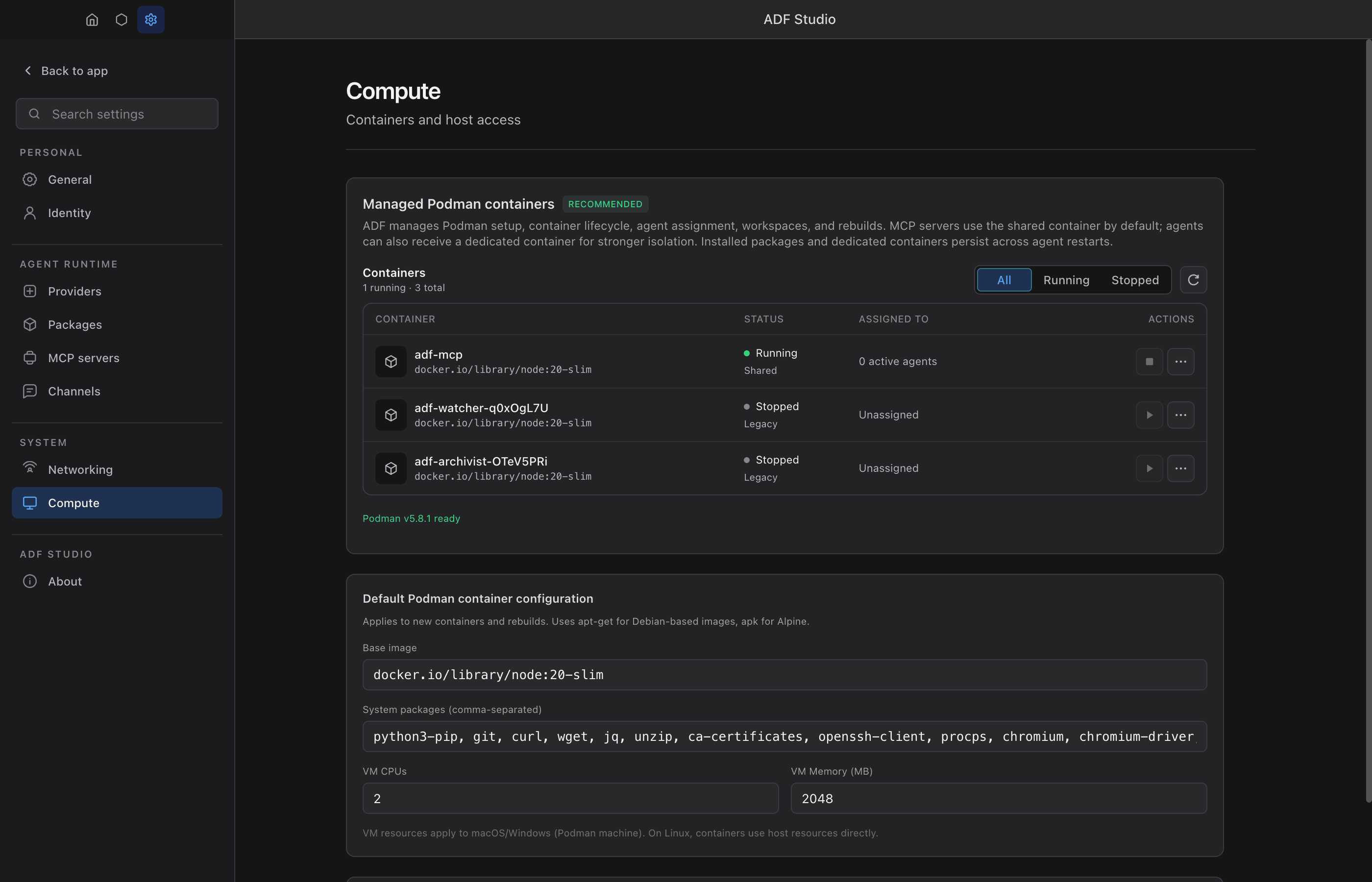
ADF-managed Podman is the recommended configuration because Studio owns setup, lifecycle, agent assignment, workspaces, and rebuilds. External Docker/Podman targets and direct host access are advanced options: the user owns their availability, lifecycle, and security posture.
Shared Container (adf-mcp)
The shared container starts on app launch and is always available when Podman is running. Every MCP server runs here by default — the ones an agent installs with mcp_install and the ones you add yourself in Settings alike. Host is a deliberate per-server choice in either case, and the few curated registry servers that cannot work containerized declare it up front (see the MCP integration guide).
- Scope: All agents share one container
- Workspace:
/workspace/{agentId}/— each agent gets its own directory - Use case: MCP server execution, shared utilities, inter-agent file exchange via the shared filesystem
- Network: Network-isolated from other agents’ containers (new containers only — see Security Considerations)
- Risk level: Low — agents can see each other’s workspace directories but the container itself is isolated from the host
Isolated Container (adf-{name}-{shortid})
A dedicated container per agent, created when compute.enabled is set to true in the agent’s config.
- Scope: One container per agent
- Workspace:
/workspace/— the agent owns the entire workspace - Use case: Agents that need a clean environment, custom packages, or shouldn’t interfere with other agents’ MCP servers
- Network: Network-isolated from other agents’ containers (new containers only — see Security Considerations)
- Risk level: Low — fully isolated from other agents and the host
- Lifecycle: Container persists across agent restarts (stopped, not removed). Rebuild for a clean slate: the container is deleted and a fresh one is provisioned right away. If provisioning fails, the container list keeps a “Setup failed” row with the error; Rebuild retries, Remove clears it.
- Not ready yet: the Computer tab opens in every state and says what the container is doing (setting up, starting, stopped, setup failed) until the desktop is up. The agent’s
compute_execgets the same state in plain words instead of a shell error; a missing or stopped container is brought back on the next command, a failed one waits for Rebuild.
External Docker/Podman Container
A user-owned, already-running container registered in Settings > Compute. ADF may execute commands in it, but never starts, stops, rebuilds, provisions, or removes it.
- Scope: Explicitly granted per agent
- Workspace: Configured when the target is registered
- Use case: Existing development containers, specialized dependencies, or remote Docker contexts added in the future
- Agent-facing name: A safe alias such as
docker-python-tools; raw container IDs are not exposed - Lifecycle: Entirely user managed
Host Machine
Direct execution on the host operating system. Requires both compute.host_access on the agent config AND Enable host access in Settings > Compute (the Settings side is owner-only — not agent-writable; ask your principal).
- Scope: Full host access with the user’s OS privileges
- Workspace:
~/.adf-studio/workspaces/{agentId}/(default working directory forcompute_exec) - Use case: Agents that need access to host resources, local services, or hardware
- Risk level: High — see Security Considerations
- Two-level gate: If either the agent or runtime setting is off, host is unavailable. ADF never silently falls back from an unavailable default.
Configuration
Compute settings are per-agent in the agent config:
{
  "compute": {
    "enabled": true,
    "host_access": false,
    "allowed_targets": ["isolated", "shared", "target-python"],
    "default_target": "isolated",
    "packages": {
      "pip": ["requests"]
    }
  }
}| Field | Default | Description |
|---|---|---|
enabled | false | Create an isolated container for this agent |
browser | true | Run the visible desktop (X server, Openbox, tint2, PCManFM, noVNC, managed Chromium) in the isolated container and show the Computer tab; false = headless-only |
host_access | false | Allow host machine execution |
allowed_targets | legacy defaults | Built-in names and registered external target IDs this agent may use |
default_target | first available | Environment used when compute_exec.target is omitted |
packages.pip | — | Python packages to install in the managed isolated container |
npm packages belong to the JavaScript sandbox (code_execution.packages), not the container.
To request an isolated container from the loop: sys_update_config({ path: "compute.enabled", value: true }). Config writes from the LLM loop are HIL-gated — see sys_update_config.
When no compute config is set, agents still have access to the shared container (via compute_exec and fs_transfer) as long as Podman is running.
Tools
Two tools interact with compute environments. Both are disabled by default — request them via tools.compute_exec.enabled / tools.fs_transfer.enabled (HIL-gated: your principal approves).
compute_exec
Execute shell commands. Has restricted: true by default — authorized code can call it directly, while LLM loop calls get automatic HIL approval if the tool is enabled.
compute_exec({ command: "ls -la", target: "shared" })Parameters:
command— shell command (passed tosh -c)target— optional safe alias from this agent’s allowlist; shown only when more than one environment is authorizedtimeout_ms— execution timeout (default 30s, max 120s)
fs_transfer
Transfer files between the VFS (adf_files) and supported managed environments. External containers are not file-transfer endpoints in this release.
fs_transfer({ from: "vfs", to: "isolated", path: "data.csv" })
fs_transfer({ from: "shared", to: "vfs", path: "output.json" })
Parameters:
path— file path (relative to workspace)from/to— different endpoints from'vfs','isolated','shared', or'host'path— relative source pathsave_as— optional destination path
Target Resolution
When compute_exec.target is omitted, the configured default_target is used. With multiple allowed environments, the agent may explicitly choose another alias. With one allowed environment, the target field is omitted from the tool schema entirely.
If the selected or default target is unavailable, the tool fails closed. It never redirects a command to another container or to the host.
MCP Server Execution Location
Each MCP server can be individually assigned to run in a specific environment. In the agent config UI under Compute > MCP Server Execution, click the location badge to cycle through available options:
| Config State | Available Locations |
|---|---|
| No isolation, no host access | Shared only |
| Isolated enabled | Isolated (default), Shared |
| Host access enabled | Shared (default), Host |
| Both enabled | Isolated (default), Shared, Host |
This is stored as run_location on the MCP server config ('host', 'shared', or undefined for default) — dot-path form mcp.servers.<name>.run_location. Changes require an agent restart to take effect.
undefined is what a freshly installed server carries, and it means containerized: the agent’s isolated container when it has one, the shared container otherwise. 'shared' is stronger than the default — it pins the server to the shared container even for an agent that has its own isolated one.
Host requires two levels of approval: The agent must have compute.host_access enabled AND the runtime must have Enable host access checked in Settings > Compute. If either is off, the “Host” option won’t appear in the location cycling UI.
Runtime fallback: If host access is disabled in Settings after a server was configured to run on host, the server silently falls back to running in the container (shared or isolated) on the next agent restart. The run_location: 'host' preference is preserved in the config but the runtime routing ignores it when host access is off. No error is raised — the server simply runs in the container instead.
Approval Policies
compute_exec has restricted: true by default. When the tool is also enabled, LLM loop calls get automatic HIL. Authorized code can call it freely. Three ways to handle approvals:
1. Manual (UI Dialog)
When the LLM loop calls compute_exec, the call pauses and shows an approval dialog in the UI. The user can inspect the command and approve or reject.
2. Trigger Lambda (Automated Policy)
Set up an on_task_create trigger that auto-approves or rejects based on the command:
{
  "on_task_create": {
    "enabled": true,
    "targets": [{
      "scope": "system",
      "filter": { "tool": "compute_exec" },
      "lambda": "lib/policies.ts:reviewComputeExec"
    }]
  }
}
// lib/policies.ts
async function reviewComputeExec({ task }) {
const args = JSON.parse(task.args)
const cmd = args.command.split(/\s+/)[0]
const blocked = ['rm', 'shutdown', 'reboot', 'dd', 'mkfs']
if (blocked.includes(cmd)) {
await adf.task_resolve({ task_id: task.id, action: 'reject', reason: `Blocked command: ${cmd}` })
} else {
await adf.task_resolve({ task_id: task.id, action: 'approve' })
}
}3. Authorized Code
Code running from an authorized file can call compute_exec directly without HIL, since restricted tools are freely available to authorized code. See Authorized Code Execution.
Security Considerations
Shared Container
- Cross-agent visibility: All agents share
/workspace/. Agent A can read/write Agent B’s files at/workspace/{agentB-id}/. This is by design — agents are assumed to be under the same operator’s control. If isolation is needed, use isolated containers. - MCP interference: A command in the shared container can affect running MCP server processes. Agents cannot kill each other’s MCP servers directly (PIDs are managed by the runtime), but resource exhaustion is possible.
- No host access: The container has no mounted host volumes and cannot reach the host filesystem.
- Network isolation from other containers: A new shared container is firewalled from other agents’ containers on the bridge — see Network isolation between containers.
Isolated Container
- Full isolation from other agents. No shared filesystem, no shared processes.
- Network isolation from other containers: A new isolated container is firewalled from other agents’ containers on the bridge — see Network isolation between containers.
- Pre-installed packages (
compute.packages) run inside the container with no host access. - Container persistence: Containers are stopped (not removed) on agent stop. State persists across restarts. Use the container rebuild action in the UI for a clean slate.
Host Access — Critical Security Implications
An agent with host access and either compute_exec or mcp_install should be treated as having full, unrestricted access to the machine. Specifically:
- Config self-modification: The agent can read and modify its own
.adffile directly on the host filesystem, bypassing all config locks, tool restrictions, and policy controls.locked_fields,restrictedflags, and disabled tools are only enforced by the runtime — direct file access circumvents them entirely. - Cross-agent access: The agent can read and modify any other
.adffile on disk, injecting tools, triggers, or instructions into other agents. - Credential access: The agent can read
~/.adf-studio/settings files, potentially accessing stored API keys and MCP credentials. - System access: Full OS-level access with the user’s privileges — filesystem, network, processes, installed software.
- MCP escape hatch: Even without
compute_exec, an agent withmcp_installand host access can install a bash/shell MCP server and achieve the same level of access.
Recommendations:
- Only enable
host_accessfor agents you fully trust - Keep
restricted: trueoncompute_exec(the default) to get HIL review on host commands from the LLM loop - Consider using
on_task_createtrigger lambdas to enforce command policies - Prefer isolated or shared containers when host access isn’t strictly necessary
- Monitor the agent’s activity via
adf_logsand the audit trail
Network isolation between containers
All managed containers — the shared container and every isolated container — share Podman’s default bridge. On the macOS Podman machine a per-container network has no outbound route, so the shared bridge is what gives each container reliable outbound internet. Previously that also meant any container could reach any other container by its bridge IP.
New containers close that path. Each managed container brings up an nftables rule set at startup (via a NET_ADMIN capability) that drops new inbound connections arriving from sibling containers on the bridge, while allowing loopback, established and return traffic, and the host-loopback port-forward that publishes the noVNC viewer. Because each container enforces this on its own inbound path, one agent cannot reach another agent’s container, and a misbehaving agent can at most re-expose itself — never a peer. Outbound internet and the Computer-tab viewer are unaffected.
This is peer isolation on a shared bridge, not separate networks, and it does not change the host boundary. It applies only to containers created after this change. A container created earlier keeps the old behavior — reachable by sibling containers — until it is rebuilt. Rebuilding erases the container’s workspace files, installed packages, and browser session/profile, so gaining the isolation on an existing container is the user’s deliberate choice, not automatic.
Defense Layers by Environment
| Control | Shared | Isolated | Host |
|---|---|---|---|
| Container isolation from host | Yes | Yes | No |
| Agent isolation from other agents | No (shared filesystem) | Yes | No |
| Network isolation from other containers | Yes (new containers) | Yes (new containers) | n/a |
restricted enforcement | Yes | Yes | Yes (but bypassable via direct file access) |
locked_fields enforcement | Yes | Yes | Yes (but bypassable via direct file access) |
| Config lock integrity | Yes | Yes | No (agent can edit .adf file) |
| Tool restriction integrity | Yes | Yes | No (agent can edit .adf file) |
Inter-Agent File Sharing
The shared container’s filesystem provides a natural channel for agents to exchange large files without encoding them into messages:
- Agent A stages a file:
fs_transfer({ path: "report.pdf", direction: "stage", target: "shared" }) - Agent A notifies Agent B via
msg_sendwith the path - Agent B ingests the file:
fs_transfer({ path: "report.pdf", direction: "ingest", target: "shared" })
This avoids the size and encoding overhead of passing binary data through the messaging system.