Timers
Scheduling future events: one-time, interval, and cron timers, timer lambdas, lifecycle, and missed-timer handling
On this page
Timers let agents schedule future events. An agent can set one-time reminders, recurring tasks, or cron-based schedules.
Overview
Timers are stored in the adf_timers table and managed through the sys_set_timer, sys_list_timers, and sys_delete_timer tools. All three timer tools are disabled by default — request them via sys_update_config (tools.sys_set_timer.enabled etc., HIL-gated: your principal approves). When a timer fires, it delivers its payload to the configured scope handlers — but only if the corresponding on_timer trigger is enabled.
Scheduling Modes
Each timer uses a schedule object with a type field that selects the scheduling mode. Fields irrelevant to the selected type are silently ignored.
One-Time (Absolute)
Fire once at a specific timestamp.
sys_set_timer({
  schedule: { type: "once", at: 1707300300000 },
  scope: ["agent"],
  payload: "check_results"
})
One-Time (Relative)
Fire once after a delay from now. The runtime converts this to an absolute timestamp on creation.
sys_set_timer({
  schedule: { type: "delay", delay_ms: 300000 },
  scope: ["agent"],
  payload: "follow_up"
})
Interval
Fire repeatedly at a fixed interval.
sys_set_timer({
  schedule: { type: "interval", every_ms: 3600000 },
  scope: ["system"],
  payload: "health_check"
})
Optional fields for interval timers:
| Field | Description |
|---|---|
start_at | First fire time (default: now + every_ms) |
end_at | Stop firing after this timestamp |
max_runs | Stop after N executions |
sys_set_timer({
  schedule: { type: "interval", every_ms: 30000, max_runs: 100 },
  scope: ["system"],
  payload: "poll_status"
})
Cron
Fire on a cron schedule using standard 5-field cron expressions.
sys_set_timer({
  schedule: { type: "cron", cron: "0 9 * * 1-5" },
  scope: ["agent"],
  payload: "daily_report"
})
Optional fields for cron timers:
| Field | Description |
|---|---|
end_at | Stop firing after this timestamp |
max_runs | Stop after N executions |
Cron Expression Reference
┌───────────── minute (0-59)
│ ┌───────────── hour (0-23)
│ │ ┌───────────── day of month (1-31)
│ │ │ ┌───────────── month (1-12)
│ │ │ │ ┌───────────── day of week (0-6, Sunday=0)
│ │ │ │ │
* * * * *
Common examples:
| Expression | Description |
|---|---|
* * * * * | Every minute |
0 * * * * | Every hour |
0 9 * * * | Daily at 9:00 AM |
0 9 * * 1-5 | Weekdays at 9:00 AM |
0 0 1 * * | First of every month |
*/15 * * * * | Every 15 minutes |
Shared Fields
All scheduling modes support these fields:
| Field | Required | Description |
|---|---|---|
scope | Yes | Array of scope(s) to fire in: ["system"], ["agent"], or ["system", "agent"] |
payload | No | String passed to the handler when the timer fires |
lambda | No | System scope only: script entry point (e.g., "lib/poller.ts:check") or shell script path (e.g., "jobs/task.sh") |
warm | No | System scope only: keep sandbox worker alive between invocations (default: false) |
locked | No | Lock the timer so agents cannot delete or modify it — only a human can unlock (default: false) |
loop | No | Agent scope only: which inner loop the wake reaches (default: main). Dropped on system-scope timers — see Target loop |
Timers own their execution config — the lambda and warm fields are stored on the timer itself, not inherited from trigger targets. The on_timer trigger config serves purely as a kill-switch gate.
Timer Lambda Execution
When a timer fires in system scope with a lambda field, the runtime executes that lambda function in the sandbox environment.
sys_set_timer({
  schedule: { type: "interval", every_ms: 60000 },
  scope: ["system"],
  lambda: "lib/monitor.ts:checkHealth",
  warm: true,
  payload: "health_check"
})
Timer Event Object
The lambda function receives an AdfEvent<'timer'>. The event data contains the full Timer row — same shape as sys_list_timers returns.
| Field | Type | Description |
|---|---|---|
event.type | string | Always "timer" |
event.source | string | "agent:<name>" |
event.time | string | ISO 8601 timestamp |
event.data.timer | Timer | Full timer object: id, schedule, payload, scope, run_count, created_at |
Example: Health Check Timer
// lib/monitor.ts
export async function checkHealth(event) {
  const start = Date.now()

  // Check inbox backlog
  const counts = await adf.msg_list({})
  const unread = JSON.parse(counts).unread ?? 0

  // Check loop size
  const config = await adf.sys_get_config({})

  // Log the health check
  await adf.db_execute({
    sql: 'INSERT INTO local_health_log (ts, unread, payload) VALUES (?, ?, ?)',
    params: [Date.now(), unread, event.data.timer.payload]
  })

  // Alert if inbox is backing up
  if (unread > 50) {
    await adf.msg_send({ recipient: 'did:adf:ops...', address: 'http://127.0.0.1:7295/agents/ops/inbox', payload: `Health alert: ${unread} unread messages` })
  }

  return { ok: true, duration_ms: Date.now() - start }
}
Shell Script Timers
The lambda field can also point at a .sh shell script:
sys_set_timer({
  schedule: { type: "cron", cron: "0 * * * *" },
  scope: ["system"],
  lambda: "jobs/task.sh"
})
The script runs headlessly through the shell runner — no JS shim. Unlike .ts:function lambdas, which receive the event object as an argument, shell scripts receive event context as environment variables: $EVENT_TYPE, $TIMER_ID, $TIMER_PAYLOAD, etc.
Cold vs. Warm Execution
By default, timer lambdas use cold execution — a fresh sandbox worker is created, the lambda runs, and the worker is destroyed. This is safe and isolated but has startup overhead.
Set warm: true on the timer to use warm execution — the worker stays alive between invocations. This is faster for frequently-firing timers (e.g., polling every few seconds) but uses more memory. All warm timer/trigger lambdas for an agent share the sandbox ID {agentId}:lambda.
See Code Execution > State Persistence and Triggers > Cold vs. Warm Execution for more details.
adf Access
Timer lambdas have full access to the adf proxy object — all enabled tools, model_invoke, and sys_lambda are available.
Timer Scope and Trigger Interaction
For a timer to actually execute, two conditions must be met:
- The timer’s
scopeincludes a matching scope (e.g.,"agent") - The
on_timertrigger is enabled (triggers.on_timer.enabled) and has a target with the matching scope
This dual-check means you can disable all timers of a scope by toggling the trigger — without deleting the timers themselves.
Target loop
An agent can run several named loops — see Inner Loops. A timer may name which one it wakes, with a loop field; an absent loop means main, so every pre-loops timer routes exactly as it did.
The loop stamp is agent-scope only. Naming a loop only means something for the part of a timer that wakes a loop:
scope: ["agent"]— the loop is honoured; the wake reaches that stream.scope: ["system"]— the lambda runs through the single agent-wide system handler, undermain’s authority, and wakes no loop. Such a timer carries no loop stamp; alooppassed with it is dropped.scope: ["system", "agent"]— the timer keeps its loop for the agent half; the system half still runs undermain’s authority.
The strip is enforced once, at the workspace chokepoint (addTimer), so it holds for every caller — Studio, sys_set_timer, or any other path. Studio hides the Loop selector when you pick system scope.
Inner loops themselves are more constrained: a timer set from inside one always wakes that loop (the row is stamped with it, and passing loop from a loop is refused), and an inner loop can create neither a system-scope lambda timer nor a locked timer. It asks main for those, with loop_send.
Timer Lifecycle
Timers are polled on a 5-second tick — the runtime wakes every 5s, collects every row whose next_wake_at has passed, settles it, then fires. Two consequences: schedules shorter than 5s are meaningless (the tick is the real floor), and any fire can land up to 5s late.
When a timer fires:
- Due rows are settled first, before firing — one-shot/exhausted timers are flagged
expired = 1; recurring ones havenext_wake_atadvanced in place. (Settling first means a crash mid-fire cannot refire the batch on the next tick.) run_countis incremented andlast_fired_atis updated- Payload is delivered to scope handler(s) that pass the dual-check
- One-time / exhausted timers are NOT deleted — they are flagged
expired = 1and kept as history.getDueTimersselects onlyexpired = 0rows, so an expired timer never fires again. - Interval/cron timers:
next_wake_atis recomputed and the row updated in place. The timer is flaggedexpired(not deleted) oncemax_runsis reached orend_athas passed.
System Timer With No Lambda
A scope: ["system"] timer with no lambda is a silent no-op trap: at each fire it does nothing but log an info entry System timer #<id> fired but no lambda — skipped. It still counts as a fire (advances run_count/next_wake_at), so a recurring system timer with no lambda just burns ticks. Give system timers a lambda, or use scope: ["agent"] to wake the loop.
Missed Timers
If the runtime loads an ADF with past-due timers (e.g., the app was closed), catch-up behavior depends on the timer type:
| Type | Behavior |
|---|---|
| Once | Fire once, then flag expired (kept as history, not deleted) |
| Interval | Fire once (coalesced — missed occurrences are not backfilled); next_wake_at recomputes to now + every_ms |
| Cron | Fire once, recompute the next future occurrence from now |
This prevents a flood of catch-up fires. However many intervals were missed, the timer fires once and gets back on schedule from the current time.
Timer Storage
The adf_timers table stores each timer’s schedule, scope, and execution config:
| Column | Description |
|---|---|
schedule_json | Resolved schedule configuration (see below) |
scope | JSON array of scopes, e.g., ["system"] or ["system", "agent"] |
lambda | Lambda entry point (system scope only), e.g., "lib/poller.ts:check" |
warm | Whether to keep the sandbox worker alive (0 or 1) |
payload | Optional string payload |
next_wake_at | Next fire timestamp (ms) |
run_count | Number of times the timer has fired |
last_fired_at | Timestamp (ms) of the most recent fire, or NULL |
locked | 1 if the timer is human-locked — agents cannot delete or modify it (0 otherwise) |
expired | 1 once the timer has completed — the row is retained as history, not deleted (0 while active) |
The schedule_json column stores the resolved schedule. The stored shape differs from the tool input: the persisted discriminator key is mode (the sys_set_timer input uses type), and cron’s expression is stored under cron (not expr). There is no stored delay mode — a delay input is resolved to a one-time schedule at creation, persisting as { "mode": "once", "at": <now + delay_ms> }. delay never appears in a stored row.
// One-time (also how a `delay` input is persisted, with at = now + delay_ms)
{ "mode": "once", "at": 1707300300000 }

// Interval (optional keys omitted when unset)
{ "mode": "interval", "every_ms": 3600000 }

// Cron
{ "mode": "cron", "cron": "0 9 * * 1-5" }
Managing Timers
Creating Timers in the UI
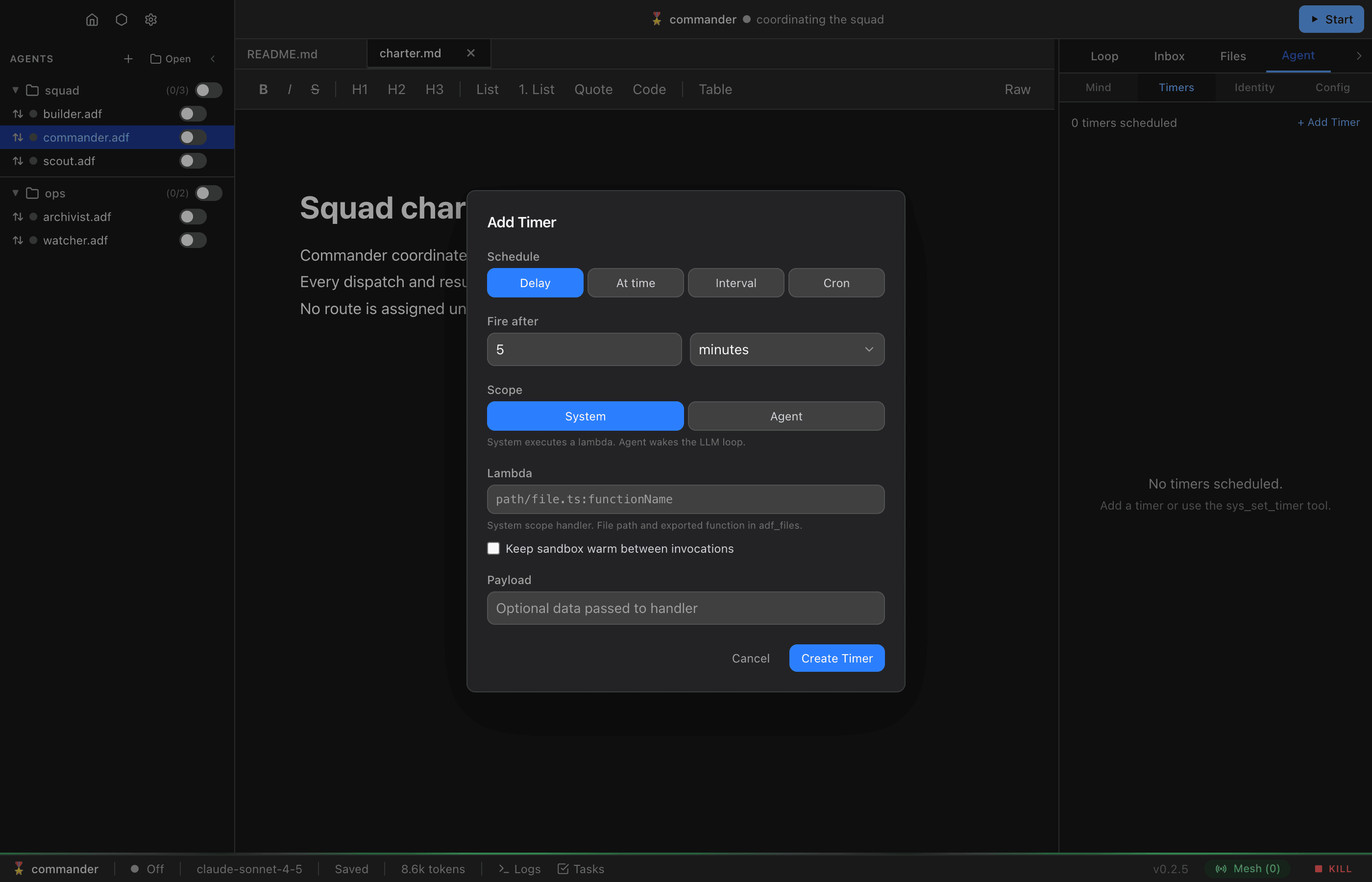
The Agent > Timers tab includes an Add Timer button that opens a modal for creating timers without using tool calls. The modal lets you:
- Select a schedule mode (delay, absolute time, interval, or cron)
- Toggle scope between system and agent (or both)
- Specify a lambda entry point and warm flag for system scope
- Set an optional payload string
Listing Timers
Use sys_list_timers to see all active timers with their schedules, next fire time, and run count. By default only active timers are returned; pass sys_list_timers({ include_expired: true }) to also list completed (expired) timers, which are retained as history. You can also view timers in the Agent > Timers tab in the UI.
Deleting Timers
Use sys_delete_timer(id) to cancel and remove a timer. In the UI, timers can be deleted from the Timers tab.
Common Patterns
Health Check Every Hour
sys_set_timer({
  schedule: { type: "interval", every_ms: 3600000 },
  scope: ["system"],
  payload: "health_check"
})
System scope script handles the check cheaply without waking the LLM.
Daily Report (Weekdays)
sys_set_timer({
  schedule: { type: "cron", cron: "0 9 * * 1-5" },
  scope: ["agent"],
  payload: "daily_report"
})
Agent wakes at 9 AM on weekdays to generate a report.
One-Time Reminder
sys_set_timer({
  schedule: { type: "delay", delay_ms: 1800000 },
  scope: ["agent"],
  payload: "Check if the deployment completed"
})
Agent gets a reminder in 30 minutes.
Limited Polling
sys_set_timer({
  schedule: { type: "interval", every_ms: 60000, max_runs: 10 },
  scope: ["system"],
  payload: "poll_api"
})
Poll every minute, stop after 10 attempts.